MCP server · Developer tools
hop MCP server
Let your AI look up your saved SSH servers and run commands on them for you.

hop is a small tool that keeps track of your SSH servers so you do not have to remember long connection commands. It also comes with an MCP server, which is the part that lets your AI assistant work with those servers. It is handy if you regularly connect to a few machines and want your AI to help you check on them.
What is an MCP server? The 30-second version
On its own, your AI can only chat with you. An MCP server is a small helper program that gives your AI a new skill or a connection to something outside the chat. This one connects your AI to hop, which is the tool that knows about your SSH servers. Once it is connected, you can ask your AI about your servers and it can look things up or run commands through hop for you.
What this MCP server does
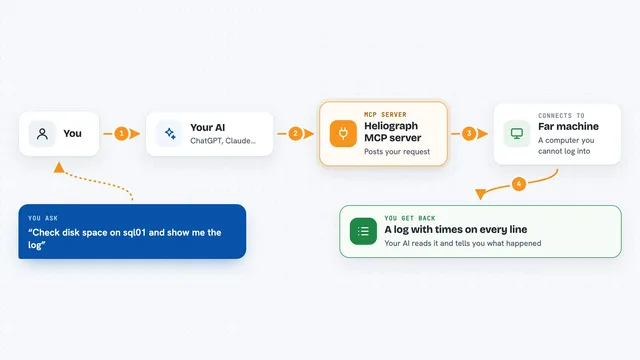
You ask your AI something about your servers, like which ones are in production. The AI uses this helper, which talks to hop on your computer. hop looks through the connections you have saved and, if you ask, runs a command on one or more of them. The result comes back to your AI, which explains it to you in the chat.
 Click to zoom
What you can do with it
- List your saved SSH connections
- Search connections by name, project, environment, or tag
- Run a command on one server or across several at once
- Check whether a server is reachable
- Look up details of a single connection
Try asking your AI
- “Which of my servers are in the production environment?”
- “Run uptime on all my prod web servers and tell me the results”
- “Is the staging server reachable right now?”
- “Show me the details of my prod-db connection”
What it gives back to you
You get answers in plain chat text. For a search or a list, your AI shows you the matching connections with their names and details. For a command you asked it to run, you get the output from each server, grouped so you can see which result came from which machine.
Before you start
What you need
- The hop tool installed on your computer
- An SSH config file or connections already saved in hop
- An AI assistant that supports MCP servers, like Claude Desktop or Claude Code
Good to know
It can run commands on your servers, so be careful about what you ask it to do on machines that matter.
Install it with your AI
Add hop MCP server to your AI, no technical skills needed
You don't install anything by hand. You copy one prompt, paste it into an AI that can work on your computer, and it checks, installs and connects the server for you, asking you when it needs something.
Sign in to get the install prompt
Members get a ready-made prompt that lets the Claude desktop app check hop MCP server, install it and connect it for them, step by step. You don't need any technical skills: you copy, paste and answer a few questions. Your connected AI can also find and install any of the 4,361 MCP servers here for you.
Who it's for
People who manage a handful of servers and want their AI to help them look things up or run quick checks.