
MCP server · Research
Dappier MCP server
by DappierAI
Lets your AI search the live web and pull fresh news, market, sports and weather data from trusted sources.
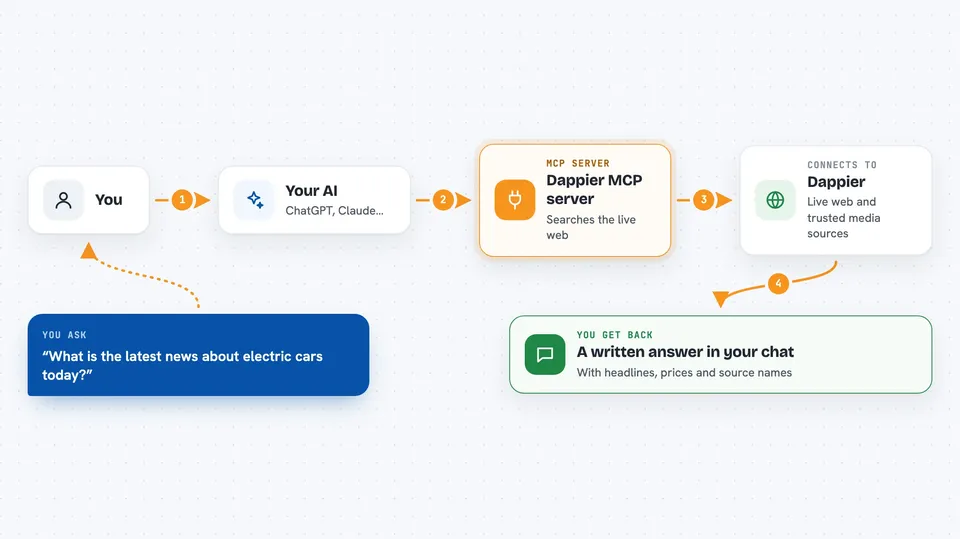
The Dappier MCP server connects your AI assistant to a live feed of web search results and curated content from real media brands. Instead of guessing or relying on old training data, your AI can look things up right now. It is handy for anyone who asks their assistant about current news, stock prices, sports scores or weather.
What is an MCP server? The 30-second version
On its own, your AI can only chat with you using what it already learned. An MCP server is a small helper program that gives your AI a new skill or a connection to an outside service. This one connects your AI to Dappier, a service that gathers live web search results and content from media brands. Once it is set up, your AI can ask Dappier for fresh information and bring the answers back into your chat.
What this MCP server does
You ask your AI a question, like what is happening in the news today or how a certain stock is doing. Your AI sends that request to this helper, which talks to Dappier's service. Dappier searches the live web and its collection of media sources, then sends back matching articles, headlines, prices or updates. Your AI reads that and writes you a plain answer in the chat. You never have to leave the conversation or open a separate website.
 Click to zoom
What you can do with it
- Search the live web for breaking news and trending topics
- Look up real-time stock prices and market headlines
- Get sports headlines, game recaps and expert commentary
- Check weather forecasts and local updates
- Find lifestyle, wellness and entertainment stories
- Pull dog care or cat care tips from dedicated pet assistants
- Discover sustainable living ideas and green innovations
Try asking your AI
- “What is the latest news about electric cars today?”
- “How is Tesla stock doing right now and what are analysts saying?”
- “Give me a recap of last night's basketball games.”
- “What is the weather forecast for Chicago this weekend?”
What it gives back to you
You get back a written answer in your chat, usually with a short summary of what was found. When articles are involved, you also see the title, the publication date, the source name and sometimes an image preview. For stocks, you get prices, headlines and short market summaries. Everything arrives as normal text you can read or copy.
Before you start
What you need
- A Dappier account and API key (a kind of password for apps; you get one free from the Dappier website)
- The uv tool installed on your computer (the README shows a one-line install command)
- An app that supports MCP servers, like Claude Desktop, Cursor or Windsurf
Good to know
It reads live web and media data, so answers can change from minute to minute and may include sources you have not checked yourself.
Install it with your AI
Add Dappier MCP server to your AI, no technical skills needed
You don't install anything by hand. You copy one prompt, paste it into an AI that can work on your computer, and it checks, installs and connects the server for you, asking you when it needs something.
Sign in to get the install prompt
Members get a ready-made prompt that lets the Claude desktop app check Dappier MCP server, install it and connect it for them, step by step. You don't need any technical skills: you copy, paste and answer a few questions. Your connected AI can also find and install any of the 4,361 MCP servers here for you.
Who it's for
Anyone who uses an AI assistant for current events, market checks, sports or weather, especially people in research, journalism, finance or planning roles.


