
MCP server · Developer tools
ChatPipe MCP server
by darktw
Turn HTML your AI writes into a live web page with a shareable link.
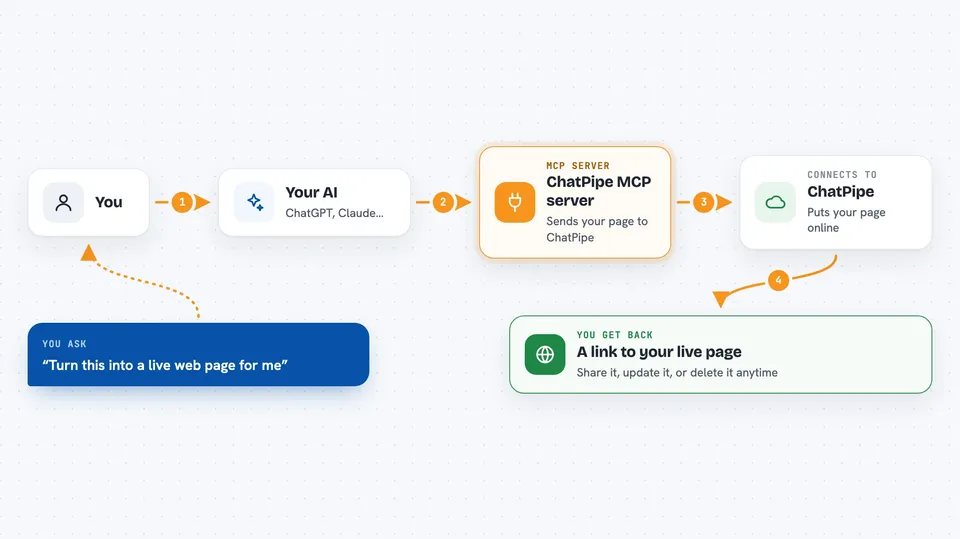
ChatPipe is a service that hosts web pages for you. This MCP server connects your AI assistant to ChatPipe, so when your AI writes a page, it can put it online and hand you a link. It is handy if you want to share a dashboard, a form, or a simple landing page without touching a hosting setup.
What is an MCP server? The 30-second version
On its own, your AI can only chat with you. An MCP server is a small helper that gives your AI one extra skill or connection. This one connects your AI to ChatPipe, a page-hosting service. So when you ask for a page, your AI can actually publish it there and give you back a real web address.
What this MCP server does
You describe the page you want, like a dashboard or a contact form, and your AI writes the HTML for it. Then the AI uses this helper to send that HTML to ChatPipe. ChatPipe puts the page online and returns a link you can share. You can also ask your AI to list your pages, update one without changing its link, or delete one you no longer need.
 Click to zoom
What you can do with it
- Publish an HTML page and get a shareable link
- List all your published pages with their URLs
- Update a page's content while keeping the same link
- Delete a page you no longer want
- Protect a page with a password
- Build a quick landing page, form, or dashboard on the spot
Try asking your AI
- “Create a landing page for my project and publish it”
- “Build a dashboard showing monthly revenue and publish it as a live page”
- “Make a contact form and give me a shareable link”
- “List all my published pages”
What it gives back to you
You get back a link to your live page, plus its name and whether it is public or password protected. When you ask for a list, you get your pages with their URLs and access levels. Updates and deletions come back as a short confirmation. Everything shows up right in the chat.
Before you start
What you need
- A free ChatPipe account from chatpipe.net
- An API key from your ChatPipe settings (a kind of password for apps; the site gives you one)
- An AI coding agent that supports MCP
Good to know
Deleting a page is permanent, and on the free plan your links expire after 30 days.
Install it with your AI
Add ChatPipe MCP server to your AI, no technical skills needed
You don't install anything by hand. You copy one prompt, paste it into an AI that can work on your computer, and it checks, installs and connects the server for you, asking you when it needs something.
Sign in to get the install prompt
Members get a ready-made prompt that lets the Claude desktop app check ChatPipe MCP server, install it and connect it for them, step by step. You don't need any technical skills: you copy, paste and answer a few questions. Your connected AI can also find and install any of the 4,066 MCP servers here for you.
Who it's for
Consultants, developers, sales teams, marketers, and freelancers who want to share a live web page quickly without a hosting setup.


