
MCP server · Analytics
Agent SEO Engine MCP server
by davidmosiah
Check your draft's SEO, guess what people are searching for, and rank which pages to fix first.
This is a small helper that checks your writing for common SEO problems before you publish it. It also guesses what a searcher really wants when they type a phrase, and helps you decide which pages are worth fixing first. It is handy if you write blog posts or web pages and want a second pair of eyes without hiring anyone.
What is an MCP server? The 30-second version
On its own, your AI can only chat. An MCP server is a small helper program that gives your AI a new skill or a connection to a service. This one gives your AI a set of SEO checks it can run on your files and numbers. So when you ask your AI to review a draft, it can actually run the checks and tell you what failed instead of guessing.
What this MCP server does
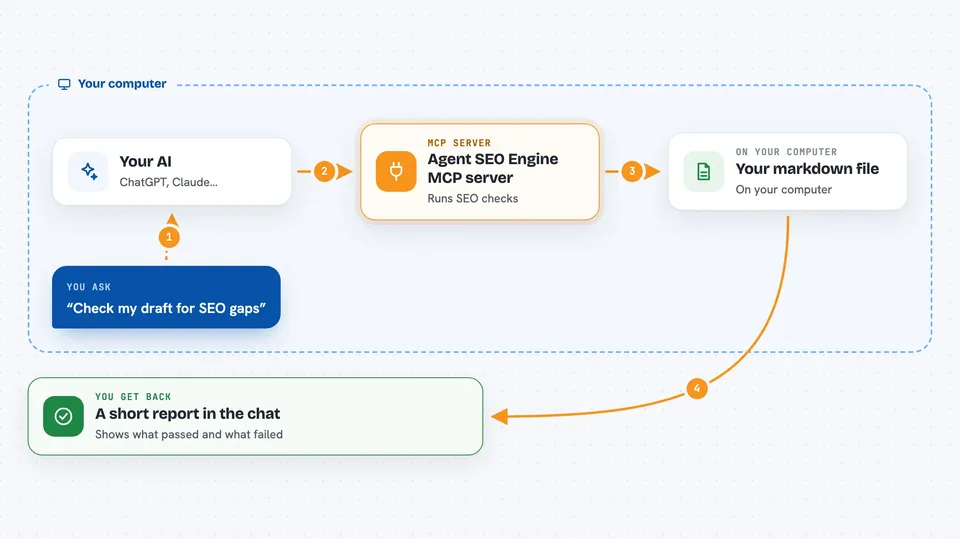
You ask your AI to look at a draft or a set of search numbers. Your AI calls this helper behind the scenes. The helper reads your markdown file or your numbers and runs a fixed set of checks. Then it hands the results back to your AI, which explains them to you in plain words and suggests what to fix.
 Click to zoom
What you can do with it
- Score a markdown article for SEO gaps and get a list of failed checks
- Guess the search intent behind a keyword phrase
- Rank search opportunities by impressions, clicks, position and value
- Check whether images on an HTML page have alt text
- Run a privacy check to see what data the tool touches
- Check that the tool is ready to use on your machine
What it gives back to you
You get back a short report in the chat. It lists which checks passed and which failed, with exact reasons. For opportunities, you get a ranked list with scores. For intent, you get one of a few labels like informational or transactional.
Before you start
What you need
- Python installed on your computer
- The agent-seo-engine package installed (the README shows a one-line install command)
- An AI app that can talk to MCP servers, like Claude Desktop or Cursor
Good to know
It reads the files you point it at, so only run it on drafts and pages you are happy for the tool to open.
Install it with your AI
Add Agent SEO Engine MCP server to your AI, no technical skills needed
You don't install anything by hand. You copy one prompt, paste it into an AI that can work on your computer, and it checks, installs and connects the server for you, asking you when it needs something.
Sign in to get the install prompt
Members get a ready-made prompt that lets the Claude desktop app check Agent SEO Engine MCP server, install it and connect it for them, step by step. You don't need any technical skills: you copy, paste and answer a few questions. Your connected AI can also find and install any of the 4,361 MCP servers here for you.
Who it's for
Writers, marketers and small site owners who publish content and want a quick SEO check before hitting publish.





