
MCP server · Generative video
Short Video Agent Kit MCP server
by davidmosiah
Let your AI plan and, when you allow it, generate short vertical videos through Sora, Veo, xAI or Seedance.
This is a helper that lets your AI work with short vertical videos, the kind you see on TikTok, Reels or Shorts. It can put together the exact request a video service needs, and only actually pay for a video when you clearly say so. It is handy if you make short videos and want your AI to help without burning money by accident.
What is an MCP server? The 30-second version
On its own, your AI can only chat. An MCP server is a small helper program that gives your AI a new skill or a connection to another service. This one connects your AI to short video generators like Sora, Veo, xAI and Seedance. So when you ask for a video plan or a video, your AI can talk to those services through this helper instead of you doing it by hand.
What this MCP server does
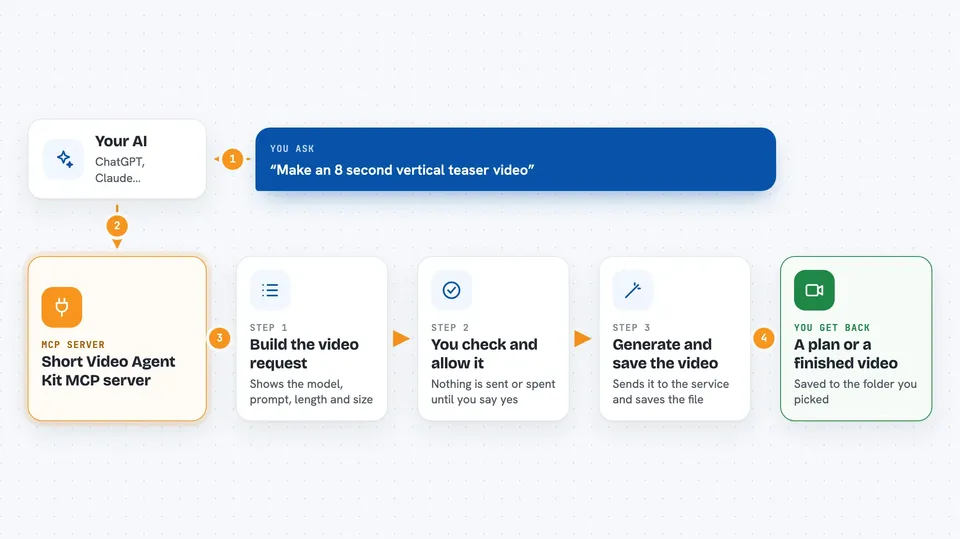
You ask your AI for a short video, for example an 8 second vertical teaser. The AI uses this helper to build the exact request that a video service like Sora or Veo expects. By default the helper just shows you that request and does not spend anything. If you clearly say you want the real video, the helper sends the request to the service and saves the file to a folder on your computer. It also tells you which video services you have keys for, without ever showing the keys themselves.
 Click to zoom
What you can do with it
- Check which video services you are set up to use
- Build a ready-to-send video request without spending money
- Generate a real short vertical video when you allow it
- Switch the same idea between Sora, Veo, xAI and Seedance
- Review what parts of your prompts and files are shared
- Save finished videos to a folder you choose
What it gives back to you
You get back a clear plan or a finished video. In dry-run mode it shows the exact request it would send, including the model, prompt, length and size, so you can check it first. When you allow a real generation, it saves the video file to the folder you picked and tells you where it went. It can also give you a simple status of which providers are ready.
Before you start
What you need
- Node.js installed on your computer
- The Claude desktop app or another AI app that supports MCP servers
- An API key from at least one video provider (a kind of password for apps; the provider gives you one when you sign up)
Good to know
Real video generation costs money, so keep it in dry-run mode until you are sure, and only use reference images you own or have permission to use.
Install it with your AI
Add Short Video Agent Kit MCP server to your AI, no technical skills needed
You don't install anything by hand. You copy one prompt, paste it into an AI that can work on your computer, and it checks, installs and connects the server for you, asking you when it needs something.
Sign in to get the install prompt
Members get a ready-made prompt that lets the Claude desktop app check Short Video Agent Kit MCP server, install it and connect it for them, step by step. You don't need any technical skills: you copy, paste and answer a few questions. Your connected AI can also find and install any of the 4,361 MCP servers here for you.
Who it's for
People who make short vertical videos, like social media creators, marketers and small business owners, who want their AI to help plan and produce clips.





