
MCP server · Social media
TikTok Agent Publisher MCP server
by davidmosiah
Lets your AI check TikTok posting readiness and prepare or publish videos safely, in dry-run by default.
This is a small helper that connects your AI assistant to TikTok's official posting tools. It lets the AI check whether your TikTok setup is ready, build a post, and only actually upload a video when you clearly turn live mode on. It is handy for people who post videos to TikTok regularly and want their AI to help prepare and track those posts.
What is an MCP server? The 30-second version
On its own, your AI can only chat with you. An MCP server is a small helper program that gives your AI a new skill or a connection to an app, and here it connects your AI to TikTok's posting system. Once it is set up, you can ask your AI to check your TikTok setup or prepare a video post, and the helper does the work behind the scenes. You stay in control because it starts in a safe practice mode and only goes live when you say so.
What this MCP server does
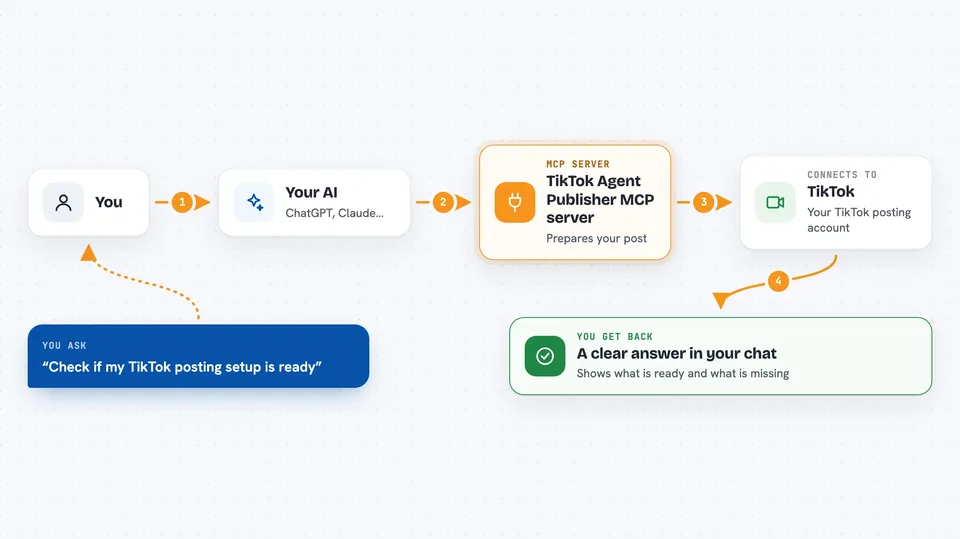
You ask your AI something like check my TikTok setup or prepare a post for this video. The AI passes your request to this helper, which talks to TikTok's official posting tools. By default the helper only practices: it builds the post, gives it a pretend ID, and reports back without uploading anything. When you turn live mode on, the same steps actually send the video to TikTok. You get clear, structured answers back in the chat so you can see exactly what happened.
 Click to zoom
What you can do with it
- Check whether your TikTok posting setup is ready
- See what information is still missing before you can post
- Build a video post with a caption and title without uploading it
- Poll the status of a post you started
- List your recent TikTok videos
- Review what stays local and what gets sent to TikTok
- Get install and setup guidance for your AI tool
Try asking your AI
- “Check if my TikTok posting setup is ready”
- “Prepare a TikTok post for ./short.mp4 with the caption Testing the dry-run flow”
- “What is the status of my last TikTok publish job”
- “List my five most recent TikTok videos”
What it gives back to you
You get back clear, structured answers in the chat. For a readiness check, you see which settings are filled in and which are still missing. For a prepared post, you get a pretend post ID and a note that it was only a practice run. For a status check or video list, you get a short status or a simple list of your recent videos.
Before you start
What you need
- Node.js 18 or newer installed on your computer
- A TikTok developer account with a client key and client secret (these are like app passwords you get from TikTok)
- An access token and refresh token from TikTok after you approve access
- A video file on your computer if you want to publish one
Good to know
This helper can actually upload videos to your TikTok account when live mode is turned on, so keep practice mode on until you are sure, and only post content you own or have permission to publish.
Install it with your AI
Add TikTok Agent Publisher MCP server to your AI, no technical skills needed
You don't install anything by hand. You copy one prompt, paste it into an AI that can work on your computer, and it checks, installs and connects the server for you, asking you when it needs something.
Sign in to get the install prompt
Members get a ready-made prompt that lets the Claude desktop app check TikTok Agent Publisher MCP server, install it and connect it for them, step by step. You don't need any technical skills: you copy, paste and answer a few questions. Your connected AI can also find and install any of the 4,361 MCP servers here for you.
Who it's for
Social media managers, content creators, and small teams who post videos to TikTok and want their AI to help prepare, check, and track those posts.





