
MCP server · Analytics
DeliverIQ MCP server
Check if email addresses are safe to send to, and get plain-English reports on a domain's email setup.
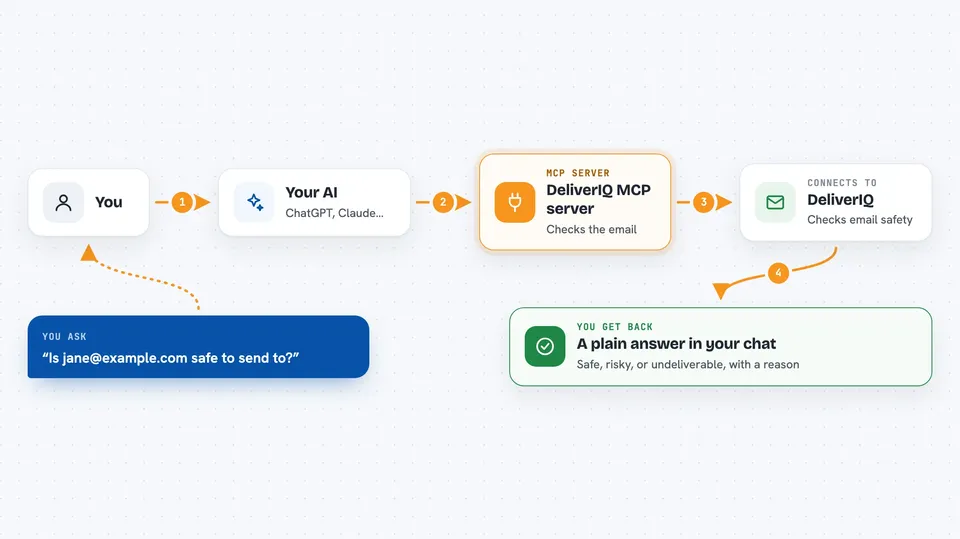
This is a helper that connects your AI assistant to DeliverIQ, a service that checks whether email addresses and domains are safe to send to. It is handy if you send newsletters, cold outreach, or any bulk email and want to avoid landing in spam folders. You ask your AI a question in normal words, and it uses DeliverIQ behind the scenes to give you an answer.
What is an MCP server? The 30-second version
On its own, your AI can only chat with you. It cannot look things up in other apps or services. An MCP server is a small helper program that gives your AI a new skill or a connection to a service, and here that service is DeliverIQ. Once it is connected, your AI can check email addresses and domains for you whenever you ask.
What this MCP server does
You type a question like whether an email address is safe to send to. Your AI sends that request to this helper, and the helper talks to the DeliverIQ service. DeliverIQ runs its checks and sends the results back. Your AI then explains what it found in plain words, right in your chat window.
 Click to zoom
What you can do with it
- Check whether a single email address is deliverable
- Submit a list of email addresses for a batch check
- Find a business email address from a name and a company domain
- See if a domain is on any of 50 email blocklists
- Review a domain's SPF, DKIM, DMARC, and BIMI setup
- Get a spam trap risk score for a domain
- Check how many DeliverIQ credits you have left
Try asking your AI
- “Is jane@example.com a safe email address to send to?”
- “Check these 200 email addresses and tell me which ones are risky”
- “Does example.com have its email authentication set up properly?”
- “Find the marketing manager's email at acme.com”
- “Is example.com on any email blocklists?”
What it gives back to you
You get answers in your chat, written in normal language. For a single check, that is a verdict like safe, risky, or undeliverable, with a short reason. For a batch, you get a summary and a link to download the full results as a spreadsheet file. For domain checks, you get a short report listing what was found and what needs fixing.
Before you start
What you need
- A DeliverIQ account and API key from min8t.com/deliveriq (a kind of password for apps; the site gives you one, and there is a free tier)
- Node.js 18 or newer on your computer
- An MCP-compatible app like Claude Desktop, Claude Code, or Cursor
Good to know
Most checks use up credits from your DeliverIQ account, so a big batch can spend a lot at once.
Install it with your AI
Add DeliverIQ MCP server to your AI, no technical skills needed
You don't install anything by hand. You copy one prompt, paste it into an AI that can work on your computer, and it checks, installs and connects the server for you, asking you when it needs something.
Sign in to get the install prompt
Members get a ready-made prompt that lets the Claude desktop app check DeliverIQ MCP server, install it and connect it for them, step by step. You don't need any technical skills: you copy, paste and answer a few questions. Your connected AI can also find and install any of the 4,361 MCP servers here for you.
Who it's for
Marketing people, email senders, and anyone who manages mailing lists and wants a quick sanity check before hitting send.





