
MCP server · Health and learning
OpenNutrition MCP server
by deadletterq
Lets your AI look up foods, nutrition facts and barcodes from a local food database.
This is a small helper that connects your AI to a big food and nutrition database called OpenNutrition. Once it is set up, you can ask your AI things like how many calories are in a certain food, or what a barcode belongs to, and it will look it up for you. It is handy for anyone who tracks what they eat, plans meals, or just gets curious about nutrition labels.
What is an MCP server? The 30-second version
On its own, your AI can only chat with you using what it already knows. An MCP server is a small helper program that gives your AI a new skill or a connection to an app or service. This one connects your AI to the OpenNutrition food database, which holds over 300,000 food items. So when you ask about a food, your AI can actually look it up there instead of guessing.
What this MCP server does
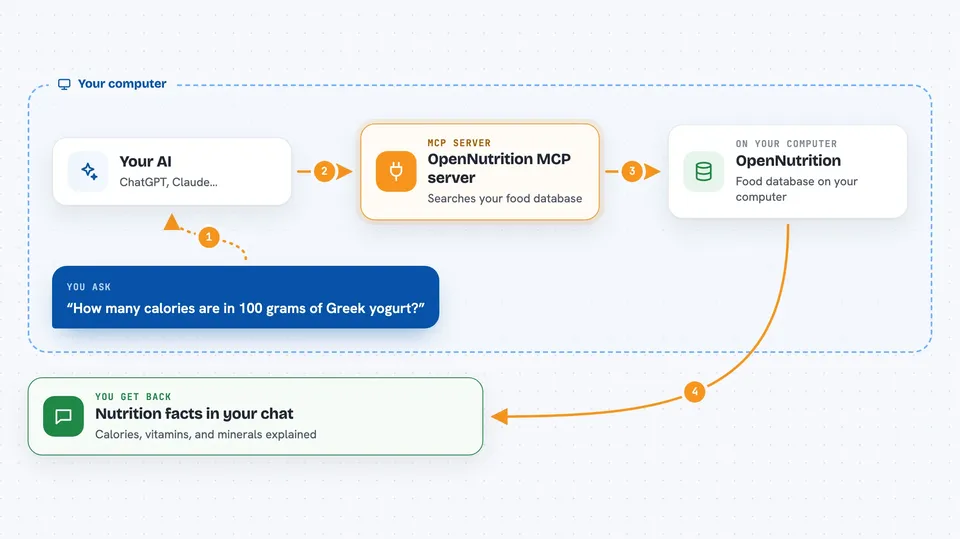
You ask your AI a question about food, like the calories in a yogurt or what a barcode is. Your AI passes that request to this helper program running on your own computer. The helper searches the OpenNutrition database, which is stored locally, and finds matching foods and their nutrition facts. It sends the results back to your AI, and your AI explains them to you in the chat. Nothing leaves your machine, so it is private and quick.
 Click to zoom
What you can do with it
- Search foods by name, brand or partial word
- Browse through lists of all foods in the database
- Look up detailed nutrition facts for a specific food
- Find a food by scanning or typing its EAN-13 barcode
- Compare calories, vitamins and minerals between foods
- Get macronutrient and micronutrient details for meal planning
Try asking your AI
- “How many calories are in 100 grams of Greek yogurt?”
- “Find foods that match the brand Quaker oats”
- “What food has the barcode 5012345678900?”
- “Show me the vitamins and minerals in a banana”
What it gives back to you
You get back plain answers in the chat, like a list of matching foods with their nutrition numbers, or a single food's full nutrition profile. It can also show you a browsable list of foods when you are just exploring. Everything appears as normal text your AI writes for you, based on what the database says.
Before you start
What you need
- Docker installed (the easiest way to run it)
- Or Node.js and npm if you build it from source
- An AI app that supports MCP, like Claude Desktop or Cline
Good to know
It only reads from the food database, so it will not change or delete anything, but the nutrition numbers come from the dataset and may not match every product label exactly.
Install it with your AI
Add OpenNutrition MCP server to your AI, no technical skills needed
You don't install anything by hand. You copy one prompt, paste it into an AI that can work on your computer, and it checks, installs and connects the server for you, asking you when it needs something.
Sign in to get the install prompt
Members get a ready-made prompt that lets the Claude desktop app check OpenNutrition MCP server, install it and connect it for them, step by step. You don't need any technical skills: you copy, paste and answer a few questions. Your connected AI can also find and install any of the 4,361 MCP servers here for you.
Who it's for
People who track their diet, plan meals, or work with nutrition data and want quick lookups without leaving their AI chat.


