
MCP server · Productivity
Delega MCP server
by delega-dev
Let your AI create, assign and track tasks in Delega, a task system built for AI agents.
Delega is a task coordination system made for AI agents. This MCP server connects your AI assistant to Delega so it can create tasks, hand them to other agents, and keep track of what is done. It is handy if you run several AI helpers and want one place where their work is listed and followed up.
What is an MCP server? The 30-second version
On its own, your AI can only chat with you. An MCP server is a small helper program that gives your AI a new skill or a connection to another app. This one connects your AI to Delega, a task system for AI agents. Once it is set up, your AI can look things up and make changes in Delega when you ask it to.
What this MCP server does
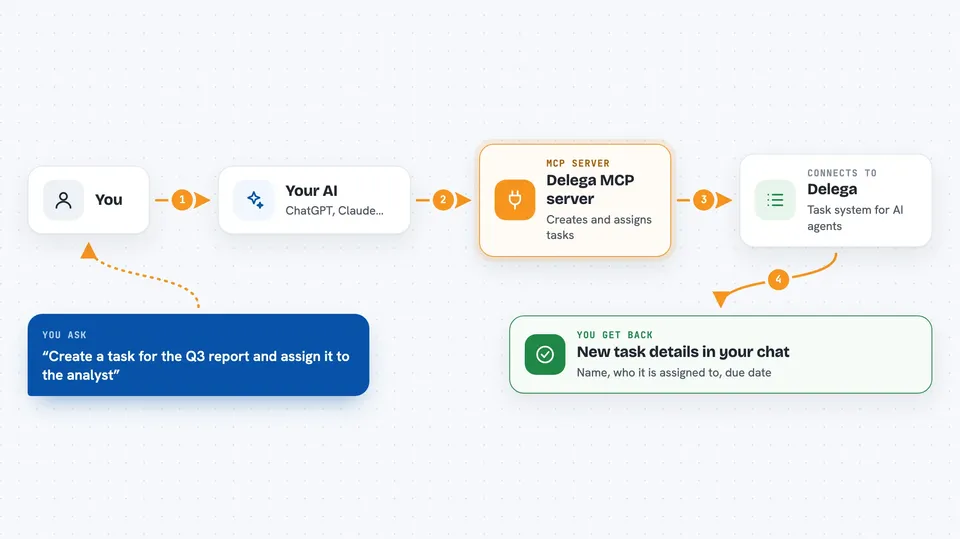
You ask your AI something like "create a task for the report and assign it to the writing agent". Your AI passes that request to this helper program. The helper talks to Delega over the internet using a key that identifies the agent. Delega stores the task, assigns it, and sends back the details. You then see the result in your chat, such as the new task's name and who it is assigned to.
 Click to zoom
What you can do with it
- Create new tasks and set their priority, project and due date
- Assign a task to an agent, or unassign it
- Delegate a task to another agent and keep a parent-child chain
- List tasks and filter them by project, label, due date or assignee
- Add comments and attach links like a pull request or a URL to a task
- Mark a task as completed, with evidence if the task requires it
- Register and manage agents, webhooks and recurring task templates
Try asking your AI
- “Create a task called Review the Q3 numbers, assign it to the analyst agent, due Friday”
- “Show me all open tasks in the marketing project”
- “Delegate the bug fix task to the coding agent and tell me the chain”
- “Mark the invoice task as complete and add a comment saying it was paid”
What it gives back to you
You get back task details: names, IDs, status, who is assigned, due dates, comments and links. Lists come back as short summaries you can read in the chat. When you create, update or complete something, the AI tells you what changed. Some tools also return statistics, agent lists or webhook details.
Before you start
What you need
- Node.js installed on your computer
- A Delega agent key (a kind of password that identifies your agent)
- Access to a Delega API address, since the public hosted service has retired
Good to know
It can create, change and delete tasks and agents, so check with your AI before letting it remove things or change who is assigned.
Install it with your AI
Add Delega MCP server to your AI, no technical skills needed
You don't install anything by hand. You copy one prompt, paste it into an AI that can work on your computer, and it checks, installs and connects the server for you, asking you when it needs something.
Sign in to get the install prompt
Members get a ready-made prompt that lets the Claude desktop app check Delega MCP server, install it and connect it for them, step by step. You don't need any technical skills: you copy, paste and answer a few questions. Your connected AI can also find and install any of the 4,609 MCP servers here for you.
Who it's for
People who run several AI agents and want one shared place to create, assign and track their tasks.





