
MCP server · Research · official
Trieve MCP server
by devflowinc · official
Lets your AI search inside your Trieve datasets and answer questions from your own documents.
Trieve is a service that stores documents you upload and lets you search them. This MCP server is a small connector that lets your AI assistant search your Trieve datasets for you. It is handy if your team keeps help articles, notes, or product docs in Trieve and you want quick answers from them.
What is an MCP server? The 30-second version
On its own, your AI can only chat with what it already knows. An MCP server is a small helper program that gives your AI a new skill or a connection to an app. This one connects your AI to Trieve, your document search service. Once it is set up, your AI can look things up in your Trieve datasets and bring the answers back into the chat.
What this MCP server does
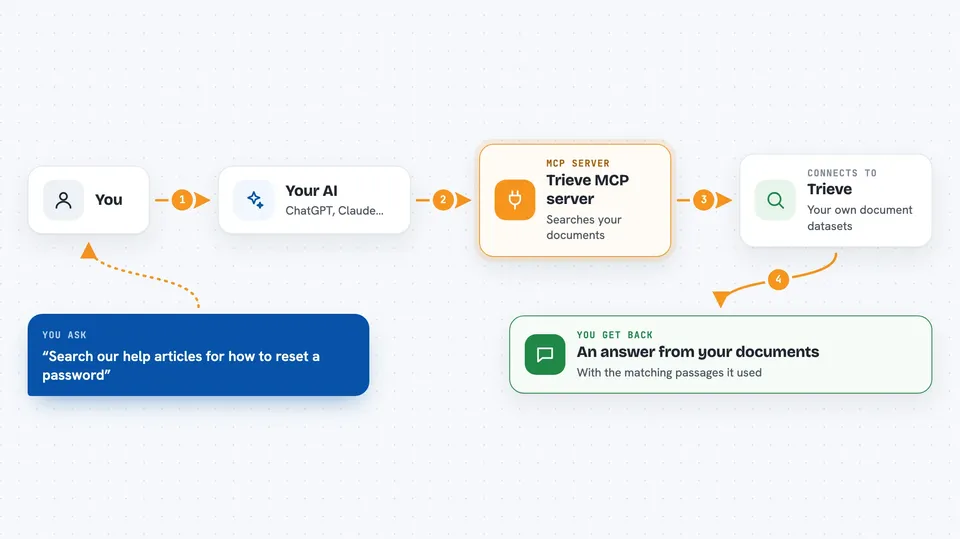
You ask your AI a question in plain words. The AI uses this helper to send a search to Trieve, using the dataset you picked. Trieve looks through the documents in that dataset and finds the closest matches. The helper hands those matches back to your AI. Your AI then reads them and writes an answer for you, sometimes running a few searches to get it right.
 Click to zoom
What you can do with it
- Search across your Trieve datasets with a plain question
- Pick which dataset to search from a list of your datasets
- Choose the search style, such as meaning-based or exact word matching
- Filter results so only certain documents come back
- Ask follow-up questions and let the AI search again
- Get highlighted snippets from the matching documents
Try asking your AI
- “Search our help articles for how to reset a password”
- “What do our product docs say about refunds?”
- “Find anything in the onboarding dataset about new hire paperwork”
- “Look through the support dataset for issues with billing”
What it gives back to you
You get answers written in the chat, based on the documents Trieve found. The AI can also show the matching passages or snippets it used. If you ask for a list, it can list the datasets you have access to. It does not change anything in your Trieve account; it only reads and searches.
Before you start
What you need
- A Trieve account
- Your Trieve API key from dashboard.trieve.ai (a kind of password for apps)
- Your Trieve organization ID from dashboard.trieve.ai
- The dataset ID you want to search, if you want to pick one ahead of time
Good to know
It only reads and searches your Trieve data, so it will not change or delete anything, but it can see whatever documents are in the datasets your key can access.
Install it with your AI
Add Trieve MCP server to your AI, no technical skills needed
You don't install anything by hand. You copy one prompt, paste it into an AI that can work on your computer, and it checks, installs and connects the server for you, asking you when it needs something.
Sign in to get the install prompt
Members get a ready-made prompt that lets the Claude desktop app check Trieve MCP server, install it and connect it for them, step by step. You don't need any technical skills: you copy, paste and answer a few questions. Your connected AI can also find and install any of the 4,609 MCP servers here for you.
Who it's for
Support teams, writers, and anyone whose team keeps documents in Trieve and wants quick answers from them.


