
MCP server · Research
Weather MCP server
by devilcoder01
Lets your AI look up live weather, forecasts, air quality and alerts for any place you name.
This is a small helper that connects your AI assistant to a weather service called WeatherAPI. Once it is set up, you can just ask your AI about the weather in plain words and it will fetch real, current data for you. It is handy for anyone who plans trips, events or commutes and wants quick answers without opening a weather site.
What is an MCP server? The 30-second version
On its own, your AI can only chat with you using what it already knows. An MCP server is a small helper program that gives your AI a new skill or a connection to an app or service. This one connects your AI to WeatherAPI, a weather data service. So when you ask about the weather, your AI can go and look it up there and bring the answer back to you.
What this MCP server does
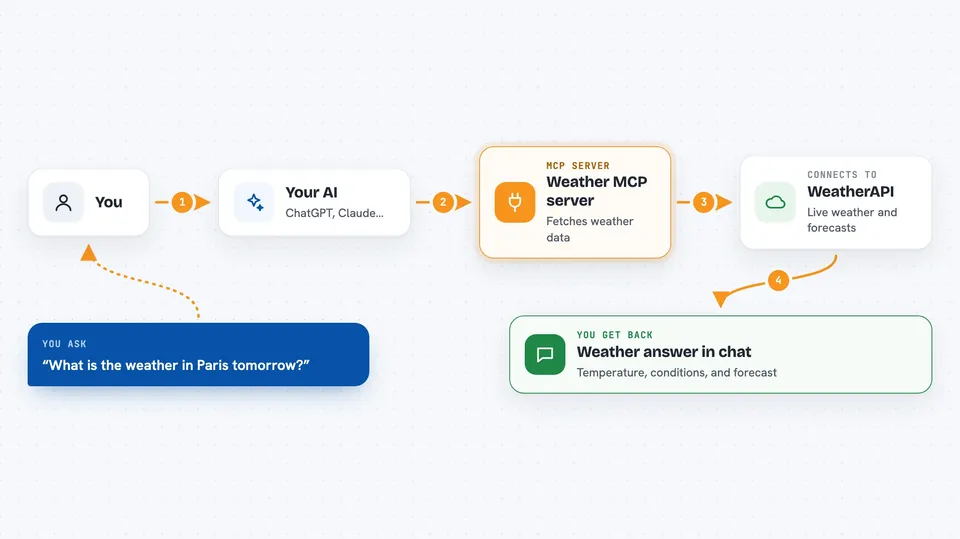
You ask your AI something like what is the weather in Paris tomorrow. Your AI passes that question to this helper program. The helper talks to WeatherAPI over the internet and asks for the data you wanted. WeatherAPI sends back the numbers and details, and the helper hands them to your AI. Your AI then writes the answer out for you in the chat, in normal sentences.
 Click to zoom
What you can do with it
- Check current weather conditions for any city or place
- Get a weather forecast from 1 up to 14 days ahead
- Look up air quality information for a location
- See weather alerts and warnings for an area
- Find sunrise, sunset and moon phase details
- Search for a location to get its exact name or coordinates
- Check the local timezone for a place
Try asking your AI
- “What is the weather in Tokyo right now?”
- “Give me a 5 day forecast for Lisbon.”
- “Is the air quality good in Delhi today?”
- “What time is sunrise in Sydney tomorrow?”
What it gives back to you
You get back a written answer in the chat, usually with the temperature, conditions like sunny or rainy, and other details you asked for. Forecasts come back as a day by day list. Air quality, alerts and astronomy details come back as short summaries or small tables. It is all just text you can read, copy or ask follow up questions about.
Before you start
What you need
- A WeatherAPI account and API key (a kind of password for apps; the WeatherAPI site gives you one for free)
- Python 3.13 or newer installed on your computer
- The uv package manager installed
- A way to run the server, such as the Claude desktop app or another MCP client
Good to know
It needs your WeatherAPI key, so keep that key private and check your plan's limits on the WeatherAPI site so you do not run out of free calls.
Install it with your AI
Add Weather MCP server to your AI, no technical skills needed
You don't install anything by hand. You copy one prompt, paste it into an AI that can work on your computer, and it checks, installs and connects the server for you, asking you when it needs something.
Sign in to get the install prompt
Members get a ready-made prompt that lets the Claude desktop app check Weather MCP server, install it and connect it for them, step by step. You don't need any technical skills: you copy, paste and answer a few questions. Your connected AI can also find and install any of the 4,609 MCP servers here for you.
Who it's for
Anyone who plans around the weather, like travellers, event organisers, commuters or people who just want quick forecasts without opening a weather site.



