
MCP server · Developer tools
Oracle Cloud (OCI) MCP server
by dockndevai
Lets your AI look at your Oracle Cloud resources and write Terraform code for them.
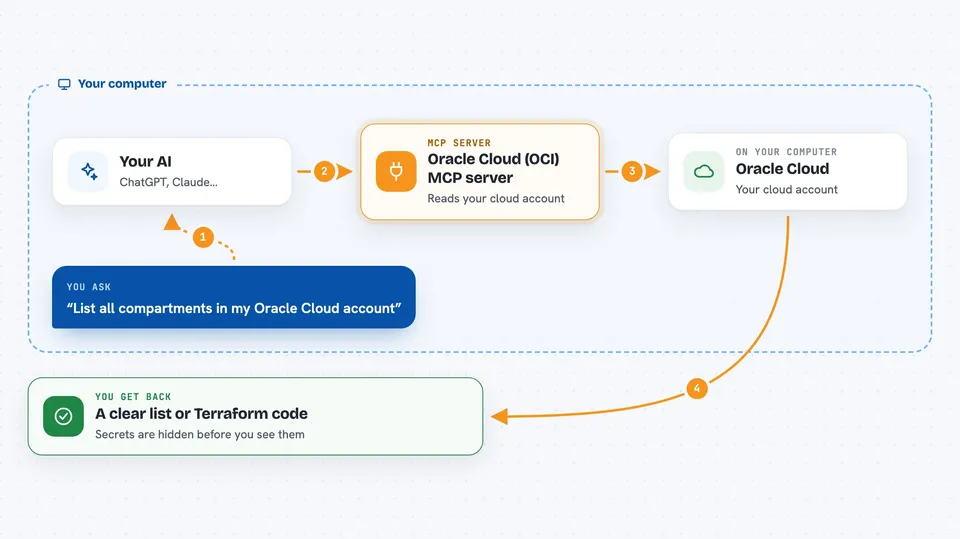
This is a helper that connects your AI assistant to Oracle Cloud Infrastructure, usually just called OCI. Once it is set up, you can ask your AI things like "show me all the networks in the prod area" or "write Terraform for this part of my cloud" and get real answers from your actual account. It is handy for anyone who looks after cloud resources but does not want to click around the OCI website all day.
What is an MCP server? The 30-second version
On its own, your AI can only chat with you. An MCP server is a small helper program that gives your AI a new skill or a connection to another service. This one connects your AI to Oracle Cloud, so it can look up your compartments, regions and resources and even write Terraform code for them. You stay in charge: you ask, the AI uses this helper, and the helper talks to Oracle Cloud for you.
What this MCP server does
You ask your AI a question about your Oracle Cloud account, for example which networks exist in a certain area. The AI passes that request to this helper program, which is running quietly on your own computer. The helper signs in to Oracle Cloud using your normal OCI config file and looks up the resources you asked about. It then hands the results back to the AI, with anything that looks like a password or secret key blanked out first. The AI turns that into a clear answer or a piece of Terraform code you can read in the chat.
 Click to zoom
What you can do with it
- List all compartments in your Oracle Cloud account
- Show every resource inside a chosen compartment
- Look up a single resource by its ID
- Generate Terraform code for a network, subnet, instance, bucket or compartment
- Generate a whole Terraform module for one compartment
- Draw a dependency graph and suggest the order to build things in
- Check which regions your account can reach
Try asking your AI
- “List all compartments, then show every resource in the prod compartment.”
- “Generate Terraform for VCN ocid1.vcn.oc1..example.”
- “Build a dependency graph for the prod compartment and tell me the provisioning order.”
- “What regions can my account use?”
What it gives back to you
You get back plain answers in the chat: lists of compartments or resources, a single resource's details, or Terraform code you can copy into a file. The dependency graph comes back as a list of items and the links between them, plus a suggested build order. Any field that looks like a secret is replaced with ***REDACTED*** before it ever reaches the AI, so you will not see real passwords or keys in the chat.
Before you start
What you need
- An Oracle Cloud (OCI) account
- An OCI config file on your computer, usually at ~/.oci/config, with a profile set up
- Node.js installed, so the npx command can run
- An MCP-capable app such as Claude Desktop, Claude Code, Cursor, Windsurf, Copilot or Codex CLI
Good to know
It reads your live Oracle Cloud account, so give it a read-only OCI user and keep the compartment and region allowlists tight.
Install it with your AI
Add Oracle Cloud (OCI) MCP server to your AI, no technical skills needed
You don't install anything by hand. You copy one prompt, paste it into an AI that can work on your computer, and it checks, installs and connects the server for you, asking you when it needs something.
Sign in to get the install prompt
Members get a ready-made prompt that lets the Claude desktop app check Oracle Cloud (OCI) MCP server, install it and connect it for them, step by step. You don't need any technical skills: you copy, paste and answer a few questions. Your connected AI can also find and install any of the 4,361 MCP servers here for you.
Who it's for
Cloud engineers, DevOps people and IT admins who manage Oracle Cloud resources and want help reading them or writing Terraform.




