
MCP server · Developer tools
Percona PostgreSQL MCP server
by dockndevai
Let your AI check and manage Percona PostgreSQL clusters on Kubernetes, safely.
This is a helper that connects your AI assistant to Percona PostgreSQL clusters running on Kubernetes. It lets you ask your AI to look at your databases, change settings, take backups, or restore data, all in plain words. It is handy for people who already run these clusters and want to do everyday tasks without typing long commands.
What is an MCP server? The 30-second version
On its own, your AI can only chat. An MCP server is a small helper program that gives your AI a new skill or a connection to another system. This one connects your AI to the Percona Operator for PostgreSQL, which manages your database clusters on Kubernetes. Once it is connected, your AI can look things up and make changes there for you when you ask.
What this MCP server does
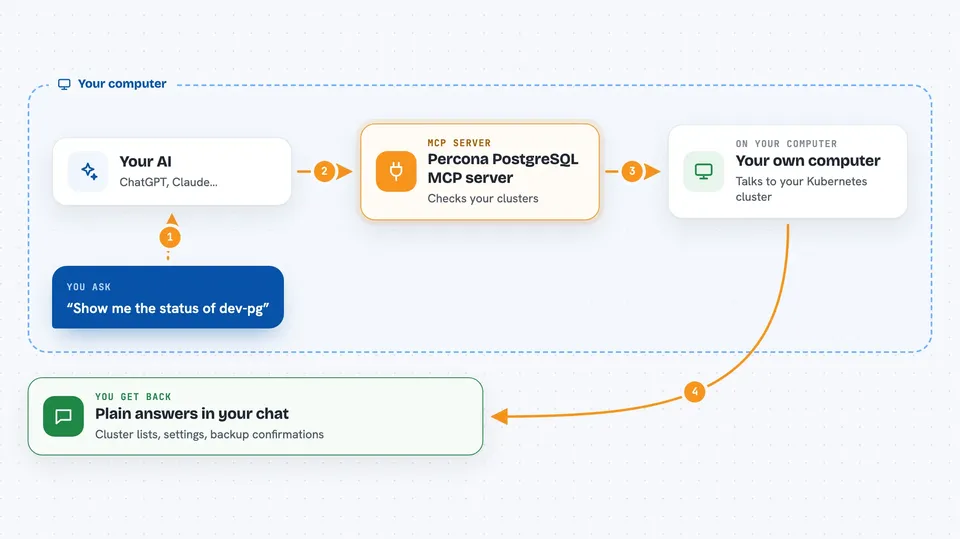
You ask your AI something like "show me the status of dev-pg". Your AI sends that request to this helper program. The helper talks to your Kubernetes cluster using your existing kube-config and the Percona operator's custom resources. It reads or changes the cluster as needed, then hands the result back to your AI. Your AI shows you the answer in the chat, in normal words.
 Click to zoom
What you can do with it
- List your PostgreSQL clusters and see their status
- Check PgBouncer pooling settings and pool sizes
- Change PgBouncer pool mode or pool size
- Read and update PostgreSQL tuning parameters
- Scale PostgreSQL or PgBouncer up or down
- Take an on-demand backup of a cluster
- Restore a cluster or do point-in-time recovery
Try asking your AI
- “List the PostgreSQL clusters and show me the status of dev-pg.”
- “What pool_mode is dev-pg using, and how big is the default pool?”
- “Set dev-pg PgBouncer to transaction pooling with default_pool_size 25.”
- “Take a full backup of dev-pg to repo1.”
What it gives back to you
You get back clear answers in the chat: lists of clusters, status summaries, current settings, backup and restore lists, and confirmation of changes it made. For example, it might show you the pool mode and pool size, or tell you a backup has started. It never shows database passwords or credentials.
Before you start
What you need
- A Kubernetes cluster running the Percona Operator for PostgreSQL v2
- A kube-config file the server can read, ideally scoped to the right namespaces
- Node.js installed on your computer (so npx can run the package)
- An MCP-capable client like Claude Desktop, Claude Code, or Cursor
Good to know
It can change, restore, or delete your database clusters, so start in read-only mode and use the allowlists and protected clusters to keep it away from anything important.
Install it with your AI
Add Percona PostgreSQL MCP server to your AI, no technical skills needed
You don't install anything by hand. You copy one prompt, paste it into an AI that can work on your computer, and it checks, installs and connects the server for you, asking you when it needs something.
Sign in to get the install prompt
Members get a ready-made prompt that lets the Claude desktop app check Percona PostgreSQL MCP server, install it and connect it for them, step by step. You don't need any technical skills: you copy, paste and answer a few questions. Your connected AI can also find and install any of the 4,361 MCP servers here for you.
Who it's for
People who run Percona PostgreSQL clusters on Kubernetes and want to check or change them through their AI assistant instead of typing kubectl commands.


