MCP server · Developer tools
SmartCLI Terminal Driver
by dwgx
Your AI can watch and control full-screen terminal programs like vim, htop and lazygit.
This is a free, open-source toolbox that lets an AI assistant operate real full-screen terminal programs on your computer. Instead of just chatting, your AI gets hands-on access to editors, system monitors and Git interfaces. It is handy for developers and anyone comfortable poking around inside a terminal window.
What is an MCP server? The 30-second version
On its own, your AI can only talk. An MCP server is a little helper program that plugs into your AI and teaches it a new trick. This particular helper connects your AI to whatever is happening inside a terminal window. Once it is switched on, your AI can peek at the screen contents and press keys for you whenever you ask.
What this MCP server does
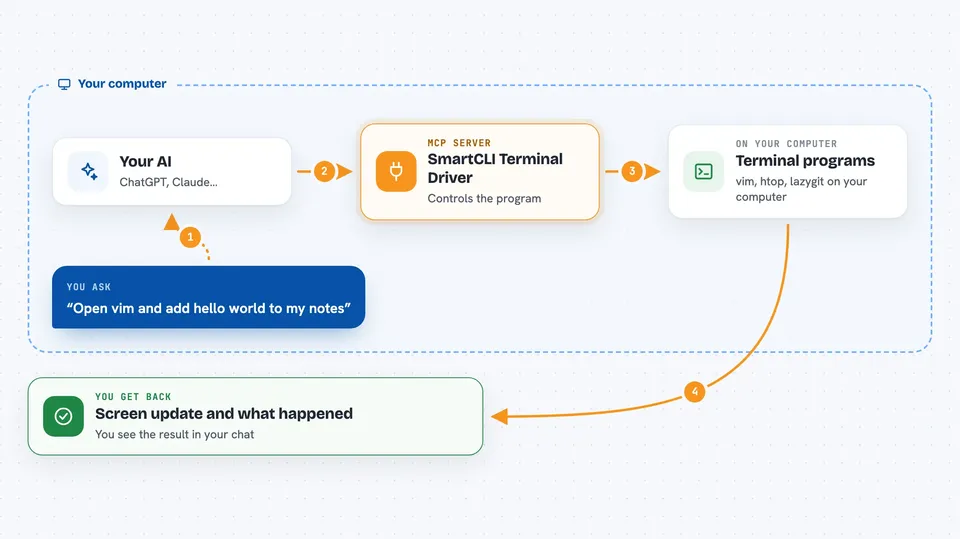
When you request something involving a terminal program, your AI sends instructions to this helper behind the scenes. The helper launches or attaches to the program, watches how the screen updates, and figures out which part is active based on the visible cells. Then it taps the correct keys until the result you wanted appears. Finally it takes a fresh picture of the screen and tells your AI what happened.
 Click to zoom
What you can do with it
- Open a text editor like vim and edit lines automatically
- Check system resource usage shown by top or htop
- Navigate branches and commits in lazygit without touching the keyboard yourself
- Answer yes/no confirmation questions asked by scripts
- Fill in forms presented interactively in the console
Try asking your AI
- “Start vim and append 'hello world' to my notes file”
- “Show me what processes are eating CPU according to top”
- “In lazygit stage everything I changed today and show me the summary”
- “Run my deployment script and accept the default options throughout”
What it gives back to you
After acting, the helper grabs a textual map of the current screen – showing colours, borders, cursors and status messages – along with metadata describing what just occurred. Your AI receives this information as readable data within the conversation thread. You also learn whether waiting conditions succeeded or timed out.
Install it with your AI
Add SmartCLI Terminal Driver to your AI, no technical skills needed
You don't install anything by hand. You copy one prompt, paste it into an AI that can work on your computer, and it checks, installs and connects the server for you, asking you when it needs something.
Sign in to get the install prompt
Members get a ready-made prompt that lets the Claude desktop app check SmartCLI Terminal Driver, install it and connect it for them, step by step. You don't need any technical skills: you copy, paste and answer a few questions. Your connected AI can also find and install any of the 4,609 MCP servers here for you.
Who it's for
Developers and power users who frequently automate repetitive tasks inside terminals and prefer letting an AI handle routine interactions.