MCP server · Developer tools
RootPilot SSH Diagnose MCP server
by Easton-OU
Let your AI safely peek at your Linux or Docker servers over SSH and read back the clues it finds.

This is a small helper that lets your AI assistant look at your Linux servers over SSH and gather clues about what is going wrong. It only runs a fixed list of safe, read-only commands, so it never changes anything on your machines. It is handy for anyone who runs a server or a few Docker containers and is tired of typing the same twenty commands by hand.
What is an MCP server? The 30-second version
On its own, your AI can only chat with you. An MCP server is a small helper program that gives your AI a new skill or a connection to something else. This one connects your AI to your own Linux servers over SSH, so it can go look at things there when you ask. You stay in charge: the helper only reads, and it never changes anything on your hosts.
What this MCP server does
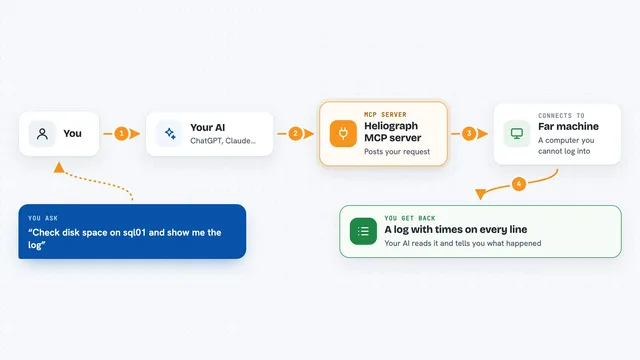
You ask your AI something like "why is prod-1 slow?" or "diagnose prod-1". The AI picks the right commands from a fixed list of 38 safe, read-only ones, like checking disk space, memory, running containers, or recent kernel errors. This helper runs those commands on your server over SSH, cleans out any passwords or keys from the output, and hands the result back to your AI. Your AI then reads the evidence and explains what it thinks is going on. Nothing is changed on your server, and nothing leaves your machine except the SSH connection to your own hosts.
 Click to zoom
What you can do with it
- List the servers you have set up and test whether they are reachable
- Show the full list of 38 read-only commands so you can audit them
- Run a quick overview of a host: disk, memory, uptime, containers, kernel errors
- Take a deeper look at one Docker container, including its logs and settings
- Ask your AI to walk through the evidence and suggest a likely cause
- Run a light health check across a host
Try asking your AI
- “Diagnose prod-1”
- “Why is my web container restarting on prod-2?”
- “Check disk and memory on prod-1 and tell me if anything looks off”
- “Run a health check on prod-2”
What it gives back to you
You get back plain text in your chat: the cleaned-up output of the commands that were run, plus your AI's own reading of it. For example, it might show disk usage, memory numbers, a list of containers, and a short explanation of what looks unusual. It can also list your configured hosts and whether they answered. Nothing is changed on your servers, so there are no edits to review.
Before you start
What you need
- Node.js installed on your computer (the helper runs through npx)
- An MCP client like Claude Desktop or Claude Code
- A hosts.json file listing your servers and how to log in
- SSH access to those servers, ideally with a dedicated read-only account
Good to know
It only reads, but it does connect to your servers over SSH, so use a dedicated read-only account and keep your hosts.json file private.
Install it with your AI
Add RootPilot SSH Diagnose MCP server to your AI, no technical skills needed
You don't install anything by hand. You copy one prompt, paste it into an AI that can work on your computer, and it checks, installs and connects the server for you, asking you when it needs something.
Sign in to get the install prompt
Members get a ready-made prompt that lets the Claude desktop app check RootPilot SSH Diagnose MCP server, install it and connect it for them, step by step. You don't need any technical skills: you copy, paste and answer a few questions. Your connected AI can also find and install any of the 4,609 MCP servers here for you.
Who it's for
Anyone who looks after a Linux server or a few Docker containers and wants a faster, safer way to gather clues when something misbehaves.