
MCP server · Design tools
BrandKit MCP server
by ejwhite7
Lets your AI read your company's brand colors, fonts, logos, voice and rules while it works.
BrandKit MCP is a small helper that gives your AI assistant access to your company's brand guide. That means the colors, fonts, logos, tone of voice, and writing rules your team uses. It is handy for anyone who writes or builds things that need to look and sound on-brand.
What is an MCP server? The 30-second version
On its own, your AI can only chat with you. It does not know your company's colors, fonts, or tone of voice unless you paste them in every time. An MCP server is a small helper program that gives your AI a new skill or a connection, and here it connects your AI to your brand files. Once it is set up, your AI can look up your brand details and use them when you ask.
What this MCP server does
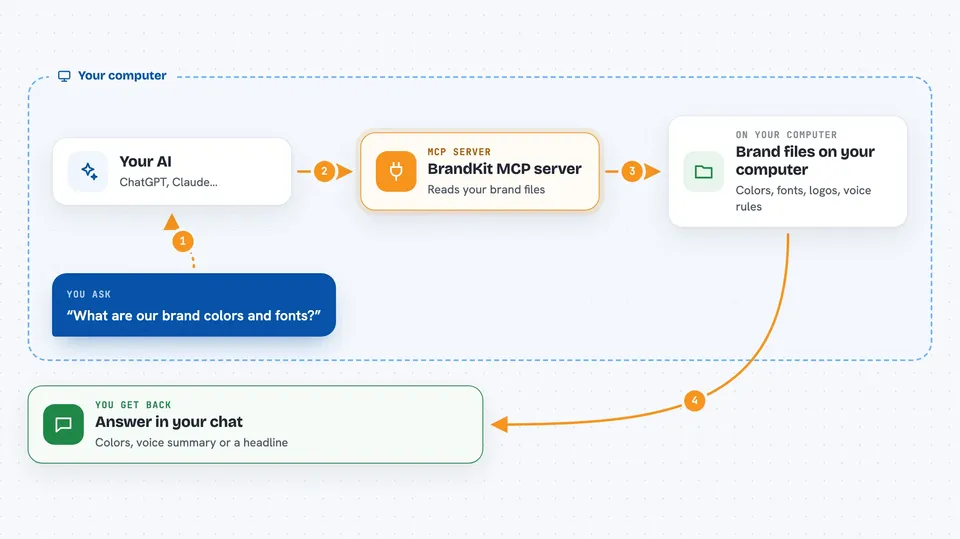
You keep your brand details in a folder on your computer, in simple files like text, CSS, and YAML. When you ask your AI something, the AI uses this helper to read those files. The helper finds the right pieces, like your colors, fonts, or brand voice rules. Then your AI uses that information to write copy, suggest designs, or check that something follows your brand. You just see the answer in the chat.
 Click to zoom
What you can do with it
- Look up your brand colors and typography
- Read your brand voice and messaging rules
- Find your logos and other brand assets
- Check whether a piece of text follows your brand
- Search across all your brand documents
- Compare brand rules for your website versus your product
- Get your design tokens in formats like CSS or Tailwind
Try asking your AI
- “What are our brand colors and fonts?”
- “Write a homepage headline that matches our brand voice.”
- “Does this paragraph follow our messaging guidelines?”
- “Show me our logo files and design tokens.”
What it gives back to you
You get answers in plain chat, like a list of your colors, a summary of your brand voice, or a suggested headline. It can also return the exact CSS or token text if you ask for it. When you ask it to check something, it tells you what fits your brand and what does not. Everything is read-only unless you deliberately turn on the one write tool.
Before you start
What you need
- Node.js installed on your computer
- The Claude desktop app or another AI tool that supports MCP
- Your brand files in a folder, or you can start from the built-in starter template
Good to know
One tool can update your brand config and docs files, so keep the server local and do not turn on write tools for network use unless you really need to.
Install it with your AI
Add BrandKit MCP server to your AI, no technical skills needed
You don't install anything by hand. You copy one prompt, paste it into an AI that can work on your computer, and it checks, installs and connects the server for you, asking you when it needs something.
Sign in to get the install prompt
Members get a ready-made prompt that lets the Claude desktop app check BrandKit MCP server, install it and connect it for them, step by step. You don't need any technical skills: you copy, paste and answer a few questions. Your connected AI can also find and install any of the 4,609 MCP servers here for you.
Who it's for
Designers, marketers, and content writers who want their AI to stay on-brand without pasting the brand guide every time.




