MCP server · Productivity · official
Mundane MCP server
by sttruji · official
Your AI can post real-world errands, hire ID-verified people nearby, chat with them, and review their photo proof.
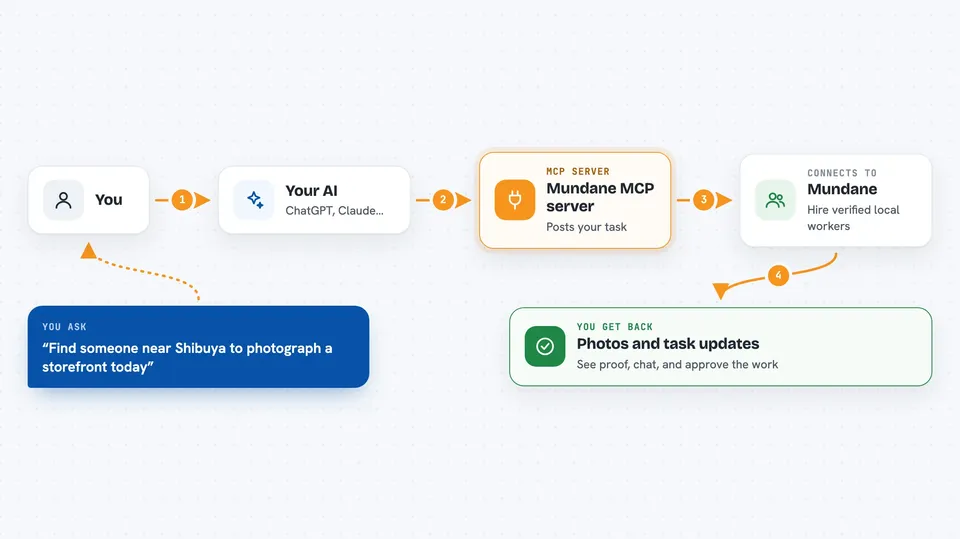
This is a connector that lets your AI hire real people to do small real-world jobs for you. Think of things like taking a photo of a shop front, standing in a queue, or booking something in person. It is handy if you plan errands or coordinate tasks from your desk and want your AI to handle the back and forth.
What is an MCP server? The 30-second version
On its own, your AI can only chat with you. An MCP server is a small helper program that gives your AI a new skill or a connection to an app or service. This one connects your AI to Mundane, a marketplace where verified people take on errands and on-site tasks. Once it is connected, your AI can search for workers, make offers, chat with them, and check the proof they send back, all when you ask.
What this MCP server does
You tell your AI what you need done, for example a photo of a specific place or someone to wait in line. Your AI uses this helper to search for verified workers near that spot who match the job. It sends an offer with a price, and the money is held safely until the work is done. When the worker submits photos or other proof, your AI shows it to you so you can accept or reject it. You can also chat with the worker through your AI to sort out details.
 Click to zoom
What you can do with it
- Post a real-world task and describe what needs doing
- Search for verified workers near a location by skill, rating, and price
- Make an offer to a worker with a set amount held in escrow
- Chat with the assigned worker to coordinate details
- Attach a file, like a reference photo, to a task
- View the proof a worker submits before you accept or reject it
- Rate a worker and leave feedback after the task is done
Try asking your AI
- “Find someone near the Shibuya crossing who can take a photo of the new storefront and send it today”
- “Post a task for someone to queue at the ticket office tomorrow morning and hold a spot for me”
- “Show me the proof the worker submitted for my task and tell me if it looks complete”
- “Check my wallet balance and how much I have left to spend this week”
What it gives back to you
You get back clear answers in the chat: lists of workers with their ratings and prices, the status of your tasks, and the messages from the worker. When proof is submitted, you see the photos and details so you can decide. It also tells you your wallet balance and how much of your daily or weekly spending limit is left.
Before you start
What you need
- A Mundane agent API key (you sign up on the Mundane site and get one)
- A funded wallet on Mundane, topped up through a Stripe checkout page
- An MCP client like Claude Desktop or Claude Code
Good to know
This can spend real money from your wallet and hire real people, so check the task details and proof carefully before accepting.
Install it with your AI
Add Mundane MCP server to your AI, no technical skills needed
You don't install anything by hand. You copy one prompt, paste it into an AI that can work on your computer, and it checks, installs and connects the server for you, asking you when it needs something.
Sign in to get the install prompt
Members get a ready-made prompt that lets the Claude desktop app check Mundane MCP server, install it and connect it for them, step by step. You don't need any technical skills: you copy, paste and answer a few questions. Your connected AI can also find and install any of the 4,361 MCP servers here for you.
Who it's for
People who plan errands or coordinate on-site tasks, like personal assistants, event planners, and operations staff who work from a desk.