
MCP server · Analytics
Infra MCP server
by esp4ce
Let your AI check Linux servers and PostgreSQL databases over SSH, safely and read-only.
This is a small helper that lets your AI look at your Linux servers and PostgreSQL databases for you, without you opening a terminal. You ask a question in plain words, and it goes and checks the service, the logs, or the database, then tells you what it found. It is handy for anyone who has to keep an eye on servers but does not want to type SSH commands all day.
What is an MCP server? The 30-second version
On its own, your AI can only chat with you. An MCP server is a small helper program that gives your AI a new skill or a connection to something else. This one connects your AI to your own Linux machines and PostgreSQL databases over SSH, so it can look things up there when you ask. It only reads; it never changes anything on your servers.
What this MCP server does
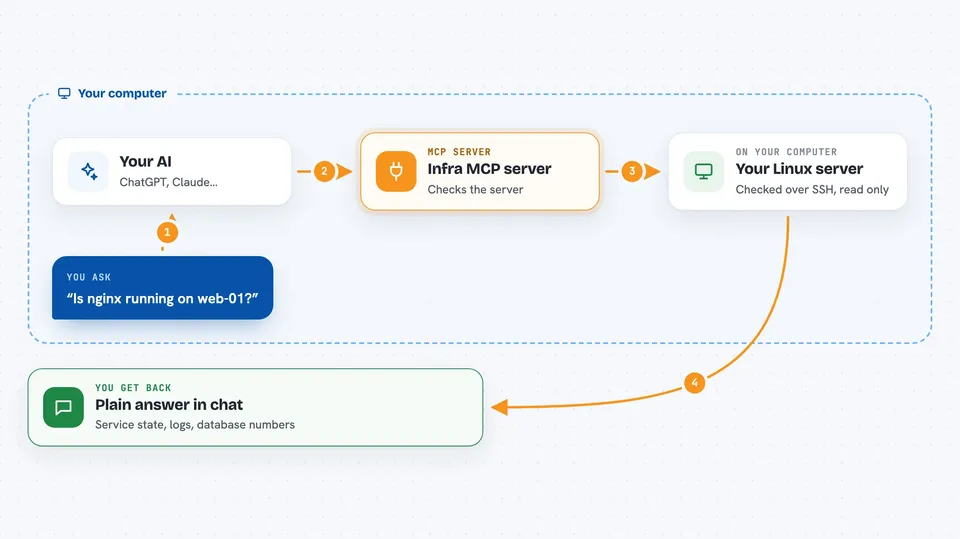
You ask your AI something like whether a service is running on a server. The AI passes that request to this helper. The helper opens an SSH connection to the machine, checks the service or the log file or the database, and comes back with the answer. It only runs commands and queries that are on a list you set up in advance, and it writes every action to a log file so you can see what was done. Then the AI shows you the result in the chat.
 Click to zoom
What you can do with it
- Check whether a service is running on a server, and for how long
- Read the last few lines of a service log or a log file
- Look at database connection counts, waiting locks, and long-running queries
- Run a read-only SELECT query against a PostgreSQL database
- List the tables in a database, or describe the columns of one table
- See a summary of service states and database health for one server
- Review the audit log of everything the AI has checked
Try asking your AI
- “Is nginx running on web-01, and what do the last log lines say?”
- “Show me the last 50 lines of /var/log/app/error.log on web-01, only errors.”
- “How many connections and waiting locks does the orders database have right now?”
- “List the tables in the billing database and describe the invoices table.”
What it gives back to you
You get short, plain answers in the chat: service states, uptime, log lines, database numbers, table names, or column lists. Long results are cut off at a fixed size and clearly marked as truncated, so you always know when you are not seeing everything. If you asked for a query, you get the rows back as a small table. Nothing on your servers is changed.
Before you start
What you need
- Python 3.10 or newer on the machine where you run it
- SSH access to your Linux servers, set up in your ~/.ssh/config file
- A read-only PostgreSQL user for each database you want to inspect
- A config file at ~/.infra-mcp/infra-mcp.yaml listing your servers and databases
Good to know
It is read-only by design, but it can still see private logs and database contents, so only point it at servers and databases you are allowed to inspect, and keep the allowlist tight.
Install it with your AI
Add Infra MCP server to your AI, no technical skills needed
You don't install anything by hand. You copy one prompt, paste it into an AI that can work on your computer, and it checks, installs and connects the server for you, asking you when it needs something.
Sign in to get the install prompt
Members get a ready-made prompt that lets the Claude desktop app check Infra MCP server, install it and connect it for them, step by step. You don't need any technical skills: you copy, paste and answer a few questions. Your connected AI can also find and install any of the 4,609 MCP servers here for you.
Who it's for
System administrators, DevOps engineers, and support staff who look after Linux servers and PostgreSQL databases and want quick answers without opening a terminal.



