
MCP server · Social media
Telegram Bot MCP server
Lets your AI send and manage Telegram messages, chats, stickers and more through your own bot.
This is a helper that connects your AI assistant to Telegram through a bot you own. Once it is set up, you can ask your AI in plain words to send a message, look up a chat, or manage your bot, and it does it for you. It is handy if you run a Telegram group, a channel, or a small bot and want to save time on everyday tasks.
What is an MCP server? The 30-second version
On its own, your AI can only chat with you. An MCP server is a small helper program that gives your AI a new skill or a connection to an app. This one connects your AI to Telegram, using a bot account you create. So when you ask your AI to do something in Telegram, it passes the request to this helper, which talks to Telegram for you.
What this MCP server does
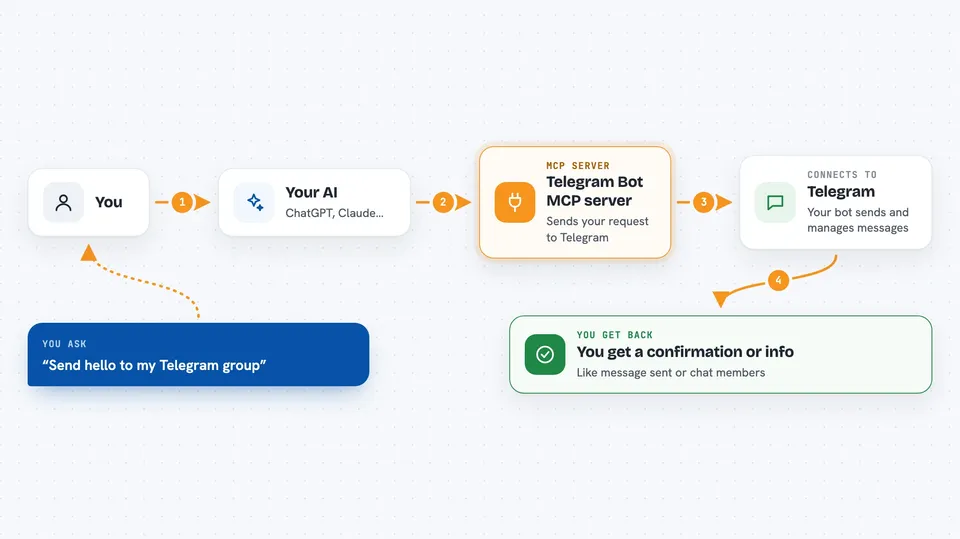
You ask your AI something like send a message to my group or show me the members of this chat. The AI uses this helper, which sends the request to Telegram using your bot. Telegram does the action, for example posting the message or returning the chat details. The helper sends the result back to your AI, and your AI shows it to you in the chat. It covers a lot of Telegram features, from simple messages to stickers, polls, and forum topics.
 Click to zoom
What you can do with it
- Send text, photos, videos, documents, polls and stickers to a chat
- Edit, forward, copy, delete or pin messages
- Look up chat info, members, and invite links
- Manage your bot's commands, profile and description
- Create and edit sticker sets and custom emoji
- Create and manage forum topics
- Post and manage stories
Try asking your AI
- “Send a message saying hello to my Telegram group”
- “Show me the list of members in this chat”
- “Create a new forum topic called Announcements”
- “Delete the last message I sent to my channel”
What it gives back to you
You get answers back in your chat with the AI. For a send action, it tells you the message was sent and may show the message details. For a lookup, it gives you a list or a short summary, like chat info or member names. For changes, it confirms what it did, such as a topic created or a message deleted.
Before you start
What you need
- A Telegram bot token from @BotFather (a kind of password for your bot; BotFather gives it to you for free in the Telegram app)
- Node.js installed on your computer
- The Claude desktop app or Claude Code, if you want to use it there
Good to know
This helper can send, edit and delete things in your Telegram chats, so check what you ask it to do before you confirm.
Install it with your AI
Add Telegram Bot MCP server to your AI, no technical skills needed
You don't install anything by hand. You copy one prompt, paste it into an AI that can work on your computer, and it checks, installs and connects the server for you, asking you when it needs something.
Sign in to get the install prompt
Members get a ready-made prompt that lets the Claude desktop app check Telegram Bot MCP server, install it and connect it for them, step by step. You don't need any technical skills: you copy, paste and answer a few questions. Your connected AI can also find and install any of the 4,361 MCP servers here for you.
Who it's for
People who run Telegram groups, channels or small bots and want to handle everyday tasks by just asking their AI.


