
MCP server · Social media
Instapdown MCP server
by farukkolip
Let your AI download Instagram Reels, Stories and photos, and get hashtag, hook and posting-time help.
This is a small helper that connects your AI chat to Instapdown, a service that works with public Instagram content. Once it is set up, you can ask your AI to grab a Reel, look at how a public account is doing, or suggest hashtags and posting times, all in plain chat. It is handy for creators, social media managers and anyone who plans Instagram posts.
What is an MCP server? The 30-second version
On its own, your AI can only chat with you. An MCP server is a small helper program that gives your AI a new skill or a connection to an app or service. This one connects your AI to Instapdown, so it can look things up and fetch files from public Instagram content for you. You just ask in normal words, and the AI uses this helper behind the scenes.
What this MCP server does
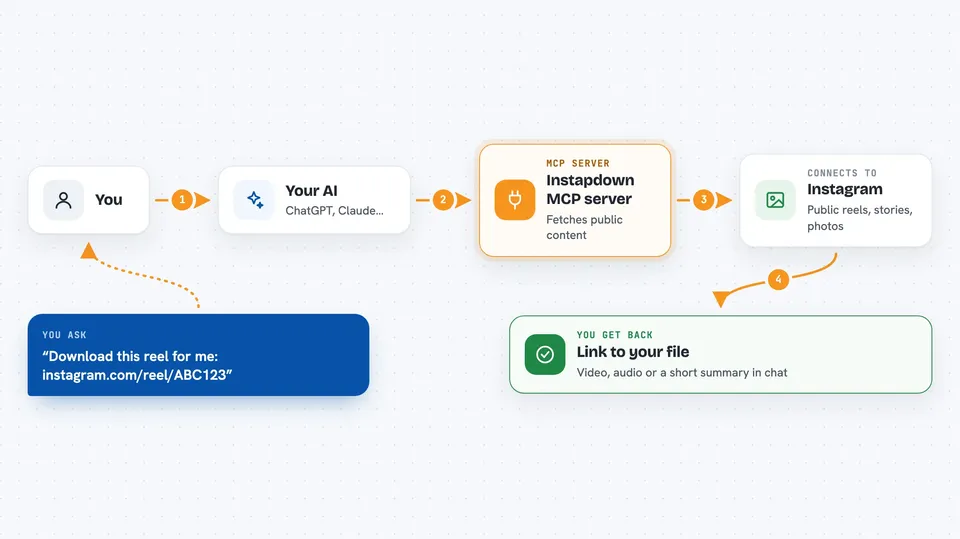
You type a request in your AI chat, like a Reel link or a public username. The AI passes that request to this helper, which talks to the Instapdown service. Instapdown fetches the public content or data and sends it back. The helper hands the result to your AI, and your AI shows it to you in the chat, as a link, a list, or a short summary.
 Click to zoom
What you can do with it
- Download a public Reel as an HD MP4 without a watermark
- Save the audio track from a Reel as an m4a file
- Grab every active Story from a public account
- Get a full-resolution profile picture
- Check how a public account's last 12 posts are performing
- Find real Instagram post counts for hashtags on a topic
- Get suggested Reels hooks and the best times to post for a country
Try asking your AI
- “Download this reel for me: https://www.instagram.com/reel/ABC123/”
- “Can you check the engagement health of the public account natgeo?”
- “Give me 10 Reels hook ideas for a fitness niche in the US”
- “What are the best times to post on Instagram in Germany?”
What it gives back to you
You get back things like a direct link to the video or audio file, a list of Story links, or a short summary with numbers. For analytics, it shows engagement rates and how they compare to a benchmark. For hashtags, hooks and posting times, it returns lists and small tables you can read right in the chat.
Before you start
What you need
- The Claude desktop app or another MCP-compatible chat app
- Node.js installed on your computer (the free program that runs this helper)
Good to know
It only works with public Instagram accounts and public content, and it cannot see or download anything from private accounts.
Install it with your AI
Add Instapdown MCP server to your AI, no technical skills needed
You don't install anything by hand. You copy one prompt, paste it into an AI that can work on your computer, and it checks, installs and connects the server for you, asking you when it needs something.
Sign in to get the install prompt
Members get a ready-made prompt that lets the Claude desktop app check Instapdown MCP server, install it and connect it for them, step by step. You don't need any technical skills: you copy, paste and answer a few questions. Your connected AI can also find and install any of the 4,361 MCP servers here for you.
Who it's for
Instagram creators, social media managers and small business owners who plan posts and want quick help from their AI chat.


