
MCP server · Social media
XTapDown MCP server
by farukkolip
Give your AI a set of X (Twitter) creator helpers: download tweet media, find hashtags, posting times, hooks and engagement math.
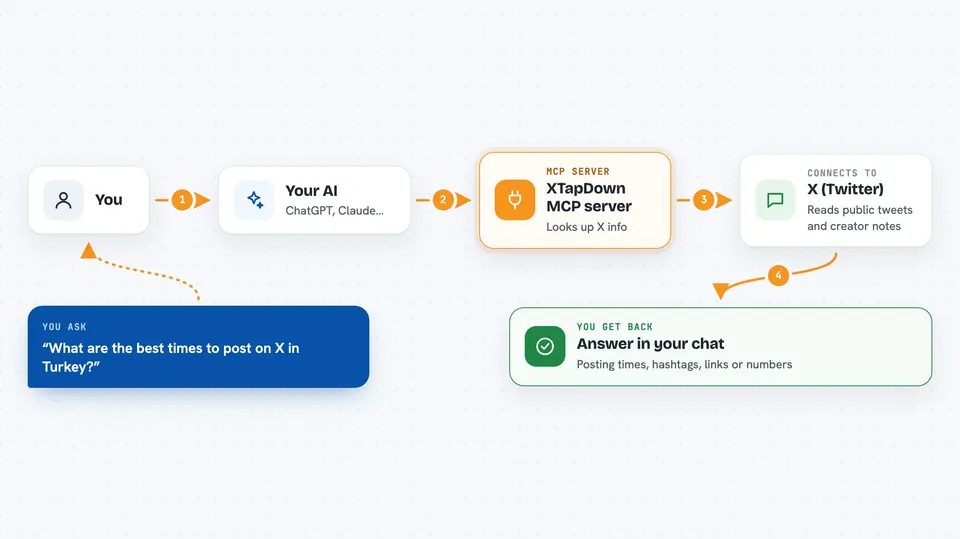
This is a small helper that connects your AI assistant to the XTapDown toolkit for X (Twitter) creators. Once it is set up, you can ask your AI things like when to post, what hashtags to use, or to grab the video from a tweet. It is handy for anyone who writes, plans or checks X posts as part of their work.
What is an MCP server? The 30-second version
On its own, your AI can only chat with you. An MCP server is a small helper program that gives your AI a new skill or a connection to an app or service. This one connects your AI to XTapDown, a toolkit for X (Twitter) creators. So when you ask about a tweet or a posting time, your AI can actually look it up instead of guessing.
What this MCP server does
You ask your AI a question about X, like the best time to post or what hashtags fit your topic. Your AI passes that request to this helper. The helper then either reads public tweet data from X's own embed-style feed or looks up XTapDown's curated notes on hashtags, posting times, hooks and benchmarks. It sends the answer back to your AI, which explains it to you in the chat. Nothing is posted or changed on your account; it only reads and calculates.
 Click to zoom
What you can do with it
- Download the video, GIF or image from a tweet as a direct link
- Get curated hashtags for a niche like tech, finance or fitness
- Find the best posting times on X for a chosen country
- Generate tweet hook ideas from proven formulas
- Calculate your engagement rate from likes, reposts and replies
- Estimate whether you qualify for X ads revenue share
- Split a long piece of text into a numbered thread
Try asking your AI
- “Download this tweet for me: https://x.com/someone/status/123456789”
- “What are the best times to post on X if my audience is in Turkey?”
- “My account has 50,000 followers and got 1,200 likes, 80 reposts and 150 replies. What is my engagement rate?”
- “Split this text into a thread: [paste your long text here]”
What it gives back to you
You get answers right in the chat: a direct link to the video or image, a list of hashtags with tips, a table of posting windows by day, or a number like your engagement rate with a tier label. For threads, it gives you the numbered tweets ready to copy. For revenue questions, it tells you if you qualify and roughly what you might earn.
Before you start
What you need
- An AI app that supports MCP servers, like Claude Desktop, Cursor, Cline or Continue
- Node.js installed on your computer (the free program that runs the helper)
Good to know
It only reads public data and never posts or changes anything, but a read tool pointed at someone can still be used to bulk-collect public tweets, so use it respectfully.
Install it with your AI
Add XTapDown MCP server to your AI, no technical skills needed
You don't install anything by hand. You copy one prompt, paste it into an AI that can work on your computer, and it checks, installs and connects the server for you, asking you when it needs something.
Sign in to get the install prompt
Members get a ready-made prompt that lets the Claude desktop app check XTapDown MCP server, install it and connect it for them, step by step. You don't need any technical skills: you copy, paste and answer a few questions. Your connected AI can also find and install any of the 4,609 MCP servers here for you.
Who it's for
X (Twitter) creators, social media managers and anyone who plans or checks posts as part of their job.


