
MCP server · Notes
Cortex memory connector
by FilippoPilo
Your AI can save what you tell it and remember it in later chats, with sources you can check.
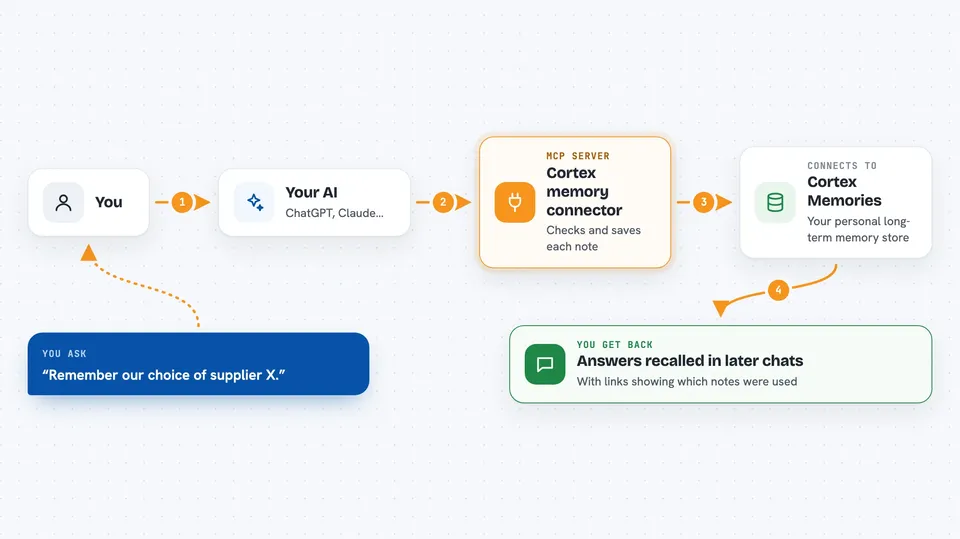
Cortex is an online memory service you connect to your AI assistant. Once it is connected, you can tell your AI to remember things, and it can find them again in a later conversation. It is handy if you keep repeating the same background facts, decisions or sources to your AI every time you start a new chat.
What is an MCP server? The 30-second version
On its own, your AI can only chat with you in the moment. An MCP server is a small helper program that gives your AI a new skill or a connection to another service. This one connects your AI to Cortex, an online memory service. When you ask your AI to remember something or to look something up, the AI uses this helper to talk to Cortex for you.
What this MCP server does
You tell your AI something worth keeping, like a decision or a piece of context. The AI sends it to Cortex through this connector. Cortex checks it first, so near-duplicates and clutter do not pile up, then stores it in your own private memory space. Later, in any new chat, you can ask your AI what it knows about a topic, and it searches your saved memories and answers with the sources behind them.
 Click to zoom
What you can do with it
- Save a decision, fact or source so it is there in future chats
- Search your saved memories by meaning, not just exact words
- Ask for a written summary of everything stored about a topic
- Open one memory to see its full detail and where it came from
- See contradictions between things you saved at different times
- Delete a memory you no longer want kept
Try asking your AI
- “Remember that we chose supplier X for the packaging.”
- “What did we decide about the budget last month?”
- “Give me a short summary of everything you know about the Milan project.”
- “Show me the sources behind that claim.”
What it gives back to you
You get answers in the chat, written in normal sentences. A search gives you a short list of matching memories. A recall request gives you a narrative summary of what is stored about a topic. When you save something, you can check the outcome, including whether it passed the quality check and whether it clashes with something you saved before.
Before you start
What you need
- A Claude plan that supports custom connectors (the Connectors entry shows up in Settings)
- A Google or email sign-in to create your Cortex account on first use
- For the local version only: Node.js installed and an access token from your Cortex sign-in
Good to know
It can delete a memory if you confirm it, and your saved memories live in your Cortex account rather than only on your computer.
Install it with your AI
Add Cortex memory connector to your AI, no technical skills needed
You don't install anything by hand. You copy one prompt, paste it into an AI that can work on your computer, and it checks, installs and connects the server for you, asking you when it needs something.
Sign in to get the install prompt
Members get a ready-made prompt that lets the Claude desktop app check Cortex memory connector, install it and connect it for them, step by step. You don't need any technical skills: you copy, paste and answer a few questions. Your connected AI can also find and install any of the 4,361 MCP servers here for you.
Who it's for
Anyone who keeps re-explaining the same background, decisions or sources to their AI, such as project leads, consultants, researchers and small teams.





