MCP server · Developer tools
Kin MCP server
by firelock-ai
Lets your AI explore your code's connections and see what a change might affect.
Kin is a code repository that keeps track of how the pieces of your code connect to each other. It comes with an MCP server, which is a small helper that lets your AI assistant ask Kin questions about your project. It is handy if you work with code and want your AI to understand it better before you change something.
What is an MCP server? The 30-second version
On its own, your AI can only chat with you. An MCP server is a small helper program that gives your AI a new skill or a connection to an app or service. This one connects your AI to Kin, a repository that records how your code is put together. Once connected, your AI can look things up in Kin and answer questions about your project for you.
What this MCP server does
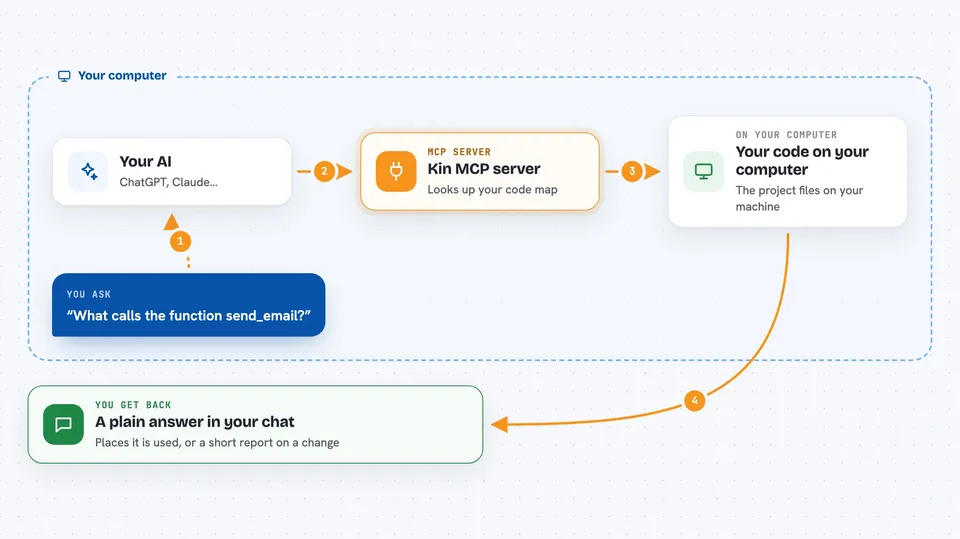
You ask your AI a question about your code, like what calls a certain function. Your AI sends that question to the Kin MCP server. The server looks it up in Kin's graph, which is a map of your code and how the parts relate. Then it sends the answer back, and your AI shows it to you in the chat. You can also ask it to review a change and it will tell you what might be affected.
 Click to zoom
What you can do with it
- Find where a function or type is used in your code
- See what might be affected if you change a function
- Trace the connections around a piece of code
- Get a report on a code change before you merge it
- Look up a symbol by name in your repository
- Ask questions about your code's structure and history
Try asking your AI
- “What calls the function send_email?”
- “Show me what might break if I change the User class.”
- “Review the changes on this branch compared to main.”
- “Where is the function parse_config defined and used?”
What it gives back to you
You get answers in the chat, like a list of places a function is used or a short report on a change. The report might say PASS, NEEDS ATTENTION, or WOULD BLOCK, with reasons. It can also show you related code and context. Everything comes back as text you can read and check.
Before you start
What you need
- A project you have cloned with Git
- Node.js 20 or newer (for the easiest install)
- Permission to run commands in your terminal
Good to know
Kin's coverage is incomplete, so an empty result does not prove there are no callers or dependencies. Always check with your compiler, tests, and review. Also, back up Kin-only state with kin backup create before deleting .kin, because it is not stored in Git.
Install it with your AI
Add Kin MCP server to your AI, no technical skills needed
You don't install anything by hand. You copy one prompt, paste it into an AI that can work on your computer, and it checks, installs and connects the server for you, asking you when it needs something.
Sign in to get the install prompt
Members get a ready-made prompt that lets the Claude desktop app check Kin MCP server, install it and connect it for them, step by step. You don't need any technical skills: you copy, paste and answer a few questions. Your connected AI can also find and install any of the 4,609 MCP servers here for you.
Who it's for
Developers and anyone who works with code and wants their AI assistant to understand how the code fits together.