
MCP server · Finance and crypto
Frihet MCP server
by Frihet-io
Lets your AI create invoices, log expenses, and manage clients and quotes in your Frihet business account.
This is a helper that connects your AI assistant to Frihet, an online tool for running a small business: invoices, expenses, clients, quotes and more. Once it is connected, you can just type what you want in plain words, like "create an invoice for Acme for 10 hours of consulting", and the AI does it in your Frihet account. It is handy for freelancers, small business owners and admin staff who spend too much time clicking around forms.
What is an MCP server? The 30-second version
On its own, your AI can only chat with you. It cannot see your invoices or change anything in your business software. An MCP server is a small helper program that gives your AI a new skill or a connection to an app. This one connects your AI to Frihet, so when you ask about your invoices or clients, the AI can actually look them up and make changes for you.
What this MCP server does
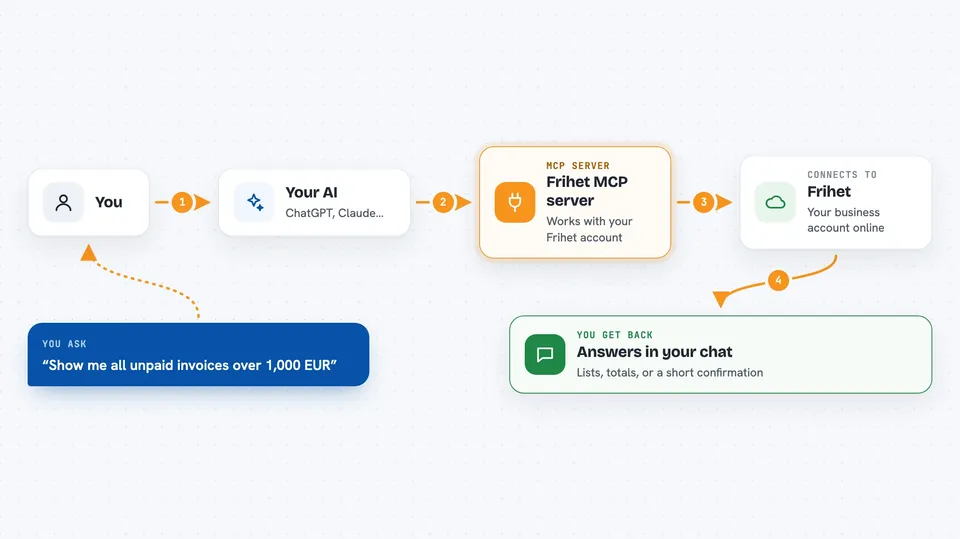
You ask your AI something in normal words, like showing unpaid invoices or adding a new client. The AI passes that request to this helper. The helper talks to Frihet over the internet using your Frihet account key. Frihet does the work, and the answer comes back into your chat as a list, a summary or a confirmation that something was created or updated.
 Click to zoom
What you can do with it
- Create invoices with line items and due dates
- List and search invoices by client, date or status
- Mark an invoice as paid
- Record expenses and sort them by category
- Add and update clients, contacts and notes
- Create quotes for a client
- Log calls, emails and meetings against a client
Try asking your AI
- “Show me all unpaid invoices over 1,000 EUR”
- “Create an invoice for TechStart SL with 40 hours of consulting at 75 EUR per hour, due March 1st”
- “Log a 59.99 EUR expense for Adobe Creative Cloud, category software”
- “Add a new client: TechStart SL, NIF B12345678, email admin@techstart.es”
What it gives back to you
You get answers right in the chat: lists of invoices or expenses, totals, client details, or a short confirmation that a record was created or updated. For example, it might reply that invoice INV-2026-089 was created with a total of 3,630.00 EUR including tax. It can also hand back invoice PDF files or e-invoice XML when you ask for them.
Before you start
What you need
- A Frihet account (app.frihet.io)
- An API key from Frihet (Settings, then API keys; it starts with fri_ and is shown only once)
- Node.js installed if you run it on your own computer, or use the hosted web address instead
Good to know
It can change or delete real business records, and some actions like sending an invoice by email or filing with a tax authority reach other people or official systems, so check before you confirm those.
Install it with your AI
Add Frihet MCP server to your AI, no technical skills needed
You don't install anything by hand. You copy one prompt, paste it into an AI that can work on your computer, and it checks, installs and connects the server for you, asking you when it needs something.
Sign in to get the install prompt
Members get a ready-made prompt that lets the Claude desktop app check Frihet MCP server, install it and connect it for them, step by step. You don't need any technical skills: you copy, paste and answer a few questions. Your connected AI can also find and install any of the 4,361 MCP servers here for you.
Who it's for
Freelancers, small business owners and admin or finance staff who use Frihet and want to handle invoices, expenses and clients by chatting instead of clicking.




