
MCP server · Finance and crypto
M-Pesa MCP server
by gabrielmahia
Let your AI send M-Pesa payment requests, check transactions, send SMS and airtime in Africa.
This is a small helper that connects your AI assistant to M-Pesa, the mobile money service used across Kenya, and to Africa's Talking, which sends SMS and airtime across many African countries. Once it is set up, you can ask your AI in normal words to send a payment request, check whether a payment went through, or text a group of people. It is handy for anyone who handles payments or messages for customers, staff or field agents in East Africa.
What is an MCP server? The 30-second version
On its own, your AI can only chat with you. It cannot reach out to a payment service or send a text. An MCP server is a small helper program that gives your AI a new skill, and here that skill is talking to M-Pesa and Africa's Talking. So when you ask your AI to send a payment request, it passes that request to this helper, which talks to the real service and brings the answer back to your chat.
What this MCP server does
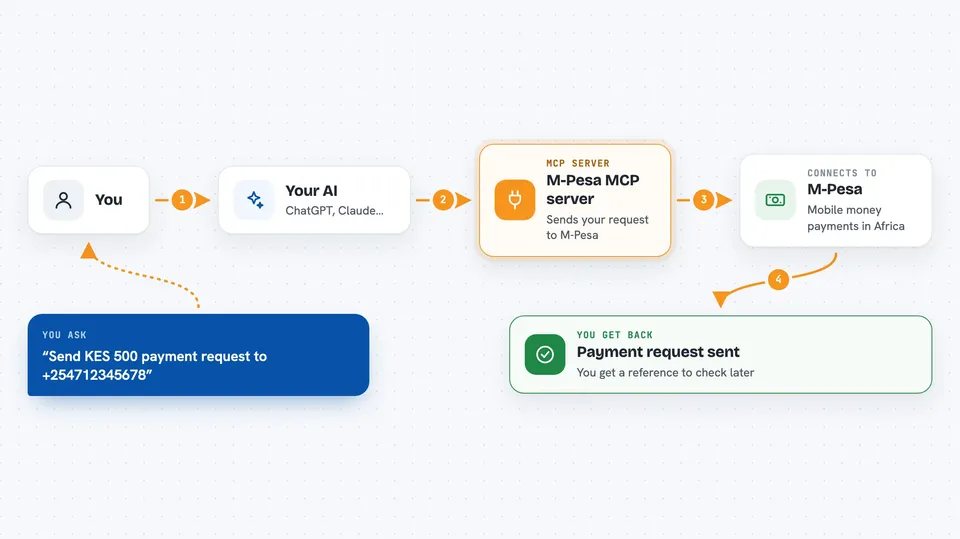
You type a request in plain words, like sending a payment prompt to a phone number. Your AI passes it to this helper program. The helper checks the details, then talks to the M-Pesa system (Safaricom Daraja) or to Africa's Talking. The service does the work, for example showing a payment prompt on a customer's phone or sending an SMS. The result comes back to your chat as a short answer or a status update.
 Click to zoom
What you can do with it
- Send an M-Pesa payment prompt (STK Push) to a customer's phone
- Check whether a payment prompt was accepted or is still pending
- Look up any M-Pesa transaction by its receipt number
- Send SMS to one person or up to a thousand recipients
- Send airtime top-ups to subscribers in several African countries
- Confirm the amount and status of a past payment for support work
Try asking your AI
- “Send KES 500 STK Push to +254712345678 for order 1234”
- “Check if the payment QKL8ABC123 has been received”
- “Send an SMS to these 50 farmers with today's maize price”
- “Top up KES 50 airtime for our field agents”
What it gives back to you
You get back short, clear answers in the chat. For a payment prompt, it tells you whether the request was sent and gives you a reference to check later. For a status check, it tells you if the payment succeeded, failed or is still waiting, and usually the amount. For SMS or airtime, it reports how many messages or top-ups were sent.
Before you start
What you need
- M-Pesa Daraja credentials from Safaricom (a consumer key, a consumer secret, a shortcode and a passkey; the developer site gives you free test ones)
- An Africa's Talking account with a username and API key (there is a free sandbox for testing)
- A callback web address where M-Pesa can send payment results
- Python installed on your computer, or the uvx tool
Good to know
This helper can move real money and send real messages, so check the phone numbers and amounts carefully before you approve anything, and keep your keys private.
Install it with your AI
Add M-Pesa MCP server to your AI, no technical skills needed
You don't install anything by hand. You copy one prompt, paste it into an AI that can work on your computer, and it checks, installs and connects the server for you, asking you when it needs something.
Sign in to get the install prompt
Members get a ready-made prompt that lets the Claude desktop app check M-Pesa MCP server, install it and connect it for them, step by step. You don't need any technical skills: you copy, paste and answer a few questions. Your connected AI can also find and install any of the 4,361 MCP servers here for you.
Who it's for
Business owners, finance and support staff, and field operations teams who handle M-Pesa payments, SMS or airtime in East Africa.




