MCP server · Customer communication
Gambot WhatsApp MCP server
by gambot-ai
Lets your AI send WhatsApp messages and manage your contacts, leads, invoices and campaigns for you.
This is a helper that connects your AI assistant to Gambot, a service for running WhatsApp business messaging. Once it is set up, you can ask your AI in plain words to send a WhatsApp message, look up a customer, or check how a campaign did. It is handy if you run a small business and use WhatsApp to talk to customers.
What is an MCP server? The 30-second version
On its own, your AI can only chat with you. An MCP server is a small helper program that gives your AI a new skill or a connection to an app or service. This one connects your AI to your Gambot WhatsApp Business account, so it can look things up and do things there when you ask. You stay in the chat, and the helper quietly does the work behind the scenes.
What this MCP server does
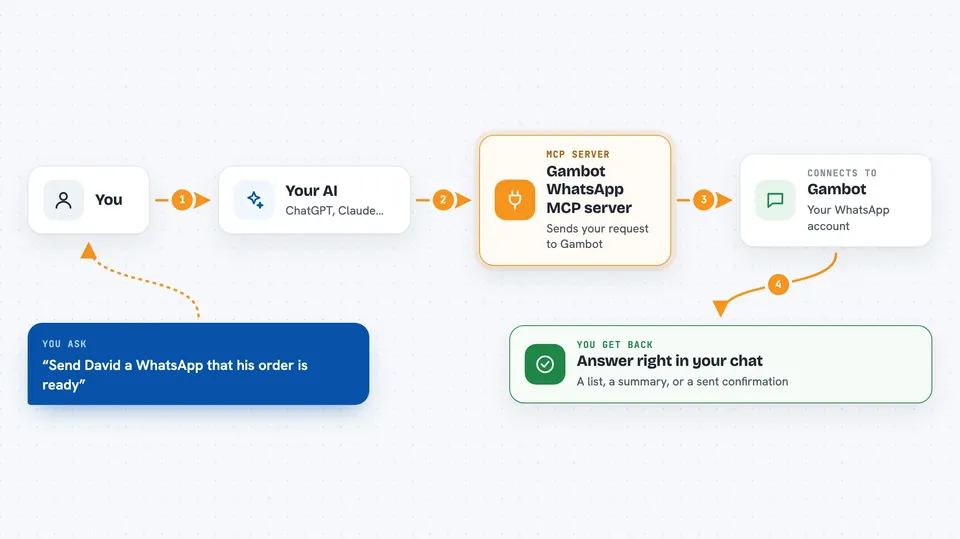
You type a request in your AI chat, like asking it to message a customer or pull up your open leads. The AI passes that request to this helper program. The helper then talks to your Gambot account over the internet, using your Gambot token to prove it is really you. Gambot does the work, and the answer comes back into your chat as a list, a summary, or a confirmation that something was sent or changed.
 Click to zoom
What you can do with it
- Send a WhatsApp text message or a pre-approved template to a customer
- Look up and update contacts, leads, cases and tasks
- Create and send quotes, invoices and orders
- Check how many messages, leads and tickets you have with a quick summary
- List your message templates and see their approval status
- Run or schedule a WhatsApp campaign to a group of contacts
- Check whether the 24 hour reply window is open before you send free text
Try asking your AI
- “Send a WhatsApp message to David saying his order is ready for pickup”
- “Show me all my open leads from this week”
- “How many messages did we send yesterday and how many new contacts came in”
- “Create an invoice for customer number 4471 for 350 shekels”
What it gives back to you
You get answers right in the chat. Sometimes that is a list, like your contacts or open tasks, and sometimes a short summary with numbers, like how many messages went out today. When you ask it to send or change something, it tells you what it did, for example that a message was sent or an invoice was created. If something cannot be done, like sending free text when the reply window is closed, it tells you that too.
Before you start
What you need
- A Gambot account (you can also start without one and let the AI help you create it)
- Your Gambot token, a long code that starts with gmbt_, found in your Gambot admin panel under Settings then General
- Node.js 18 or newer on your computer if you install it locally
Good to know
This helper can send real WhatsApp messages to real customers and create or change records like invoices and contacts, so check what the AI is about to do before you say yes.
Install it with your AI
Add Gambot WhatsApp MCP server to your AI, no technical skills needed
You don't install anything by hand. You copy one prompt, paste it into an AI that can work on your computer, and it checks, installs and connects the server for you, asking you when it needs something.
Sign in to get the install prompt
Members get a ready-made prompt that lets the Claude desktop app check Gambot WhatsApp MCP server, install it and connect it for them, step by step. You don't need any technical skills: you copy, paste and answer a few questions. Your connected AI can also find and install any of the 4,361 MCP servers here for you.
Who it's for
Small business owners and support or sales teams who use WhatsApp to talk to customers and want their AI to handle the busywork.