MCP server · Customer communication · official
Infobip MCP server
by infobip · official
Lets your AI send SMS, WhatsApp, Viber and email messages and check delivery through your Infobip account.
Infobip is a service companies use to send messages to customers, like text messages, WhatsApp notes and emails. This MCP server connects your AI assistant to your Infobip account so it can send those messages and look things up for you. It is handy if you handle customer communication and want to skip clicking around a dashboard.
What is an MCP server? The 30-second version
On its own, your AI can only chat with you. An MCP server is a small helper that gives your AI a new skill or a connection to another service. This one connects your AI to Infobip, so when you ask it to send a text or check a delivery, it can actually do that in your account. You stay in the chat, and the helper does the work behind the scenes.
What this MCP server does
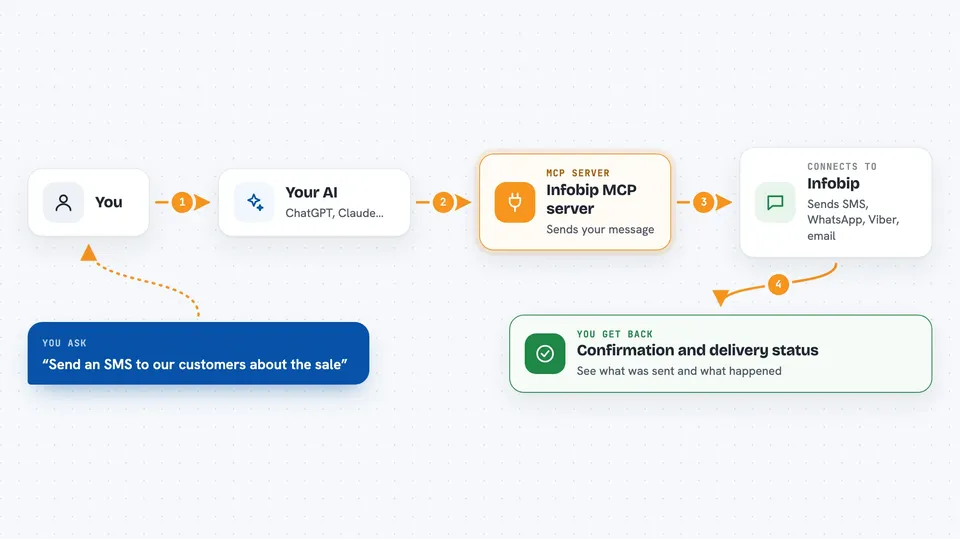
You ask your AI something in plain words, like sending a message to a group of customers. The AI passes that request to this Infobip helper. The helper talks to Infobip, which sends the message over the channel you picked, such as SMS, WhatsApp or email. Then it brings the result back to your chat, so you can see what was sent and what happened to it.
 Click to zoom
What you can do with it
- Send an SMS, WhatsApp, Viber or email message to one person or a list
- Schedule a message for later and change the time if plans shift
- Check delivery reports to see if messages arrived
- Look up message logs and error codes when something fails
- Set up and run two-factor login codes for your customers
- Store and update customer details in your Infobip contact lists
- Search Infobip documentation without leaving the chat
Try asking your AI
- “Send an SMS to +1 555 0100 saying our store opens at 9am tomorrow”
- “How many of yesterday's WhatsApp messages were delivered?”
- “Schedule a Viber message for all customers in my newsletter list for Monday at 10am”
- “Show me the error codes from the messages that failed last week”
What it gives back to you
You get answers in the chat, like a short confirmation that a message was sent, or a list of delivery numbers and statuses. If you ask about logs or errors, it shows those as a readable list. When you ask it to change something, like updating a customer profile, it tells you what it changed.
Before you start
What you need
- An Infobip account (a free trial is available)
- An AI app that supports MCP connections, like Claude Desktop
- Either your Infobip API key or permission to sign in through Infobip when asked
Good to know
It can send real messages to real people and may cost money on your Infobip account, so check what you ask it to send before you confirm.
Install it with your AI
Add Infobip MCP server to your AI, no technical skills needed
You don't install anything by hand. You copy one prompt, paste it into an AI that can work on your computer, and it checks, installs and connects the server for you, asking you when it needs something.
Sign in to get the install prompt
Members get a ready-made prompt that lets the Claude desktop app check Infobip MCP server, install it and connect it for them, step by step. You don't need any technical skills: you copy, paste and answer a few questions. Your connected AI can also find and install any of the 4,361 MCP servers here for you.
Who it's for
People who handle customer messaging, support teams, and marketers who already use Infobip and want their AI to help send and check messages.