MCP server · Customer communication · official
iletiMerkezi MCP server
by iletimerkezi · official
Let your AI send SMS, check delivery reports, and manage senders and blacklists through iletiMerkezi.
This is a helper that connects your AI assistant to iletiMerkezi, a Turkish service for sending text messages in bulk. Once it is set up, you can just ask your AI to send an SMS or check whether a message arrived, and it will do it for you. It is handy if you work with customer messages, reminders, or one-time codes.
What is an MCP server? The 30-second version
On its own, your AI can only chat with you. An MCP server is a small helper program that gives your AI a new skill or a connection to an app or service. This one connects your AI to iletiMerkezi, so the AI can send messages and look things up there when you ask. You do not need to understand how it works inside; you just add it once and then talk to your AI normally.
What this MCP server does
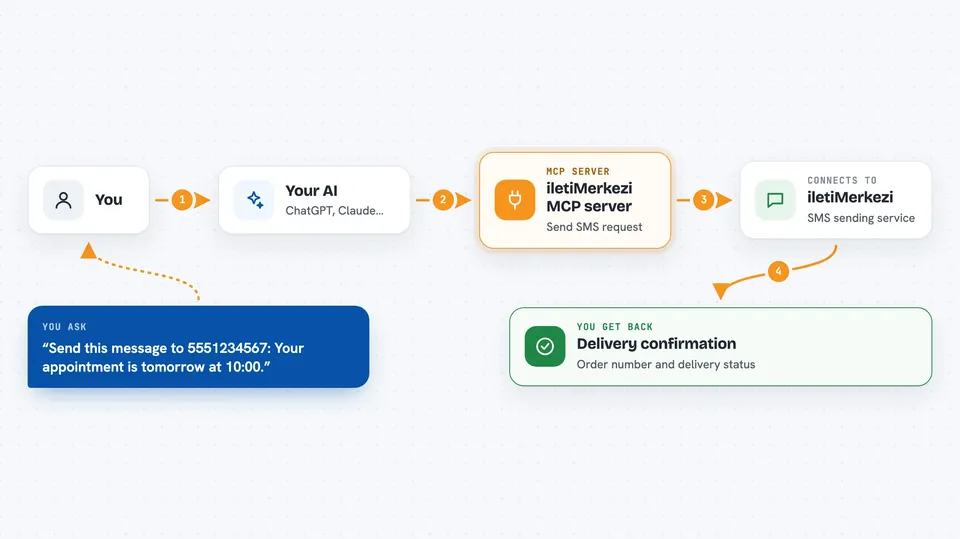
You ask your AI something like send this message to these numbers, or check if yesterday's messages were delivered. The AI passes your request to this helper program. The helper talks to the iletiMerkezi service using your account details. iletiMerkezi sends the message or looks up the information, and the answer comes back to your AI. Your AI then shows you the result in the chat, in plain words.
 Click to zoom
What you can do with it
- Send an SMS to one number or a whole list
- Check the delivery report for a message you sent
- See a summary of your recent sending orders
- Look up your account balance in credits and Turkish lira
- List the approved sender names on your account
- Block or unblock a phone number on your blacklist
- Register and check İYS consent records for recipients
Try asking your AI
- “Send this message to 5551234567: Your appointment is tomorrow at 10:00.”
- “Did the messages I sent yesterday get delivered?”
- “What is my current SMS balance?”
- “Show me the sender names I am allowed to use.”
What it gives back to you
You get answers in the chat, written out in normal sentences. For a send, your AI tells you whether it was accepted and gives you an order number. For a report, you get a short summary plus a list of who received the message and who did not. For balance or sender lists, you get the numbers or names straight away.
Before you start
What you need
- An iletiMerkezi account with SMS credits
- Your API key and API hash from the iletiMerkezi panel (Settings, then Security, then API Access)
- API access switched on in your panel (Settings, then Security, then Access Permissions)
- A desktop AI app that supports MCP, such as Claude Desktop, Cursor, or Claude Code
Good to know
Sending SMS uses your paid credits, so check the message and the numbers before you let your AI send.
Install it with your AI
Add iletiMerkezi MCP server to your AI, no technical skills needed
You don't install anything by hand. You copy one prompt, paste it into an AI that can work on your computer, and it checks, installs and connects the server for you, asking you when it needs something.
Sign in to get the install prompt
Members get a ready-made prompt that lets the Claude desktop app check iletiMerkezi MCP server, install it and connect it for them, step by step. You don't need any technical skills: you copy, paste and answer a few questions. Your connected AI can also find and install any of the 4,361 MCP servers here for you.
Who it's for
People who send customer texts, reminders, or verification codes, like marketing staff, support teams, and small business owners in Turkey.