MCP server · Customer communication · official
FastAlert MCP server
by FastAlertNow · official
Lets your AI list your FastAlert channels and send alert notifications to them for you.
This is the official helper from FastAlert that connects your AI assistant to your FastAlert account. FastAlert is a service for sending alert notifications to groups of people, called channels. If you already use FastAlert to keep people informed, this lets your AI do the listing and sending for you.
What is an MCP server? The 30-second version
On its own, your AI can only chat with you. It cannot see your FastAlert account or send anything there. An MCP server is a small helper program that gives your AI one new skill, and here that skill is talking to FastAlert. Once it is connected, you can just ask your AI in plain words, and it will look up your channels or send a notification through FastAlert for you.
What this MCP server does
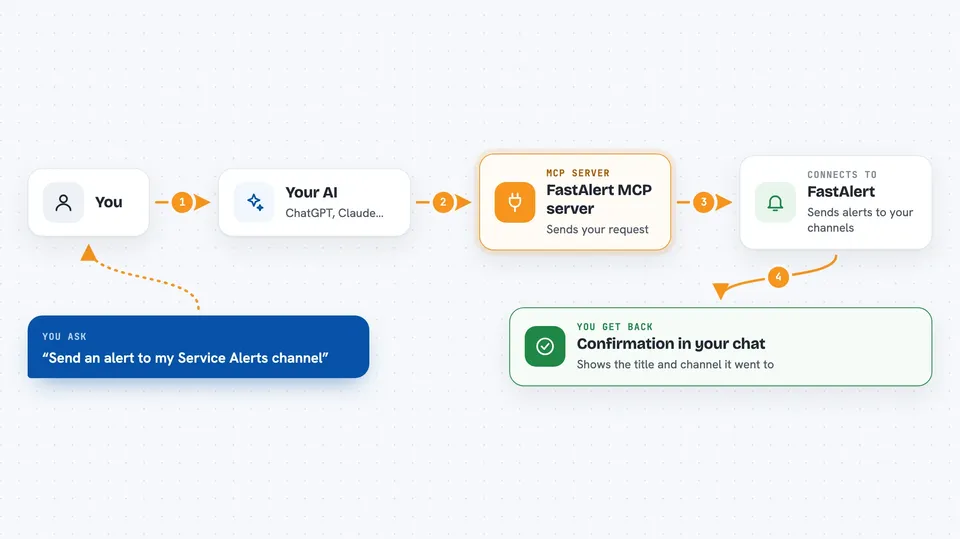
You ask your AI something like which channels you have, or to send an alert. The AI passes that request to this helper program. The helper then talks to the FastAlert service using your API key. FastAlert does the work, either handing back your channel list or sending the notification out. The AI then tells you what happened, right in the chat.
 Click to zoom
What you can do with it
- List all your FastAlert channels
- Search your channels by name
- See how many subscribers each channel has
- Send a notification with a title and message to a channel
- Add a button-style action like a website link, email, or phone call to a notification
- Include an image in a notification
Try asking your AI
- “List all my FastAlert channels.”
- “Which FastAlert channels have 'Service Alerts' in the name?”
- “Send a notification to my Service Alerts channel titled System Update with the message A new version is now live.”
- “Send an alert to my Service Alerts channel about the outage, and add a link to our status page.”
What it gives back to you
When you ask for your channels, you get a list with each channel's name, its ID, and how many subscribers it has. When you send a notification, you get a short confirmation that says it was sent, along with the title and the channel it went to. Everything shows up as normal text in your chat, so you can read it at a glance.
Before you start
What you need
- A FastAlert account
- Your FastAlert API key (a kind of password for apps; you can find it in your FastAlert Settings page)
- The Claude desktop app, Cursor, or ChatGPT, depending on where you want to use it
- Node.js version 18 or newer if you run it on your own computer
Good to know
This can send real notifications to real people, so check the channel and the wording before you let your AI send anything.
Install it with your AI
Add FastAlert MCP server to your AI, no technical skills needed
You don't install anything by hand. You copy one prompt, paste it into an AI that can work on your computer, and it checks, installs and connects the server for you, asking you when it needs something.
Sign in to get the install prompt
Members get a ready-made prompt that lets the Claude desktop app check FastAlert MCP server, install it and connect it for them, step by step. You don't need any technical skills: you copy, paste and answer a few questions. Your connected AI can also find and install any of the 4,361 MCP servers here for you.
Who it's for
People who use FastAlert to send alerts to groups, like support teams, on-call staff, or community managers, and want to do it by just asking their AI.