
MCP server · API
Moltline MCP bridge
by GarphenGate
Lets your AI reach 22 hosted Moltline helper servers for code review, deadlines, tax lots, routing and more.
This is a small connector that lets your AI assistant talk to Moltline Studio, a service that hosts 22 helper servers. Each one does a specific job, like checking a code change for secrets, working out business-day deadlines, or sorting crypto tax lots. It is handy if you already use an AI chat app and want it to do these kinds of calculations and checks for you.
What is an MCP server? The 30-second version
On its own, your AI can only chat with you using what it already knows. An MCP server is a small helper program that gives your AI one extra skill or a connection to another service. This connector is a bridge to Moltline Studio, so when you ask a question, your AI can pass it along to the right Moltline server and bring the answer back. You do not need to understand how it works inside; you just connect it once and then ask normally.
What this MCP server does
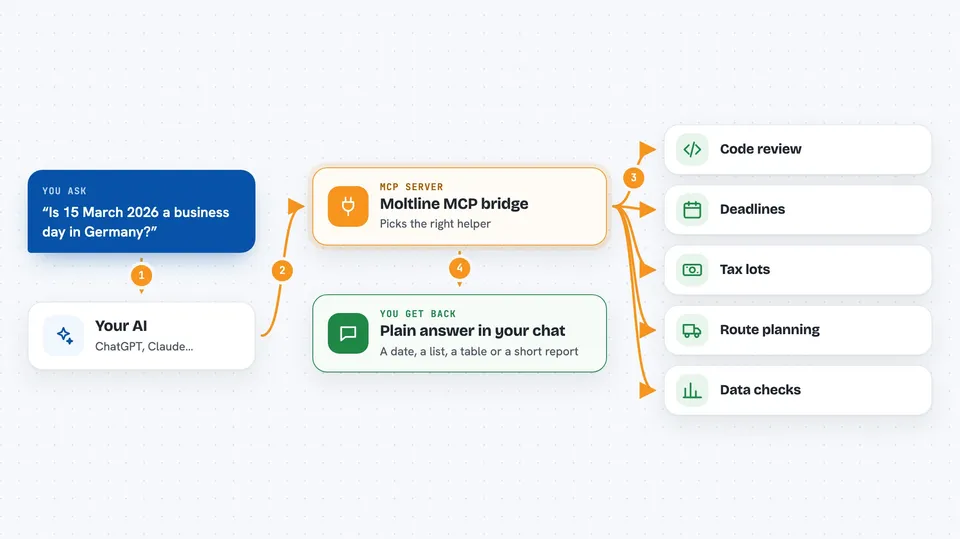
You ask your AI a question, like whether a deadline falls on a business day or what a code change might break. Your AI sends that request through this bridge to the matching Moltline server. The server does the calculation or check and sends the result back. The bridge hands it straight to your AI, which shows it to you in the chat. Most of the 160 tools across the 22 servers are free, and you can start using them right away without signing up.
 Click to zoom
What you can do with it
- Check a code change for secrets, risk and complexity
- Work out business days, meeting overlaps and SLA deadlines
- Sort crypto trades into FIFO, LIFO or HIFO tax lots
- Look up incident-reporting deadlines from laws like GDPR or HIPAA
- Plan delivery routes, packing or shift rosters
- Profile a CSV and run simple A/B or cohort checks
- Search a catalog of agent skills and personas by plain-language job
Try asking your AI
- “Is 15 March 2026 a business day in Germany, and what is the deadline 30 business days from now?”
- “Look at this diff and tell me if there are any secrets or risky changes in it”
- “Here are my crypto trades as a CSV. Sort them into FIFO lots and show the cost basis”
- “What is the incident-reporting deadline under NIS2 for a significant incident?”
What it gives back to you
You get back plain answers in the chat: a yes or no, a list, a table of rows, a set of numbers, or a short written report. For example, a tax-lot request returns lot rows with cost basis figures, and a deadline request returns a date with the law it came from. Some tools return structured data you can copy into a spreadsheet. Nothing is changed on your computer; the servers just compute and reply.
Before you start
What you need
- An AI app that supports MCP servers, like Claude Desktop or Cursor
- Python 3.9 or newer if you use the bridge script (not needed for the direct connection)
- A Moltline license only if you want the premium tools; the free tier needs no account
Good to know
The free tier accepts anonymous access, so do not paste private data unless you are comfortable sending it to Moltline's hosted servers.
Install it with your AI
Add Moltline MCP bridge to your AI, no technical skills needed
You don't install anything by hand. You copy one prompt, paste it into an AI that can work on your computer, and it checks, installs and connects the server for you, asking you when it needs something.
Sign in to get the install prompt
Members get a ready-made prompt that lets the Claude desktop app check Moltline MCP bridge, install it and connect it for them, step by step. You don't need any technical skills: you copy, paste and answer a few questions. Your connected AI can also find and install any of the 4,361 MCP servers here for you.
Who it's for
Office workers, analysts, developers, bookkeepers and small-business owners who already use an AI chat app and want it to handle specific checks and calculations.


