MCP server · Security
cloud-audit MCP server
Let your AI check your AWS account for security holes and explain what an attacker could reach.
cloud-audit is a free security scanner for Amazon Web Services, usually called AWS. It looks through your cloud account and points out weak spots, like a role that could be abused to get admin access. It is handy if you manage AWS and want a plain-language security check without hiring a specialist.
What is an MCP server? The 30-second version
On its own, your AI can only chat. An MCP server is a small helper program that gives your AI a new skill or a connection to an app or service. This one connects your AI to cloud-audit, which reads your AWS account and produces security reports. Once connected, you can ask your AI about your cloud security and it will fetch the answers from this helper for you.
What this MCP server does
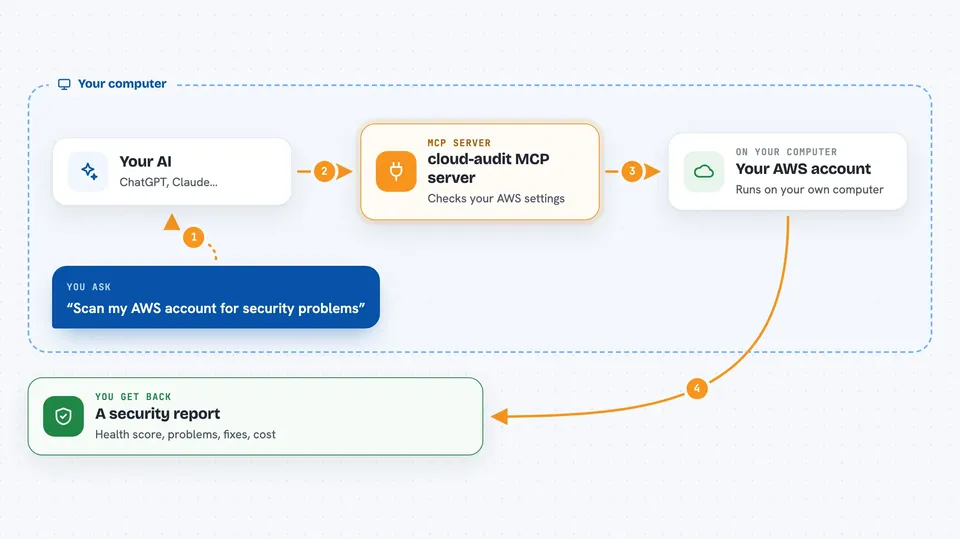
You ask your AI a question about your AWS security. The AI passes the request to this helper program, which runs the cloud-audit scanner against your account. The scanner reads your settings, finds weak spots and attack paths, and works out how much a breach could cost. The helper sends the results back, and your AI explains them to you in the chat.
 Click to zoom
What you can do with it
- Scan your AWS account for security problems
- Show how an attacker could chain small weaknesses into full admin access
- Estimate the money a breach could cost
- See what a hijacked AI agent could reach inside your account
- Get ready-made fix commands for the command line and Terraform
- Test a fix on paper before you change anything
Try asking your AI
- “Run a security scan on my AWS account and tell me the worst problems”
- “What could an attacker reach if my support bot agent gets tricked?”
- “How much could a breach cost me based on the current findings?”
- “Show me the fix for the PassRole escalation finding”
What it gives back to you
You get back a security report with a health score, a list of failed checks, and any attack chains it found. Each problem comes with a plain description, a suggested fix, and an estimated cost range. Your AI can then summarise it or walk you through the fixes one by one.
Before you start
What you need
- An AWS account you want to check
- AWS access keys or a configured AWS profile on your computer
- The SecurityAudit permission policy attached to that AWS user (it only allows reading, not changing)
Good to know
The scanner only reads your account, but the fix commands it suggests can change or delete real AWS settings, so review them before running anything.
Install it with your AI
Add cloud-audit MCP server to your AI, no technical skills needed
You don't install anything by hand. You copy one prompt, paste it into an AI that can work on your computer, and it checks, installs and connects the server for you, asking you when it needs something.
Sign in to get the install prompt
Members get a ready-made prompt that lets the Claude desktop app check cloud-audit MCP server, install it and connect it for them, step by step. You don't need any technical skills: you copy, paste and answer a few questions. Your connected AI can also find and install any of the 4,609 MCP servers here for you.
Who it's for
Cloud engineers, DevOps people, and IT staff who look after an AWS account and want a quick security check.