MCP server · Developer tools
mockd MCP server
by getmockd
Lets your AI create fake APIs and test data for you, without any coding.

mockd is a free tool that creates fake versions of online services, called mocks, so you can test software without touching the real thing. It comes with a built-in helper that lets your AI assistant set up and manage those fake services for you. It is handy for anyone who needs a pretend API, sample data, or a safe place to try things out.
What is an MCP server? The 30-second version
On its own, your AI can only chat with you. An MCP server is a small helper program that gives your AI a new skill or a connection to another tool. This one connects your AI to mockd, a program that runs on your own computer and makes fake online services. Once connected, your AI can ask mockd to create, change, or check those fake services for you, just by you describing what you want.
What this MCP server does
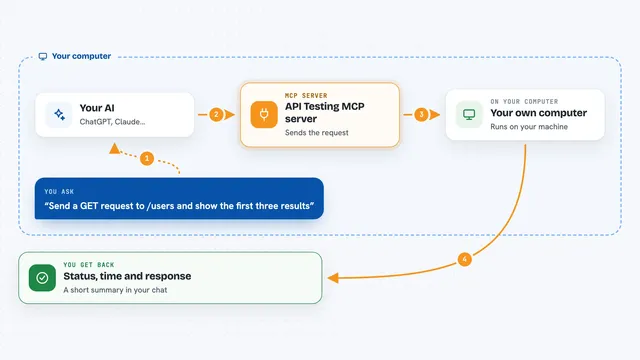
You tell your AI what kind of fake service you need, like a pretend user list or a fake weather API. Your AI passes that request to the mockd helper running on your computer. The helper creates the fake service and starts it up, so it behaves like the real thing. You can then send test requests to it, and your AI can look at the results, change settings, or add pretend problems like slow responses. Everything happens locally, so nothing is sent to an outside company.
 Click to zoom
What you can do with it
- Create a fake web address that returns sample data
- Add pretend users, orders, or other records you can read and change
- Make the fake service slow or unreliable on purpose to test how your app copes
- Import a real service description and turn it into a working fake
- Check what requests were made to your fake service
- Save and switch between different sets of fake services
- Export your fake service setup so you can share or reuse it
Try asking your AI
- “Create a fake user API with a list of users I can add to and read from”
- “Make a pretend weather service that returns a sunny forecast for any city”
- “Add some random failures to my fake payment service so I can see how my app handles errors”
- “Show me all the requests that were sent to my fake service in the last hour”
What it gives back to you
You get back plain answers in the chat, like a list of the fake services you have running, the data inside them, or a note that something was created or changed. If you ask for request logs, you see a simple list of what was called and when. When your AI checks something, it tells you yes or no, or shows you the details it found.
Before you start
What you need
- The mockd program installed on your computer (a single file, no other software needed)
- An AI assistant that can connect to MCP helpers, like Claude Desktop, Cursor, or Windsurf
Good to know
This tool creates and changes fake services on your computer, so be careful not to point it at anything real or important.
Install it with your AI
Add mockd MCP server to your AI, no technical skills needed
You don't install anything by hand. You copy one prompt, paste it into an AI that can work on your computer, and it checks, installs and connects the server for you, asking you when it needs something.
Sign in to get the install prompt
Members get a ready-made prompt that lets the Claude desktop app check mockd MCP server, install it and connect it for them, step by step. You don't need any technical skills: you copy, paste and answer a few questions. Your connected AI can also find and install any of the 4,361 MCP servers here for you.
Who it's for
Anyone who needs to test software without a real backend, like developers, testers, and product people who want to try ideas safely.