MCP server · Health and learning
SCORM MCP server
Turn your HTML course into a SCORM package any learning system can import.
This is a small helper that takes a finished HTML learning module and turns it into a SCORM package. A SCORM package is the standard file format that online learning systems (called LMS) accept, so your course shows up with progress, completion and scores tracked. It is handy if you build courses in HTML and need to hand them to a training platform.
What is an MCP server? The 30-second version
On its own, your AI can only chat. An MCP server is a small helper program that gives your AI a new skill or a connection to an app or service. This one connects your AI to a SCORM packager, so when you ask it to package your course, it can actually build the zip file for you. You just talk to your AI like normal, and the helper does the technical work behind the scenes.
What this MCP server does
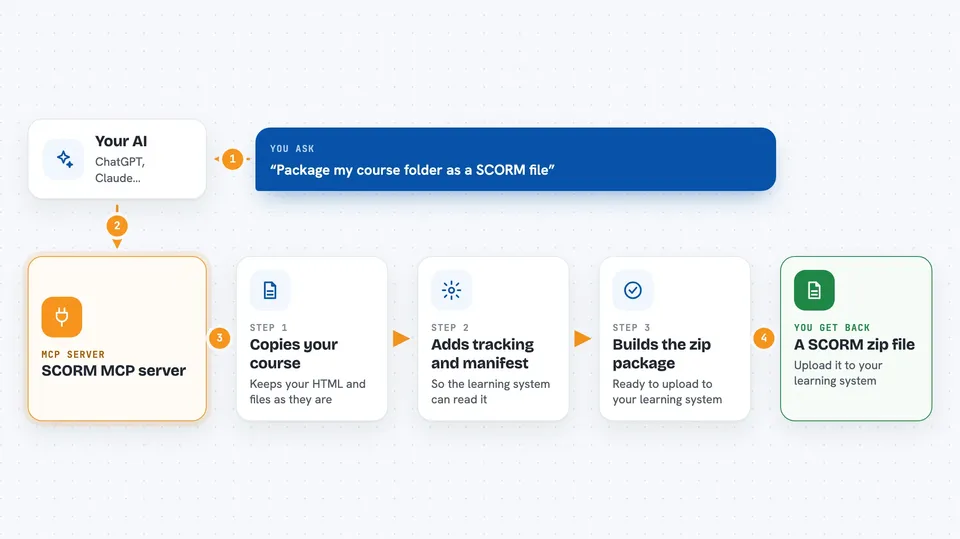
You ask your AI to package a course. The AI calls this helper with your HTML file or folder. The helper copies your HTML as-is, then pulls in every image, font and script so the course works fully offline. It adds a small tracking script that reports progress, completion and scores to the learning system, and builds the manifest file the system needs. Finally it hands back a zip file you can upload.
 Click to zoom
What you can do with it
- Package a single HTML file as a SCORM 2004 or 1.2 course
- Package a whole folder or zip of a multi-file module
- Convert a Claude Design .dc bundle into a SCORM package
- Rebuild a mobile-learning export (Excel templates plus media) into an interactive course
- Check any existing SCORM zip and explain why a learning system might reject it
- Run a quick one-second health check on the server
- Batch-package a whole folder of courses in one go
Try asking your AI
- “Package this module as SCORM.”
- “Turn my course folder into a SCORM 1.2 package with a pass mark of 60 percent.”
- “Validate this SCORM zip and tell me why my LMS rejects it.”
- “Batch package every course in this folder.”
What it gives back to you
You get back the path to a zip file (a SCORM package) that you can upload to your learning system. If you asked for validation, you get a plain report explaining any problems found, like a missing manifest or a file that is not in the zip. For batch runs, you get one package per course plus a summary report. The chat shows the file path and any warnings.
Before you start
What you need
- Node.js 20 or newer (the free program that runs the helper)
- An output folder on your computer where the zip files will be saved
- The Claude desktop app or another MCP-compatible client
Good to know
It reads your course files and writes zip files to your output folder, so make sure the folder is one you are happy to have new files in.
Install it with your AI
Add SCORM MCP server to your AI, no technical skills needed
You don't install anything by hand. You copy one prompt, paste it into an AI that can work on your computer, and it checks, installs and connects the server for you, asking you when it needs something.
Sign in to get the install prompt
Members get a ready-made prompt that lets the Claude desktop app check SCORM MCP server, install it and connect it for them, step by step. You don't need any technical skills: you copy, paste and answer a few questions. Your connected AI can also find and install any of the 4,361 MCP servers here for you.
Who it's for
Anyone who builds HTML learning content and needs to deliver it to a training platform, such as instructional designers, teachers and e-learning developers.