MCP server · Analytics · official
GreenCalculus MCP server
by greencalculus · official
Your AI can look up greenhouse gas emission factors and run carbon calculations with citable sources.
GreenCalculus is a service that holds greenhouse gas emission factors and does carbon calculations for you. This MCP server connects your AI assistant to that service, so you can ask for a number and get it back with its source and data version. It is handy for anyone who has to report emissions, fill in a sustainability spreadsheet, or check a figure someone else gave them.
What is an MCP server? The 30-second version
On its own, your AI can only chat. An MCP server is a small helper that gives your AI a new skill or a connection to another service. This one connects your AI to GreenCalculus, so when you ask about an emission factor or a carbon calculation, the AI can go and look it up there for you. You stay in the chat, and the AI brings the answer back.
What this MCP server does
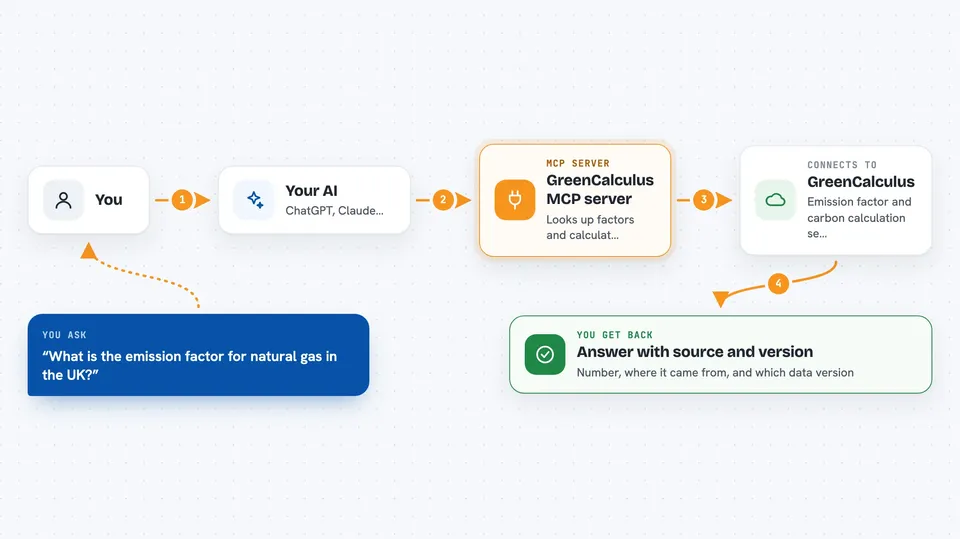
You ask your AI a question in normal words, like how much CO2 a flight produces or what factor to use for natural gas. The AI sends that request to this helper, and the helper talks to the GreenCalculus service. GreenCalculus finds the right factor or runs the calculation, and sends back the number along with where it came from and which data version was used. Your AI then shows you that answer in the chat, ready to copy into your report.
 Click to zoom
What you can do with it
- Look up a single emission factor by its key
- Look up many factors at once for a whole portfolio
- Search the factor library using plain text
- Match a messy description to the closest factor
- Explain why a factor does not exist instead of returning nothing
- Calculate emissions from an activity, with unit conversion and scope
- Calculate electricity, embodied carbon, financed emissions, freight, spend and business travel
Try asking your AI
- “What is the emission factor for natural gas in the UK, and where does it come from?”
- “Calculate the emissions for 500 kWh of electricity in Germany, both location-based and market-based.”
- “I have a line in my spreadsheet that says 'diesel, misc, 2022'. Which factor should I use?”
- “Work out the financed emissions for this loan using PCAF.”
What it gives back to you
You get numbers back, not just text. Each answer comes with the source reference and the data version, so you can cite it or check it later. Some tools also tell you which lifecycle stages or details were missing, so you know what the number does and does not cover. It all shows up in the chat like a normal reply, ready to copy.
Before you start
What you need
- A free API key from https://greencalculus.com/developers (no card needed)
- An AI app that can use MCP servers, such as the Claude desktop app
- Nothing else if you use the remote URL; Node.js or Docker only if you install the local bridge
Good to know
The numbers come from the sources named in each reply, and the licence of that source applies to the data, so check the source before you publish a figure.
Install it with your AI
Add GreenCalculus MCP server to your AI, no technical skills needed
You don't install anything by hand. You copy one prompt, paste it into an AI that can work on your computer, and it checks, installs and connects the server for you, asking you when it needs something.
Sign in to get the install prompt
Members get a ready-made prompt that lets the Claude desktop app check GreenCalculus MCP server, install it and connect it for them, step by step. You don't need any technical skills: you copy, paste and answer a few questions. Your connected AI can also find and install any of the 4,361 MCP servers here for you.
Who it's for
Sustainability, finance and operations people who need emission factors and carbon numbers they can actually cite.