MCP server · Analytics
Data Profiler MCP server
by haiiibin
Let your AI read your CSV, Excel, Parquet or JSON files and tell you what's inside them.

This is a small helper that lets your AI assistant open a data file on your computer and describe it for you. Instead of copying rows and pasting them into the chat, you just point the AI at the file. It's handy for anyone who works with spreadsheets or data exports and wants quick answers about what's in them.
What is an MCP server? The 30-second version
On its own, your AI can only chat. It can't open files on your computer unless you give it a tool that can. An MCP server is exactly that kind of tool: a small helper program that gives your AI one new skill. This one gives it the skill of reading data files, here CSV, Excel, Parquet and JSON files, so the AI can look inside them and report back to you.
What this MCP server does
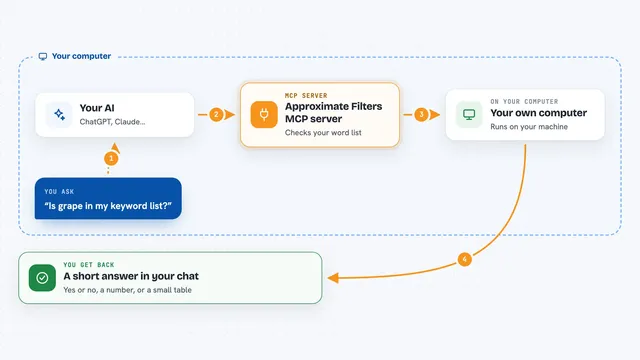
You tell your AI something like "profile sales.csv". The AI passes that request to this helper program. The helper opens the file on your machine, reads it with a data tool, and works out things like how many rows and columns there are, what each column contains, and what looks off. Then it hands the results back to the AI as clean text, and the AI explains them to you in the chat. Nothing is written to disk and nothing leaves your computer.
 Click to zoom
What you can do with it
- Get a one-page overview of any data file: size, columns, missing values, duplicates
- Spot data-quality problems like empty columns, numbers stored as text, or repeated rows
- Look at a sample of rows from the start, the end, or at random
- Get full statistics for one column, including outliers and a histogram
- Get suggestions for shrinking the file's memory use or fixing column types
- Compare two versions of a file and see what changed between them
- Check which numeric columns move together (correlations)
Try asking your AI
- “Profile ~/data/sales_2025.csv and tell me what's in it.”
- “Are there any data-quality problems in customers.parquet?”
- “Show me 20 random rows from events.jsonl.”
- “Give me full stats for the revenue column, including outliers.”
- “What changed between snapshot_jan.csv and snapshot_feb.csv?”
What it gives back to you
You get back a written summary in the chat, plus the underlying details as structured text: row and column counts, a list of columns with their types, missing-value numbers, duplicate counts, and plain-language warnings about anything odd. For a single column you get numbers like minimum, maximum, average and median, and for comparisons you get a side-by-side list of what changed. It's all text you can read and copy.
Before you start
What you need
- Python 3.10 or newer on your computer
- The data-profiler-mcp package installed (or run from source)
- An MCP-compatible app like Claude Desktop, Claude Code, or Cursor
- A data file on your computer you want to look at
Good to know
It only reads files, it never changes or deletes them, but it will open any file path you give it, so avoid pointing it at private files you don't want the AI to see.
Install it with your AI
Add Data Profiler MCP server to your AI, no technical skills needed
You don't install anything by hand. You copy one prompt, paste it into an AI that can work on your computer, and it checks, installs and connects the server for you, asking you when it needs something.
Sign in to get the install prompt
Members get a ready-made prompt that lets the Claude desktop app check Data Profiler MCP server, install it and connect it for them, step by step. You don't need any technical skills: you copy, paste and answer a few questions. Your connected AI can also find and install any of the 4,609 MCP servers here for you.
Who it's for
Anyone who regularly opens spreadsheets, CSV exports or data files and wants quick, plain-language answers about them without writing code.