
MCP server · Research
Context CLI MCP server
by hanselhansel
Check how ready any web page is for AI tools, with a 0 to 100 score and a plain report.
Context CLI is a small program that checks a web page and tells you how easy it is for AI tools to read it. It looks at things like whether AI crawlers are allowed in, whether there is a llms.txt file, and whether the page has clean structured data. It is handy if you run a website and want AI assistants to find and understand your pages.
What is an MCP server? The 30-second version
On its own, your AI can only chat with you. An MCP server is a small helper program that gives your AI a new skill or a connection to a service. This one connects your AI to Context CLI, so when you ask about a web page, the AI can run the check for you and read the results back. You do not need to learn any commands; you just ask in normal words.
What this MCP server does
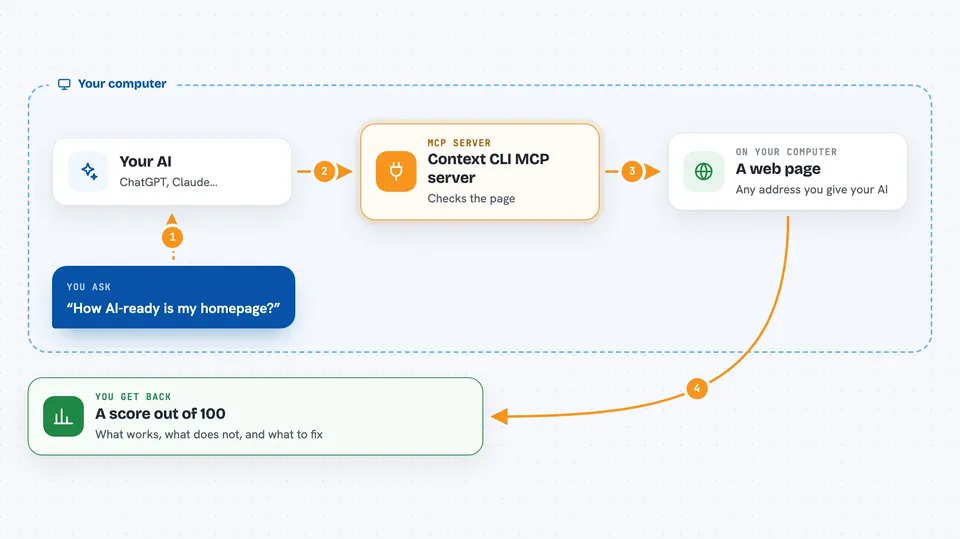
You give your AI a web address and ask how AI-ready it is. The AI passes that address to this helper program. The helper visits the page, checks the robots.txt file, looks for llms.txt and structured data, and measures how much useful text is on the page. Then it hands the score and the details back to the AI, which explains them to you in the chat.
 Click to zoom
What you can do with it
- Check any web page and get a 0 to 100 readiness score
- See which AI crawlers are allowed or blocked on a site
- Find out if a page has a llms.txt or llms-full.txt file
- Check whether a page has clean structured data that AI can read
- Compare two pages or two versions of a page side by side
- Turn a web page into clean, shorter markdown text
- Get suggestions on what to fix to raise the score
Try asking your AI
- “Check how AI-ready my homepage is and give me the score”
- “Which AI crawlers are blocked on example.com?”
- “Compare my page before and after the update”
- “Turn this page into clean markdown and tell me how much shorter it got”
What it gives back to you
You get a score out of 100, broken down by area, plus a short list of what is working and what is not. There are also plain suggestions for what to fix. In the chat it shows up as a small report with numbers and bullet points, and you can ask follow-up questions about any part of it.
Before you start
What you need
- Python installed on your computer
- The Context CLI program installed with pip install context-linter
- A one-time setup step called crawl4ai-setup after installing
- The Claude desktop app or another AI app that supports MCP servers
Good to know
The generate, radar, and benchmark features can send page content to an AI provider and may cost money if you use a paid key, so check before running them on private pages.
Install it with your AI
Add Context CLI MCP server to your AI, no technical skills needed
You don't install anything by hand. You copy one prompt, paste it into an AI that can work on your computer, and it checks, installs and connects the server for you, asking you when it needs something.
Sign in to get the install prompt
Members get a ready-made prompt that lets the Claude desktop app check Context CLI MCP server, install it and connect it for them, step by step. You don't need any technical skills: you copy, paste and answer a few questions. Your connected AI can also find and install any of the 4,361 MCP servers here for you.
Who it's for
Website owners, content and SEO people, and anyone who wants AI assistants to read and recommend their pages.


