
MCP server · Developer tools · official
Terraform MCP server
by hashicorp · official
Lets your AI look up Terraform providers and modules, and manage HCP Terraform workspaces for you.
This is a small helper from HashiCorp, the company behind Terraform, that connects your AI assistant to the Terraform world. It lets your AI search the public Terraform Registry for providers and modules, and work with HCP Terraform or Terraform Enterprise if you have an account. It is handy for anyone who writes or maintains Terraform files and wants a hand finding the right pieces.
What is an MCP server? The 30-second version
On its own, your AI can only chat with you. An MCP server is a small helper program that gives your AI a new skill or a connection to an app or service. This one connects your AI to the Terraform Registry and to HCP Terraform, so it can look up providers and modules or check your workspaces when you ask. You just talk to your AI like normal, and it quietly uses this helper behind the scenes.
What this MCP server does
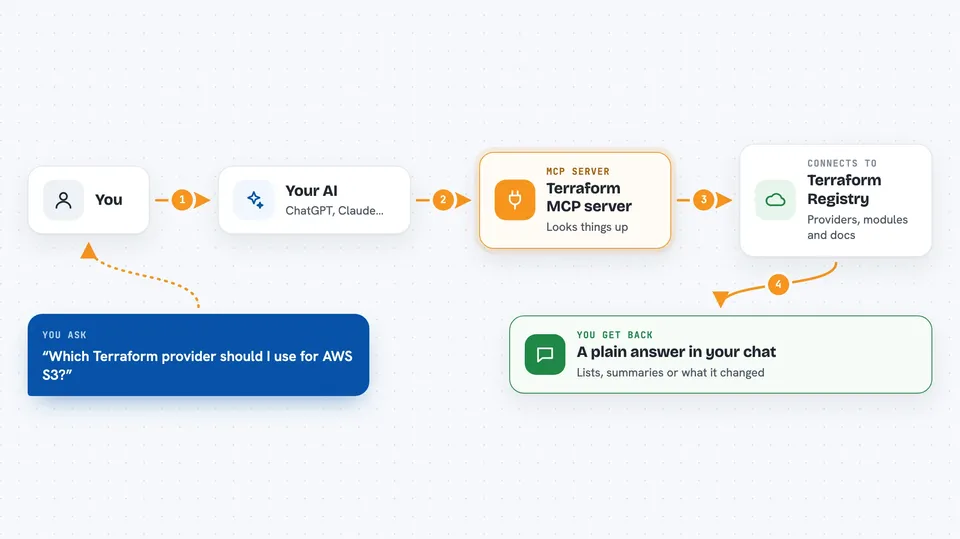
You ask your AI something about Terraform, like which provider version to use or what a module does. The AI sends that request to this helper program. The helper then talks to the Terraform Registry or to HCP Terraform over the internet. It brings back the details it found, and your AI explains them to you in plain words in the chat. If you have an HCP Terraform account, it can also make changes like creating or updating a workspace when you ask.
 Click to zoom
What you can do with it
- Search the Terraform Registry for providers and see their details
- Look up modules and read what they do
- Check provider documentation and version info
- List your HCP Terraform organizations and projects
- Create, update, or delete workspaces in HCP Terraform
- Manage workspace variables and tags
- Start and check runs in your workspaces
Try asking your AI
- “Find me a Terraform provider for managing AWS S3 buckets”
- “What does the terraform-aws-vpc module do and what inputs does it need?”
- “List my HCP Terraform workspaces in the marketing project”
- “Create a new workspace called staging-app in my acme organization”
What it gives back to you
You get answers in your chat, written out by your AI. That might be a list of providers or modules with short descriptions, a summary of what a module needs, or the names of your workspaces. If you asked it to change something in HCP Terraform, it tells you what it did.
Before you start
What you need
- The Docker app installed and running on your computer
- An AI assistant that supports MCP, like VS Code, Cursor, or Claude Desktop
- For HCP Terraform features: an HCP Terraform account and an API token (a kind of password the site gives you)
Good to know
If you connect your HCP Terraform account, this server can create, change, and delete workspaces and their settings, so review anything it proposes before you say yes.
Install it with your AI
Add Terraform MCP server to your AI, no technical skills needed
You don't install anything by hand. You copy one prompt, paste it into an AI that can work on your computer, and it checks, installs and connects the server for you, asking you when it needs something.
Sign in to get the install prompt
Members get a ready-made prompt that lets the Claude desktop app check Terraform MCP server, install it and connect it for them, step by step. You don't need any technical skills: you copy, paste and answer a few questions. Your connected AI can also find and install any of the 4,361 MCP servers here for you.
Who it's for
People who write or maintain Terraform files, like cloud engineers, platform teams, and developers who manage infrastructure as code.




