
MCP server · Research
Cite Caddy MCP server
Let your AI read and update your Zotero library: find items, add tags, write notes, and export citations.
Cite Caddy is a helper that connects your AI assistant to your Zotero reference library. Once it is connected, you can ask your AI to find papers, add tags, write notes, or build a bibliography, and it will actually do those things in Zotero for you. It is handy for researchers, students, and anyone who keeps a big pile of references in Zotero.
What is an MCP server? The 30-second version
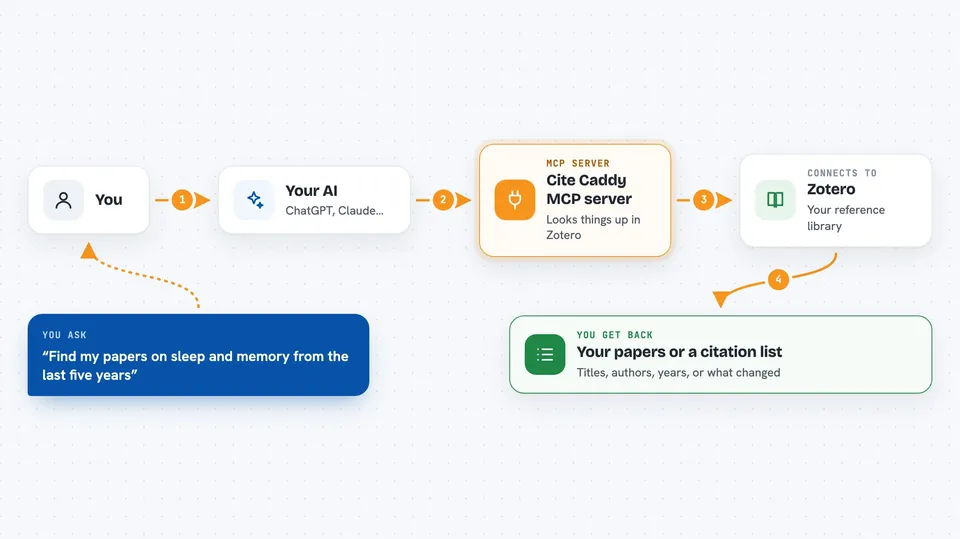
On its own, your AI can only chat. It cannot see your Zotero library or change anything in it. An MCP server is a small helper program that gives your AI a new skill or a connection to an app. Cite Caddy is that helper for Zotero: it lets your AI look things up in your library and make changes there when you ask.
What this MCP server does
You ask your AI something about your references, like finding a paper or adding a tag. The AI passes your request to Cite Caddy. Cite Caddy talks to the Zotero website using your own Zotero account key. Zotero sends back the results, and Cite Caddy hands them to your AI. Your AI then shows you the answer or tells you what it changed.
 Click to zoom
What you can do with it
- Search your Zotero library by title, author, year, or full text inside attachments
- Add, remove, or replace tags on items
- Create new items and collections, or rename and update existing ones
- Write and read notes attached to items
- Export a formatted bibliography or citation list in a style you choose
- Download attachments and read their extracted text
- Move items to the trash or restore them
Try asking your AI
- “Find all papers in my Zotero library about sleep and memory from the last five years”
- “Add the tag 'to-read' to every item in my 'Thesis sources' collection”
- “Write a short note on the item called 'Attention Is All You Need' summarising why I saved it”
- “Give me a bibliography in APA style for these five item keys”
What it gives back to you
You get back lists of items with their titles, authors, and years, or short summaries of what changed. For bibliography requests, you get formatted citations or export data you can copy. For notes and attachments, you get the text or the file content shown in the chat.
Before you start
What you need
- A Zotero account with a library (free or paid)
- A Zotero API key with write permission, from Zotero Settings, Security, Applications
- Your Zotero library ID and whether it is a personal or group library
Good to know
It can delete and move items in your Zotero library, and deleting or moving an item can break citations in Word documents that point to it.
Install it with your AI
Add Cite Caddy MCP server to your AI, no technical skills needed
You don't install anything by hand. You copy one prompt, paste it into an AI that can work on your computer, and it checks, installs and connects the server for you, asking you when it needs something.
Sign in to get the install prompt
Members get a ready-made prompt that lets the Claude desktop app check Cite Caddy MCP server, install it and connect it for them, step by step. You don't need any technical skills: you copy, paste and answer a few questions. Your connected AI can also find and install any of the 4,361 MCP servers here for you.
Who it's for
Researchers, students, librarians, and writers who keep their references in Zotero and want their AI to help manage them.





