
MCP server · Developer tools
eleata Claim Verifier MCP server
Check whether a claim is supported by the evidence, with a verdict and a confidence score.
This is a small helper for your AI that fact-checks a statement against a piece of evidence you give it. You hand it a claim and the source text, and it tells you if the source supports the claim, contradicts it, or does not say enough. It is handy for anyone who wants their AI to slow down and check before repeating something.
What is an MCP server? The 30-second version
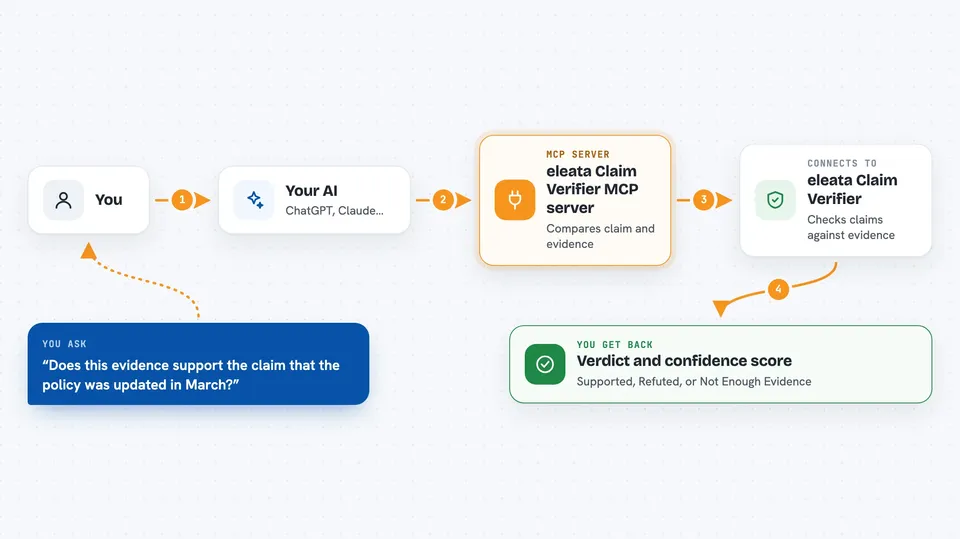
On its own, your AI can only chat with you. An MCP server is a small helper program that gives your AI a new skill or a connection to another service. This one connects your AI to the eleata Claim Verifier, a hosted fact-checking service. So when you ask your AI to check a claim, it can send the claim and the evidence to eleata and bring the verdict back to you.
What this MCP server does
You give your AI a claim and the evidence you want it checked against. Your AI passes both to this helper, which sends them to the eleata service. The service compares the claim with the evidence and decides whether the evidence supports it, refutes it, or is not enough. You get back a verdict, a confidence number, and a flag that says whether the service chose to abstain. If the flag is on, or the verdict is anything other than Supported, you should not rely on the claim.
 Click to zoom
What you can do with it
- Check whether a claim is supported by a piece of evidence
- See if a claim is refuted by the evidence you provide
- Get told when the evidence is not enough to decide
- Check whether an AI answer is grounded in the context it was given
- Use a stricter setting for legal or compliance work
- Spot when a confidence score is too low and the service abstained
Try asking your AI
- “Does this evidence support the claim that the policy was updated in March?”
- “Check if my summary is grounded in the source document I pasted.”
- “Is this statement refuted by the article text below?”
- “Use the strict setting and tell me if this legal claim is supported.”
What it gives back to you
You get a verdict in plain words: Supported, Refuted, or Not Enough Evidence. Along with it comes a confidence number and an abstained flag that tells you the service was not sure enough to commit. In the chat, your AI will usually repeat the verdict and explain what it means for your claim.
Before you start
What you need
- An API key from eleata (a kind of password for apps; you get one from their checkout page)
- The Claude desktop app or another AI tool that supports MCP servers
- Node.js installed on your computer so the npx command can run
Good to know
Your claim and evidence are sent to the eleata hosted service, and the confidence number is not a real probability, so rely on the verdict and the abstained flag instead.
Install it with your AI
Add eleata Claim Verifier MCP server to your AI, no technical skills needed
You don't install anything by hand. You copy one prompt, paste it into an AI that can work on your computer, and it checks, installs and connects the server for you, asking you when it needs something.
Sign in to get the install prompt
Members get a ready-made prompt that lets the Claude desktop app check eleata Claim Verifier MCP server, install it and connect it for them, step by step. You don't need any technical skills: you copy, paste and answer a few questions. Your connected AI can also find and install any of the 4,066 MCP servers here for you.
Who it's for
People who fact-check text, review AI answers, or work in research, compliance, and legal roles where a wrong Supported verdict is costly.


