
MCP server · Security
Entra ID MCP server
by hieuttmmo
Lets your AI look up Microsoft Entra ID users, groups, devices, sign-ins and MFA status for you.
This is a helper that connects your AI assistant to Microsoft Entra ID, the service formerly called Azure AD that holds your company's user accounts, groups and devices. Once it is set up, you can ask your AI plain questions about people and groups at work instead of clicking around admin portals. It is handy for IT admins, helpdesk staff and anyone who manages accounts in a Microsoft 365 company.
What is an MCP server? The 30-second version
On its own, your AI can only chat with you. An MCP server is a small helper program that gives your AI a new skill or a connection to another service. This one connects your AI to Microsoft Entra ID through Microsoft Graph, which is Microsoft's behind-the-scenes way for apps to read and change directory data. So when you ask about a user or a group, your AI uses this helper to fetch the answer from Entra ID and tells you back in the chat.
What this MCP server does
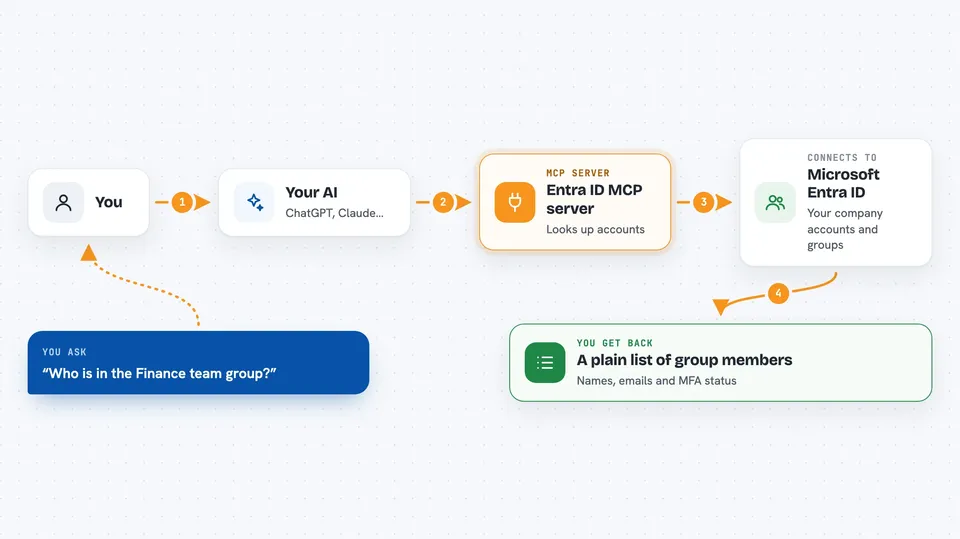
You ask your AI something like who is in a group or whether a user has MFA turned on. Your AI passes that request to this helper program. The helper talks to Microsoft Entra ID using Microsoft Graph and your company's app credentials. Entra ID sends back the details, and the helper hands them to your AI, which explains them to you in normal words. For some tasks, like resetting a password or creating a group, the helper can also make the change for you.
 Click to zoom
What you can do with it
- Search for users by name or email
- List the members of a group
- Check whether a user has MFA set up
- See a user's recent sign-in activity
- Create, update or delete groups and manage their members
- List managed devices and see who owns them
- Reset a user's password and require a change at next sign-in
Try asking your AI
- “Find the user account for Maria Lopez and show me her email address”
- “Who are the members of the Finance team group?”
- “Does james@ourcompany.com have multi-factor authentication turned on?”
- “Show me the sign-in activity for that user over the last seven days”
What it gives back to you
You get answers in plain chat text: lists of users or group members, a short profile for one person, a yes or no on MFA, or a summary of recent sign-ins. When you ask it to change something, like adding a member to a group or resetting a password, it tells you what it did. Longer results come back as tidy lists you can read or copy.
Before you start
What you need
- A Microsoft Entra ID (Azure AD) tenant where you have admin rights
- An app registration in Entra ID with a tenant ID, client ID and client secret
- The right Microsoft Graph permissions granted to that app (the README lists them)
- Python and the fastmcp tool installed on the machine that runs the server
Good to know
This helper can change real things in your company directory, like creating or deleting groups and resetting passwords, so give the app only the permissions it truly needs and double-check before you confirm a change.
Install it with your AI
Add Entra ID MCP server to your AI, no technical skills needed
You don't install anything by hand. You copy one prompt, paste it into an AI that can work on your computer, and it checks, installs and connects the server for you, asking you when it needs something.
Sign in to get the install prompt
Members get a ready-made prompt that lets the Claude desktop app check Entra ID MCP server, install it and connect it for them, step by step. You don't need any technical skills: you copy, paste and answer a few questions. Your connected AI can also find and install any of the 4,609 MCP servers here for you.
Who it's for
IT admins, helpdesk and security staff at Microsoft 365 companies who manage user accounts, groups and devices in Entra ID.



