
MCP server · Developer tools
drwho.me MCP server
by hikmahtech
Give your AI a toolbox for domain, DNS, email, and web checks, plus handy developer utilities.
drwho.me is a free website full of small tools for looking up domains, checking email setup, and doing everyday developer chores like decoding a JWT or formatting JSON. Its MCP server hands those same tools to your AI assistant, so you can just ask instead of clicking around. It is handy for anyone who works with websites, domains, or email and wants quick answers without hunting through menus.
What is an MCP server? The 30-second version
On its own, your AI can only chat with you. An MCP server is a small helper program that gives your AI a new skill or a connection to an app or service. This one connects your AI to drwho.me, so it can run domain and web checks and developer utilities for you. You ask in plain words, and the AI uses this helper to get the answer.
What this MCP server does
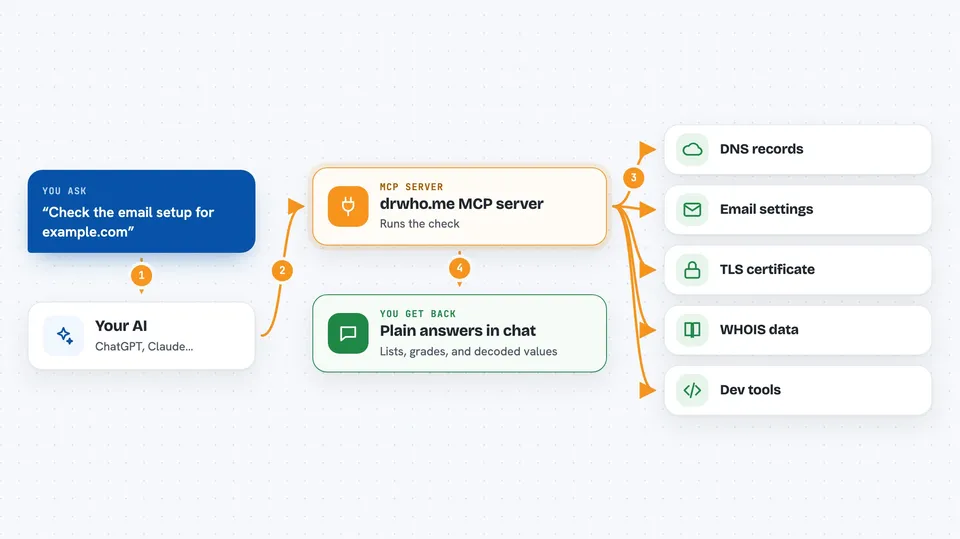
You ask your AI something like "check the email setup for example.com" or "decode this JWT". The AI sends that request to the drwho.me MCP server. The server runs the check or utility and sends the result back. Your AI then explains it to you in the chat. You never have to visit a website or copy results by hand.
 Click to zoom
What you can do with it
- Check a domain's DNS records, mail servers, and DNSSEC
- Look at SPF, DMARC, and DKIM email authentication settings
- Inspect a site's TLS certificate, response headers, and redirects
- See what robots.txt, sitemap, and llms.txt say about a site
- Look up WHOIS registration data and subdomains from certificate logs
- Decode a JWT, format JSON, or encode and decode Base64 and URLs
- Generate a UUID or parse a User-Agent string
Try asking your AI
- “Run a full domain check on example.com and tell me what is wrong”
- “Does example.com have SPF and DMARC set up correctly?”
- “Decode this JWT for me: eyJhbGciOiJIUzI1NiIsInR5cCI6IkpXVCJ9...”
- “Format this messy JSON and generate a UUID for me”
What it gives back to you
You get back plain answers in the chat: lists of DNS records, a graded line for each email or TLS check, decoded JWT contents, formatted JSON, or a generated UUID. For domain checks, you also get a link to the full report on Domain Posture. The AI can summarise everything in a sentence or two if you ask.
Before you start
What you need
- An AI client that supports MCP, like Claude Code or another MCP-compatible app
- Nothing else: no account and no API key are needed
Good to know
Every tool is read-only, so it cannot change or delete anything, but it does look up public information about domains and sites you name.
Install it with your AI
Add drwho.me MCP server to your AI, no technical skills needed
You don't install anything by hand. You copy one prompt, paste it into an AI that can work on your computer, and it checks, installs and connects the server for you, asking you when it needs something.
Sign in to get the install prompt
Members get a ready-made prompt that lets the Claude desktop app check drwho.me MCP server, install it and connect it for them, step by step. You don't need any technical skills: you copy, paste and answer a few questions. Your connected AI can also find and install any of the 4,609 MCP servers here for you.
Who it's for
Anyone who works with domains, email, or websites and wants quick checks without leaving their AI chat, including developers, IT admins, and marketers.



