
MCP server · Productivity
temp.md MCP server
by huangdun
Publish HTML, Markdown, CSV or Mermaid files to one public link your AI can update in place.
This is a small helper that lets your AI put a file on the web and give you back a single public link. You can keep updating that same link with new versions, so anyone you shared it with always sees the latest. It is handy if you make reports, charts, or simple pages with your AI and want to share them without emailing new files every time.
What is an MCP server? The 30-second version
On its own, your AI can only chat with you. An MCP server is a small helper program that gives your AI a new skill or a connection to an app or service. This one connects your AI to temp.md, a place that hosts files on the web. Once it is connected, your AI can publish a file to temp.md for you and hand you back a public link.
What this MCP server does
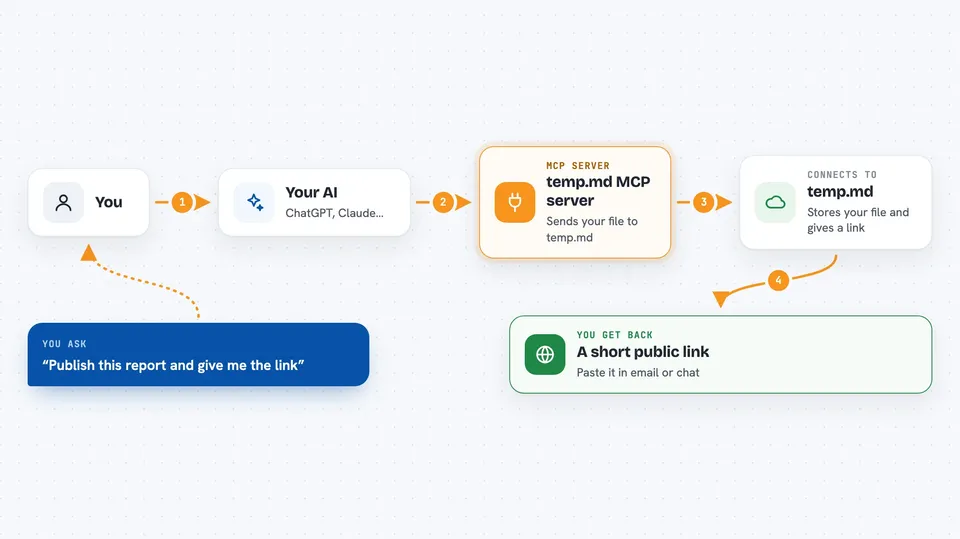
You ask your AI to publish something, like a Markdown report or a small HTML page. The AI sends the file to temp.md through this helper. temp.md stores it and gives back a short public link, something like amber-hill-9eb6.temp.md. When you ask for changes, the AI pushes a new version behind that same link, so the link never changes. If you do not touch it for 7 days, the link expires, and you can bring it back within another 7 days.
 Click to zoom
What you can do with it
- Publish an HTML, Markdown, CSV or Mermaid file and get a public link
- Update the same link with a new version instead of making a new one
- Check whether a link is still live or has expired
- Restore a link that expired recently
- Freeze a version as a fixed snapshot for reference
- Turn pinned visitor comments on or off
- List the links you have made
Try asking your AI
- “Publish this Markdown summary as a temp.md page and give me the link”
- “Update the temp.md link with the new version of the report”
- “Is my temp.md link still active, or has it expired?”
- “Turn on comments for that temp.md page”
What it gives back to you
You get back a short public link you can paste into an email or chat. You also get a quick note about the status, like whether it is live or expired. When you update, the AI confirms the same link now shows the new version. If you ask for a list, you get the links you have made.
Before you start
What you need
- The Claude desktop app or another MCP client
- Node.js 18 or newer if you install the local version
- Nothing else for anonymous publishing
Good to know
Anyone with the link can see the file, so do not publish anything private or sensitive.
Install it with your AI
Add temp.md MCP server to your AI, no technical skills needed
You don't install anything by hand. You copy one prompt, paste it into an AI that can work on your computer, and it checks, installs and connects the server for you, asking you when it needs something.
Sign in to get the install prompt
Members get a ready-made prompt that lets the Claude desktop app check temp.md MCP server, install it and connect it for them, step by step. You don't need any technical skills: you copy, paste and answer a few questions. Your connected AI can also find and install any of the 4,361 MCP servers here for you.
Who it's for
Anyone who makes reports, charts, or simple pages with an AI and wants to share them with a stable link.


