MCP server · Productivity · official
NetLicensing MCP server
by Labs64 · official
Ask your AI to manage software licenses, customers, and renewals in NetLicensing for you.

This is a small helper that connects your AI assistant to Labs64 NetLicensing, the service companies use to hand out and track software licenses. Once it is set up, you can just type what you want in plain English instead of clicking around the NetLicensing website. It is handy for anyone who deals with customer licenses, renewals, or billing questions.
What is an MCP server? The 30-second version
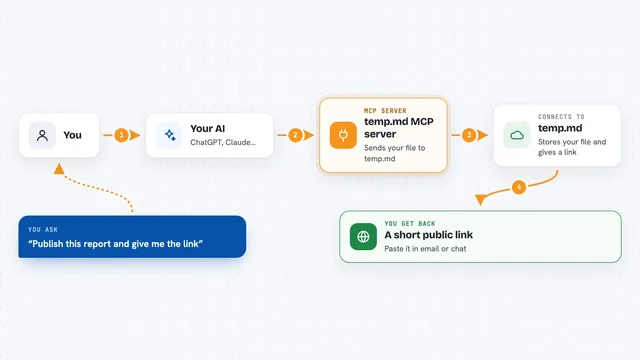
On its own, your AI can only chat. An MCP server is a little helper program that gives your AI a new skill, in this case a connection to your NetLicensing account. You ask your AI something, the AI passes the request to this helper, and the helper talks to NetLicensing for you. Then the answer comes back into your chat like a normal reply.
What this MCP server does
You type a request in your AI chat, like asking which licenses expire soon. The AI sends that request to this helper program. The helper logs into your NetLicensing account using your API key and looks up the right information or makes the change you asked for. Then it hands the result back to your AI, which explains it to you in the chat. You never have to open the NetLicensing website or write any code.
 Click to zoom
What you can do with it
- List all products, licensees, and licenses in your account
- Create a new licensee or license for a customer
- Check whether a customer's license is still valid
- Generate a shop URL so a customer can renew on their own
- Find licenses that expire in the next few weeks
- Transfer licenses from one customer to another
- Create a read-only API key for safe sharing
Try asking your AI
- “List all products in my NetLicensing account.”
- “Create a new licensee for customer@example.com under product PTEST.”
- “Which licenses are expiring in the next 30 days?”
- “Validate the license for licensee L001 and tell me if it passes.”
What it gives back to you
You get back plain answers in your chat: lists of products or customers, yes or no answers about a license, dates for upcoming expirations, or a shop link you can send to a customer. When you ask it to create or change something, it tells you what it did. Sensitive values like API keys are shown masked, so you only see part of them.
Before you start
What you need
- A Labs64 NetLicensing account
- A NetLicensing API key (a kind of password for apps, you can generate one in your NetLicensing account)
- An MCP-compatible AI app like Claude Desktop, VS Code with Copilot, or JetBrains IDEA
Good to know
It can create, change, and delete real licensing records in your account, so double-check before you confirm a delete or a transfer.
Install it with your AI
Add NetLicensing MCP server to your AI, no technical skills needed
You don't install anything by hand. You copy one prompt, paste it into an AI that can work on your computer, and it checks, installs and connects the server for you, asking you when it needs something.
Sign in to get the install prompt
Members get a ready-made prompt that lets the Claude desktop app check NetLicensing MCP server, install it and connect it for them, step by step. You don't need any technical skills: you copy, paste and answer a few questions. Your connected AI can also find and install any of the 4,361 MCP servers here for you.
Who it's for
People who manage software licenses, customer accounts, or renewals, like licensing managers, support teams, and small software vendors.