MCP server · Productivity
dochost MCP server
by zyli5313
Turn your AI's Markdown or HTML output into a public web page with a shareable link.

dochost is a service that takes text or HTML your AI just wrote and turns it into a normal web page with its own link. This MCP server connects your AI assistant to dochost, so instead of copy-pasting a long report into an email, you can just ask and get a link back. It is handy for anyone who wants to share a report, a README, or a small web page without setting up a website.
What is an MCP server? The 30-second version
On its own, your AI can only chat with you. An MCP server is a small helper program that gives your AI a new skill or a connection to another service. This one connects your AI to dochost, so when you ask it to publish something, it can actually create a real page on the web and hand you back the link. You do not need to understand how it works under the hood; you just approve it once and then ask in plain words.
What this MCP server does
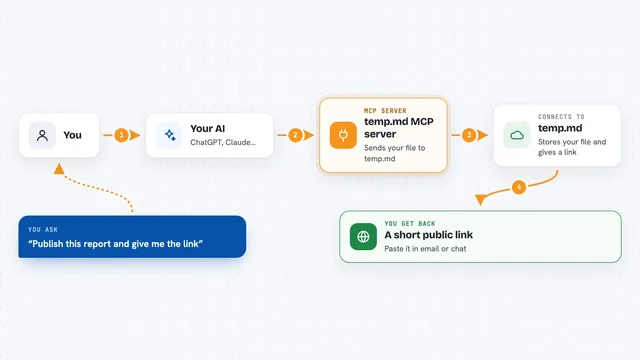
You ask your AI to publish something you have been working on, like a report or a page of HTML. The AI passes that content to this helper, which sends it to dochost. dochost turns it into a live web page and gives back a link. Your AI shows you the link in the chat, and you can share it with anyone. Later, if you want to change the page, you can ask your AI to update it, and the same link keeps working.
 Click to zoom
What you can do with it
- Publish a Markdown report as a shareable web page
- Publish an HTML file your AI just built
- Update an already published page without changing its link
- List the pages you have published so far
- Check the details of one page, like views and expiry
- See your account plan and how many pages you have left
- Delete a page you no longer want online
Try asking your AI
- “Publish this Q3 report as a private page with a password”
- “Turn this README into a public web page and give me the link”
- “Update the page called q3-report with this new version”
- “List all the pages I have published this month”
What it gives back to you
You get back a link you can click and share, plus a short note about when the link expires. When you list your pages, you get a simple list with titles and links. When you look up one page, you get its title, format, how many views and likes it has, and whether a password is needed. When you update or delete, you get a short confirmation that it worked.
Before you start
What you need
- A dochost account (free plan works, paid plans add longer-lasting links and extras)
- A browser to approve the connection once, if you use OAuth
- For headless agents only: a DOCHOST_API_KEY from Settings, API keys on dochost.io
- For the local bridge only: Node.js 22 or newer, or Docker
Good to know
Publishing creates a real page on the web, and delete_page removes one for good, so check the link and content before you share or delete.
Install it with your AI
Add dochost MCP server to your AI, no technical skills needed
You don't install anything by hand. You copy one prompt, paste it into an AI that can work on your computer, and it checks, installs and connects the server for you, asking you when it needs something.
Sign in to get the install prompt
Members get a ready-made prompt that lets the Claude desktop app check dochost MCP server, install it and connect it for them, step by step. You don't need any technical skills: you copy, paste and answer a few questions. Your connected AI can also find and install any of the 4,361 MCP servers here for you.
Who it's for
Anyone who writes reports, notes, or small web pages with an AI and wants to share them as a normal link, without touching a website builder.