MCP server · Coding
Lucidity MCP server
by hyperb1iss
Your AI reviews your code changes and points out quality problems before you commit them.

Lucidity is a small helper program that lets your AI assistant review code changes you have made. It looks at your recent edits and gives you feedback on things like confusing logic, missing error handling, or security risks. It is handy for anyone who uses an AI to write or edit code and wants a second look before saving that work.
What is an MCP server? The 30-second version
On its own, your AI can only chat with you. An MCP server is a small helper program that gives your AI a new skill or a connection to something useful. This one connects your AI to your local code changes, so it can read them and comment on them. When you ask for a review, your AI talks to Lucidity, and Lucidity hands back the details it needs to give you an answer.
What this MCP server does
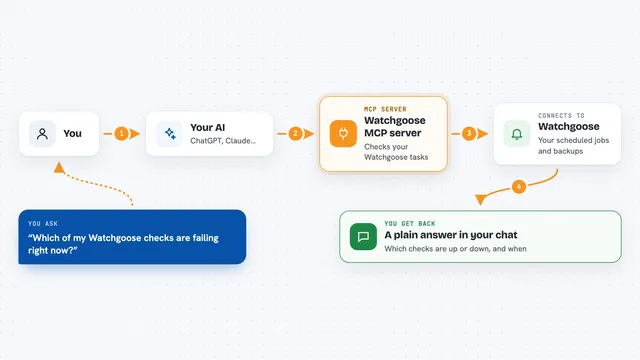
You ask your AI to look over your recent code changes. Your AI passes that request to Lucidity, which reads the changes from your git history. Lucidity then guides your AI through ten checks, such as complexity, duplication, security, and error handling. Your AI uses that guidance to write up feedback for you. You read the feedback in the chat and decide what to fix.
 Click to zoom
What you can do with it
- Review your latest code changes before you commit them
- Check for security issues in the code you just wrote
- Spot logic that is more complicated than it needs to be
- Find code that was accidentally deleted or changed
- Look for missing error handling and missing tests
- Focus the review on one file instead of everything
- Ask whether your code follows your project's usual style
Try asking your AI
- “Analyze the code quality in my latest git changes”
- “Check for security vulnerabilities in my JavaScript changes”
- “Are there any unintended side effects in my recent refactoring?”
- “Find any hallucinated API calls in my latest commit”
What it gives back to you
You get a written review in your chat window. It lists the problems it found, grouped by type, with short explanations and suggestions. It may also point out things you did well. Nothing in your code is changed automatically; you decide what to act on.
Before you start
What you need
- Python 3.13 or newer installed on your computer
- Git installed, with your project saved as a git repository
- The UV package manager (the README recommends it for setup)
- An AI assistant that can connect to MCP servers, such as Claude
Good to know
It reads your local code and git history, so only point it at projects you are comfortable sharing with your AI assistant.
Install it with your AI
Add Lucidity MCP server to your AI, no technical skills needed
You don't install anything by hand. You copy one prompt, paste it into an AI that can work on your computer, and it checks, installs and connects the server for you, asking you when it needs something.
Sign in to get the install prompt
Members get a ready-made prompt that lets the Claude desktop app check Lucidity MCP server, install it and connect it for them, step by step. You don't need any technical skills: you copy, paste and answer a few questions. Your connected AI can also find and install any of the 4,609 MCP servers here for you.
Who it's for
Developers and anyone who uses an AI to write or edit code and wants a quick quality check before committing.