MCP server · Developer tools
SSH MCP server
by hypnosis
Lets your AI run commands and move files on your own servers over SSH, safely.
This is a small helper that connects your AI assistant to the servers you already log into with SSH. Instead of copying terminal output back and forth, you can just ask your AI to check a server, read logs, or upload a file. It is handy if you run a website, a VPS, or a home server and want less back-and-forth.
What is an MCP server? The 30-second version
On its own, your AI can only chat. An MCP server is a small helper program that gives your AI a new skill or a connection to something outside the chat. This one gives your AI a connection to your servers over SSH, the same way you connect from a terminal. So when you ask about a server, your AI can actually look at it and do things there for you.
What this MCP server does
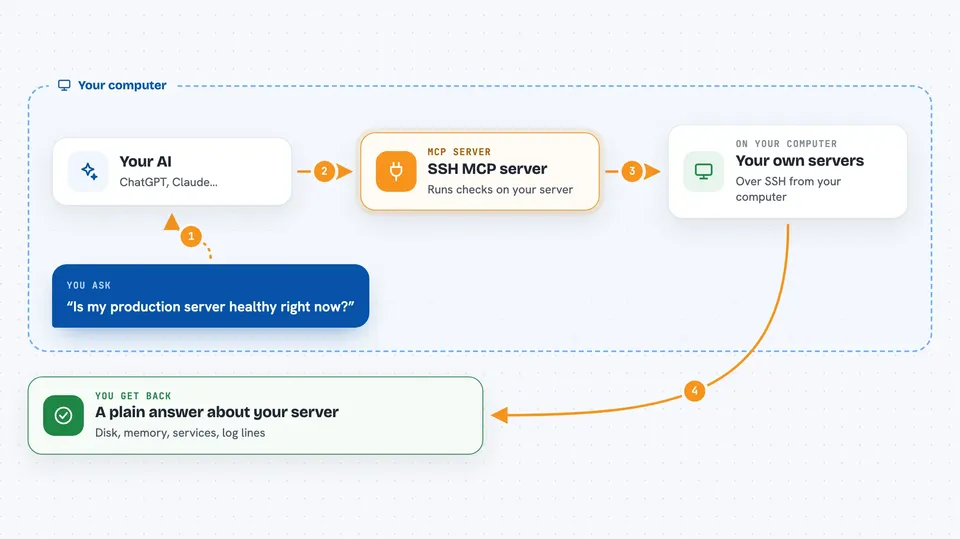
You ask your AI something like "is my production server healthy?" Your AI passes that to this helper. The helper uses the normal ssh program already on your computer, with your existing keys and settings, to connect to the machine you named. It runs the checks, gathers the results, and hands a tidy answer back to your AI. Your AI then explains it to you in plain words.
 Click to zoom
What you can do with it
- Check whether a server is healthy: disk, memory, services, containers, errors
- Search logs across several files at once for a word or error
- Read the last lines of a log file without downloading the whole thing
- Upload a config file and confirm the bytes that landed
- Download or list files on a remote machine
- Run a batch of commands with sudo and see each result separately
- Audit a host for common problems and get CRITICAL, WARNING or OK findings
Try asking your AI
- “Is my production server healthy right now?”
- “Search the nginx and syslog logs on production for the word timeout from the last hour”
- “Upload this nginx config to /etc/nginx/conf.d/api.conf on production with sudo and verify it”
- “Run a baseline audit on my home server and tell me what needs attention”
What it gives back to you
You get back short, structured answers: numbers like disk percent and memory percent, lists of failed services, matching log lines with a little context, or a clear note that a file was written and verified. If something could not be measured, it says so instead of pretending the answer is zero. Your AI then turns that into a normal sentence or two for you.
Before you start
What you need
- Node.js 18 or newer
- A system ssh client (the one you already use in a terminal)
- A profiles file listing the machines you want to reach, with host, username and key path
- SSH keys that already work from your computer (on Windows, key-based profiles only for now)
Good to know
It can change or delete things on your servers, so keep an eye on what you ask it to do and use the built-in blocking of destructive commands as a safety net, not a guarantee.
Install it with your AI
Add SSH MCP server to your AI, no technical skills needed
You don't install anything by hand. You copy one prompt, paste it into an AI that can work on your computer, and it checks, installs and connects the server for you, asking you when it needs something.
Sign in to get the install prompt
Members get a ready-made prompt that lets the Claude desktop app check SSH MCP server, install it and connect it for them, step by step. You don't need any technical skills: you copy, paste and answer a few questions. Your connected AI can also find and install any of the 4,361 MCP servers here for you.
Who it's for
People who run their own servers, VPS, NAS or router and use an AI assistant to help with debugging, deploys and routine checks.