MCP server · Customer communication · official
Kudosity MCP server
by kudosity · official
Send SMS, MMS and WhatsApp messages, check replies and delivery status, and manage contacts from your AI chat.
This is a helper made by Kudosity, a company that sends text messages for businesses. Once you connect it, your AI assistant can send SMS, MMS and WhatsApp messages, look up delivery reports and replies, and manage your contact lists. It is handy if you send texts to customers or staff and want to do it by just asking, instead of clicking around a website.
What is an MCP server? The 30-second version
On its own, your AI can only chat with you. An MCP server is a small helper program that gives your AI a new skill or a connection to an app or service. This one connects your AI to Kudosity, so it can send messages and look things up in your Kudosity account for you. You just ask in plain words, and the helper does the clicking behind the scenes.
What this MCP server does
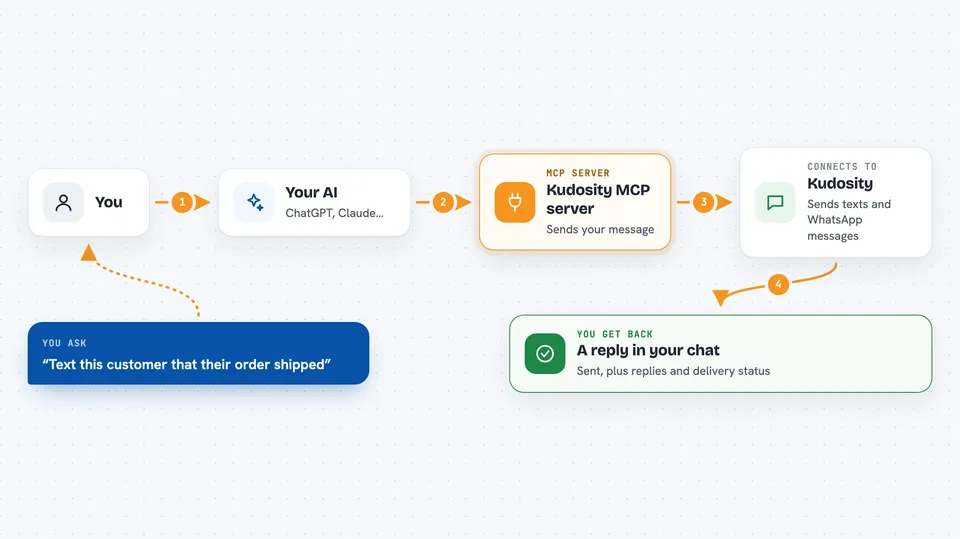
You ask your AI something like send an SMS to this number saying the order shipped. Your AI passes that request to this helper program, which talks to Kudosity using your account. Kudosity sends the message and reports back. Your AI then tells you what happened, like the message was sent or shows you the list of replies you asked for.
 Click to zoom
What you can do with it
- Send an SMS to a phone number
- Send an MMS with a picture or file attached
- Send a WhatsApp message, either free text or an approved template
- Check the status of a sent message or list recent messages
- See inbound replies and which messages were delivered
- Create contact lists and add or remove people
- Check your account balance
- Search the Kudosity API docs by keyword
Try asking your AI
- “Send an SMS to 61438333061 from KudosityDemo saying the order shipped.”
- “List my delivered SMS from the last day.”
- “Show me inbound SMS replies.”
- “Create a contact list called VIPs and add 61438333061.”
- “What's my account balance?”
What it gives back to you
You get answers in the chat, in plain words. For a send, it tells you the message was accepted and gives you an ID. For a lookup, it shows a list of messages with their status, direction and dates. For contacts, it shows your lists and who is in them.
Before you start
What you need
- A Kudosity account
- Your Kudosity API key (found in Settings, then API Settings)
- Your Kudosity API secret, only if you want the contact list and balance tools
- Node.js 18 or newer on your computer
Good to know
It can send real messages and change your contact lists, and sending messages costs money from your Kudosity balance, so check the details before you say yes.
Install it with your AI
Add Kudosity MCP server to your AI, no technical skills needed
You don't install anything by hand. You copy one prompt, paste it into an AI that can work on your computer, and it checks, installs and connects the server for you, asking you when it needs something.
Sign in to get the install prompt
Members get a ready-made prompt that lets the Claude desktop app check Kudosity MCP server, install it and connect it for them, step by step. You don't need any technical skills: you copy, paste and answer a few questions. Your connected AI can also find and install any of the 4,361 MCP servers here for you.
Who it's for
People who send texts to customers or teams, like marketing, support and operations staff, who would rather ask their AI than use a messaging dashboard.