
MCP server · Research
Google Search MCP server
by jae-jae
Let your AI run Google searches for several keywords at once and bring back the top results.
This is a small helper that lets your AI search Google for you. You give it a few keywords, and it looks them all up at the same time instead of one by one. It is handy if you often need quick research on several topics in one go.
What is an MCP server? The 30-second version
On its own, your AI can only chat with you using what it already knows. An MCP server is a small helper program that gives your AI a new skill or a connection to an app or service. This one connects your AI to Google search. Once it is set up, your AI can look things up on Google for you whenever you ask.
What this MCP server does
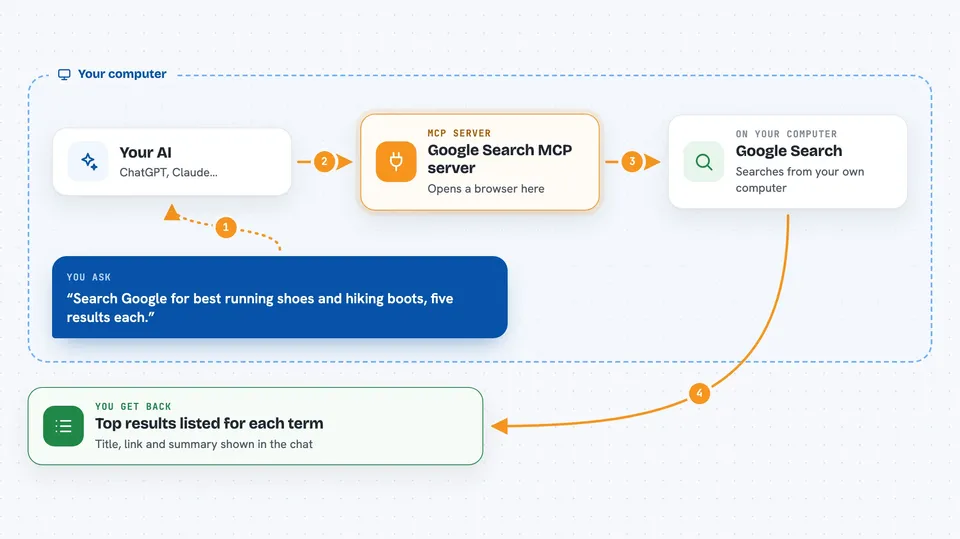
You ask your AI to search Google for one or more keywords. Your AI passes those keywords to this helper program. The helper opens a browser on your computer, runs the searches, and reads the results. It then sends the titles, links, and short descriptions back to your AI. Your AI shows them to you in the chat.
 Click to zoom
What you can do with it
- Search Google for several keywords at the same time
- Get the top results for each keyword, with titles, links, and short descriptions
- Ask for more or fewer results per keyword
- Change the search region or language
- Give the search more time when pages load slowly
- Show the browser window when you want to watch the search happen
- Handle a Google captcha check by letting you solve it in a visible browser
Try asking your AI
- “Search Google for machine learning and artificial intelligence and give me the top 10 results for each”
- “Look up the latest news about electric cars and solar panels, 15 results each”
- “Search Google for remote work tips using the Chinese locale”
- “Please set the page loading timeout to 120 seconds and search for small business accounting software”
What it gives back to you
You get back a list of results for each keyword you asked about. Each result has a title, a link, and a short description. Your AI shows this as a tidy list in the chat, grouped by keyword. You can then ask follow-up questions or click the links yourself.
Before you start
What you need
- Node.js 18 or newer installed on your computer
- The Chromium browser that Playwright uses (installed with one command)
Good to know
It opens a real browser and searches Google, so Google may sometimes show a captcha check that you have to solve yourself in the browser window.
Install it with your AI
Add Google Search MCP server to your AI, no technical skills needed
You don't install anything by hand. You copy one prompt, paste it into an AI that can work on your computer, and it checks, installs and connects the server for you, asking you when it needs something.
Sign in to get the install prompt
Members get a ready-made prompt that lets the Claude desktop app check Google Search MCP server, install it and connect it for them, step by step. You don't need any technical skills: you copy, paste and answer a few questions. Your connected AI can also find and install any of the 4,361 MCP servers here for you.
Who it's for
Anyone who does quick research on several topics at once, like analysts, writers, students, or assistants.


