MCP server · Chat
Mattermost MCP Host
Lets your AI chat inside Mattermost and use connected helper tools to answer and act for you.
This is a small program that turns your AI into a helpful bot living inside Mattermost. You chat with it in a channel or thread, and it can also use other connected helper tools to look things up or do tasks. It is handy if your team already talks in Mattermost and you want an AI assistant right there.
What is an MCP server? The 30-second version
On its own, your AI can only chat. An MCP server is a small helper program that gives your AI a new skill or a connection to an app. This project is both a Mattermost bot and an MCP host, which means it lets your AI talk to you in Mattermost and also plug in other MCP servers as extra tools. So when you ask something, the AI can reach out to those helpers and bring back answers or take actions for you.
What this MCP server does
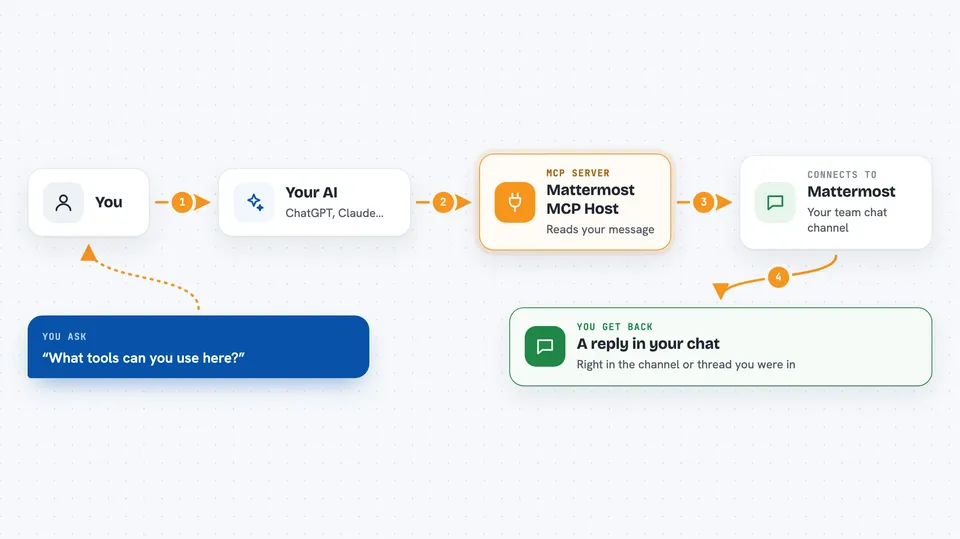
You add this bot to a Mattermost channel and talk to it like a coworker. The bot reads your message, and if it needs extra help, it quietly calls one of the connected MCP helper tools. That helper goes to the other service, gets what is needed, and hands it back. The bot then writes a normal reply in the channel or thread. You can also type short commands starting with # to peek at what tools are available or run one directly.
 Click to zoom
What you can do with it
- Chat with an AI assistant right inside a Mattermost channel or thread
- Ask the bot to use connected tools to look things up or take actions
- List which helper servers and tools are connected
- Run a specific tool by typing a short command
- Keep context across a thread so follow-up questions make sense
- Chain several tool calls together to finish a bigger request
Try asking your AI
- “Can you search our connected tools and tell me what is available?”
- “Look up the latest status of the project and summarize it here.”
- “Use the connected tool to create a ticket for this issue.”
- “#servers”
What it gives back to you
You get normal chat replies in the Mattermost channel or thread, written in plain language. If the bot used a tool, the answer usually includes what it found or what it did. For direct commands like #servers or #<server> tools, you get a short list back in the chat. Everything shows up right where you were talking, so you do not have to switch apps.
Before you start
What you need
- A Mattermost server and a bot account with an API token
- The bot invited to your team and channel
- An AI provider key, for example Azure OpenAI, OpenAI, Anthropic, or Google
- Python 3.13.1 or newer and the uv package manager
Good to know
This bot can read messages in the channels it is added to and can take actions through any helper tools you connect, so only add it to channels and tools you are comfortable with.
Install it with your AI
Add Mattermost MCP Host to your AI, no technical skills needed
You don't install anything by hand. You copy one prompt, paste it into an AI that can work on your computer, and it checks, installs and connects the server for you, asking you when it needs something.
Sign in to get the install prompt
Members get a ready-made prompt that lets the Claude desktop app check Mattermost MCP Host, install it and connect it for them, step by step. You don't need any technical skills: you copy, paste and answer a few questions. Your connected AI can also find and install any of the 4,609 MCP servers here for you.
Who it's for
Teams and office workers who already use Mattermost and want an AI helper that can also use other connected tools.