
MCP server · Research
Skim MCP server
by JessieJanie
Turn any web page, batch of pages, or PDF into clean Markdown your AI can read and summarize.
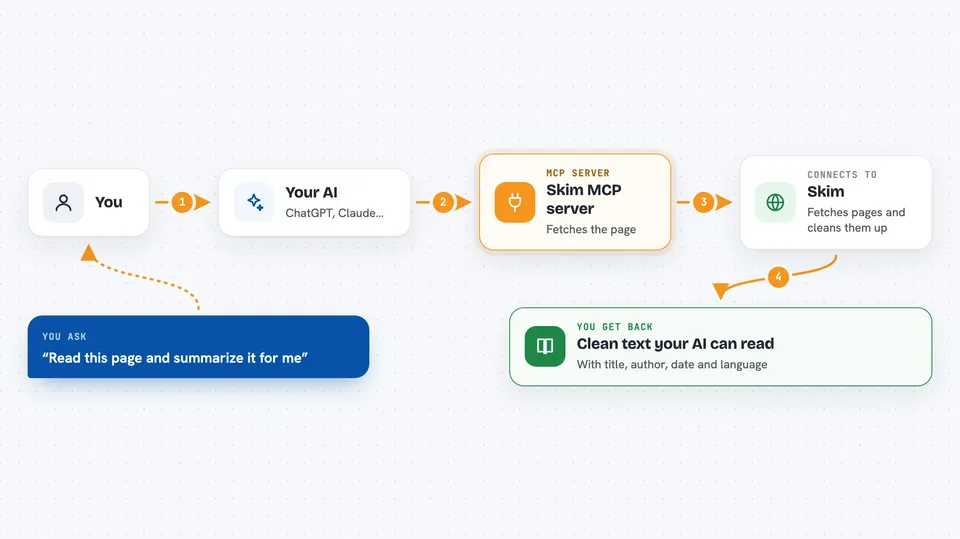
Skim is a helper that lets your AI read web pages properly. Instead of messy HTML, you get clean text with the title, author, date, and language at the top. It is handy for anyone who asks their AI to summarize articles, compare pages, or pull facts from a site.
What is an MCP server? The 30-second version
On its own, your AI can only chat with you. It cannot open a web page and read it. An MCP server is a small helper program that gives your AI a new skill. This one connects your AI to Skim, a web reading service, so when you ask about a page, the AI can fetch it and hand you back clean text.
What this MCP server does
You ask your AI to read a web page, a few pages, a PDF, or a whole small site. The AI passes the address to this helper. The helper sends it to Skim, which fetches the page and strips out ads, menus, and clutter. Skim sends back tidy Markdown with a small header showing the title, author, date, and language. Your AI then reads that and answers you.
 Click to zoom
What you can do with it
- Read a single web page and summarize it
- Read up to 10 pages in one go and compare them
- Pull specific fields like product name, price, or job details as structured data
- Crawl a small site and list its page titles
- Read a public PDF and give you the outline
- Watch pages for changes and check what changed later
- Poll a Skim Signal feed for the latest items in a topic
Try asking your AI
- “Read https://en.wikipedia.org/wiki/HTTP_402 and summarize it.”
- “Read these three pricing pages and compare them: https://a.example/pricing https://b.example/pricing https://c.example/pricing”
- “Extract the product name, price, and availability from https://example.com/products/notebook as JSON.”
- “Crawl https://example.com (max 10 pages) and list the page titles.”
What it gives back to you
You get clean Markdown text in the chat, with a short header at the top showing title, author, date, and language. For extraction, you get structured fields like name, price, and availability. For crawling, you get one clean page per result. For watches, you get a list of what changed.
Before you start
What you need
- A free Skim API key from skim402.com (starts with sk402_, 1,000 reads per month on the free plan)
- Node.js 18 or newer on your computer
- An MCP client like Claude Desktop, Cursor, Cline, Continue, or Zed
Good to know
It uses credits or money for each call, so a runaway loop or a big crawl can add up, and your API key sits in a plain config file that anyone with access to your computer can read.
Install it with your AI
Add Skim MCP server to your AI, no technical skills needed
You don't install anything by hand. You copy one prompt, paste it into an AI that can work on your computer, and it checks, installs and connects the server for you, asking you when it needs something.
Sign in to get the install prompt
Members get a ready-made prompt that lets the Claude desktop app check Skim MCP server, install it and connect it for them, step by step. You don't need any technical skills: you copy, paste and answer a few questions. Your connected AI can also find and install any of the 4,361 MCP servers here for you.
Who it's for
Anyone who asks their AI to read, summarize, or compare web pages, like researchers, analysts, writers, and office workers doing desk research.


